A full analytics dashboard for Instagram, follower growth, engagement trends, top posts, audience demographics, story insights, and auto-sync.
feature
analytics
instagram
Your Instagram data, all in one place.
We just launched Instagram Analytics, a dedicated dashboard that tracks everything that matters about your Instagram performance. No more switching between apps to understand what's working.
What you get
KPI Summary Cards, Followers, reach, views, and engagement rate at a glance, with period-over-period change indicators.
Follower Growth Chart, Track how your audience grows (or shrinks) over time with daily snapshots.
Reach & Views Chart, See how far your content travels, with impressions and reach plotted over your selected date range.
PostPulse Engagement, Every post's likes, comments, saves, and shares visualized in one interactive chart. Spot trends instantly.
Top Performing Posts, Your best posts ranked by engagement, reach, or saves. Sortable and clickable.
Reels Performance, Average watch time, replays, skip rate, and reposts for your Reels content.
Content Mix, Breakdown of your content types (images, carousels, reels) so you know what you're publishing most.
Best Time to Post, Heatmap showing when your audience engages most, based on your actual posting history.
Engagement Rate Trend, Track your engagement rate over time, calculated both by reach and by followers.
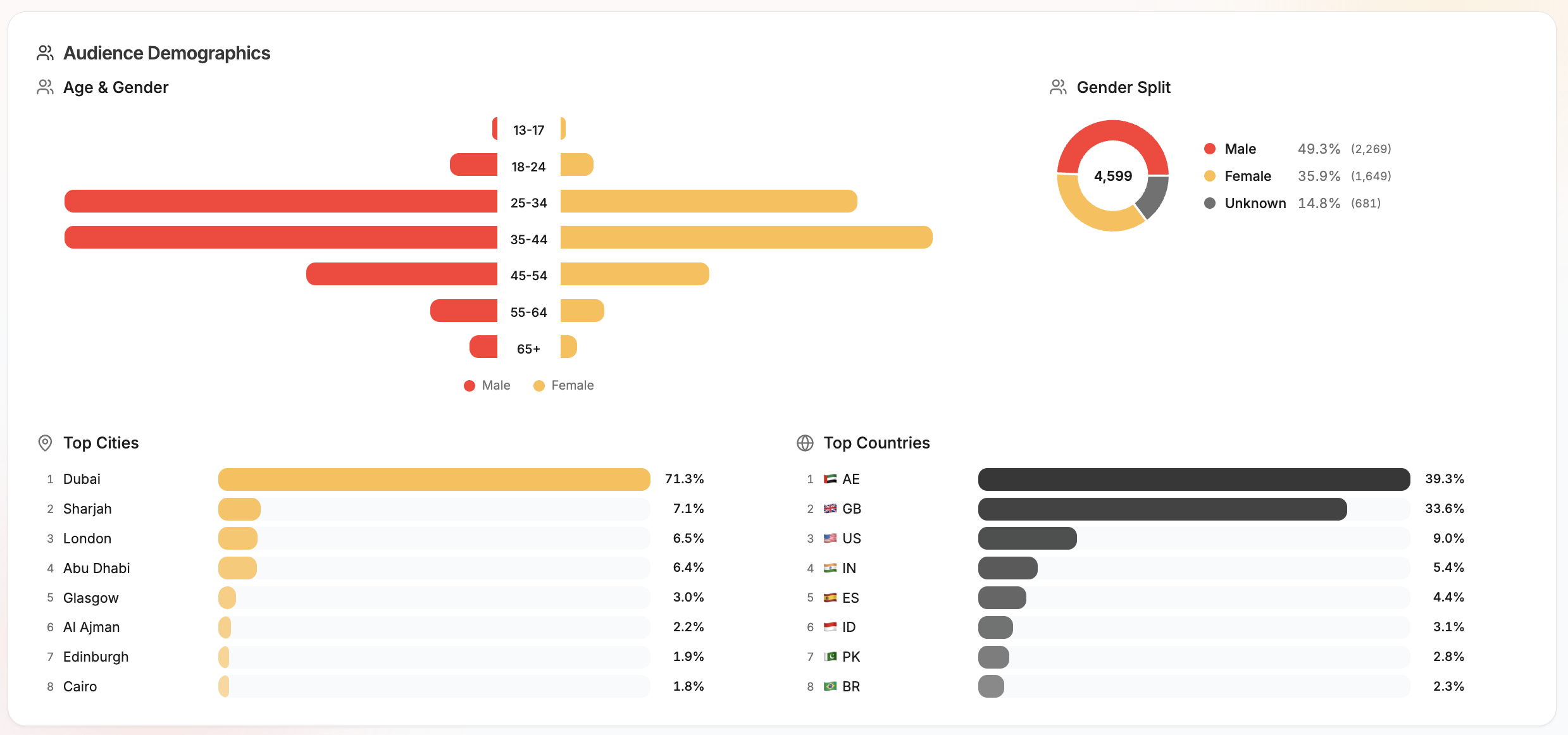
Audience Demographics, See your followers by age & gender (population pyramid), top cities, and top countries with flag emojis.
Story Insights, Active stories sync with reach, impressions, replies, taps, and exits.
Auto-Sync Every 6 Hours, Your data refreshes automatically in the background. No manual syncing needed.
Explore your dashboard, use the date range picker to adjust the window
Good to know
Requires an Instagram Business or Creator account.
Audience demographics need at least 100 followers to display.
Analytics is currently Instagram only (beta). More platforms coming soon.
Available on Pro, Power User, and Agency plans.
New
Instagram Tagging & Facebook Colored Backgrounds
2026.03.24
Tag @usernames on Instagram posts and publish eye-catching colored background posts on Facebook, right from the composer.
feature
instagram
facebook
Tag people on Instagram, stand out on Facebook
Two highly requested features are here: Instagram user tagging for feed posts and carousels, and Facebook colored background posts for text-only updates.
What's new
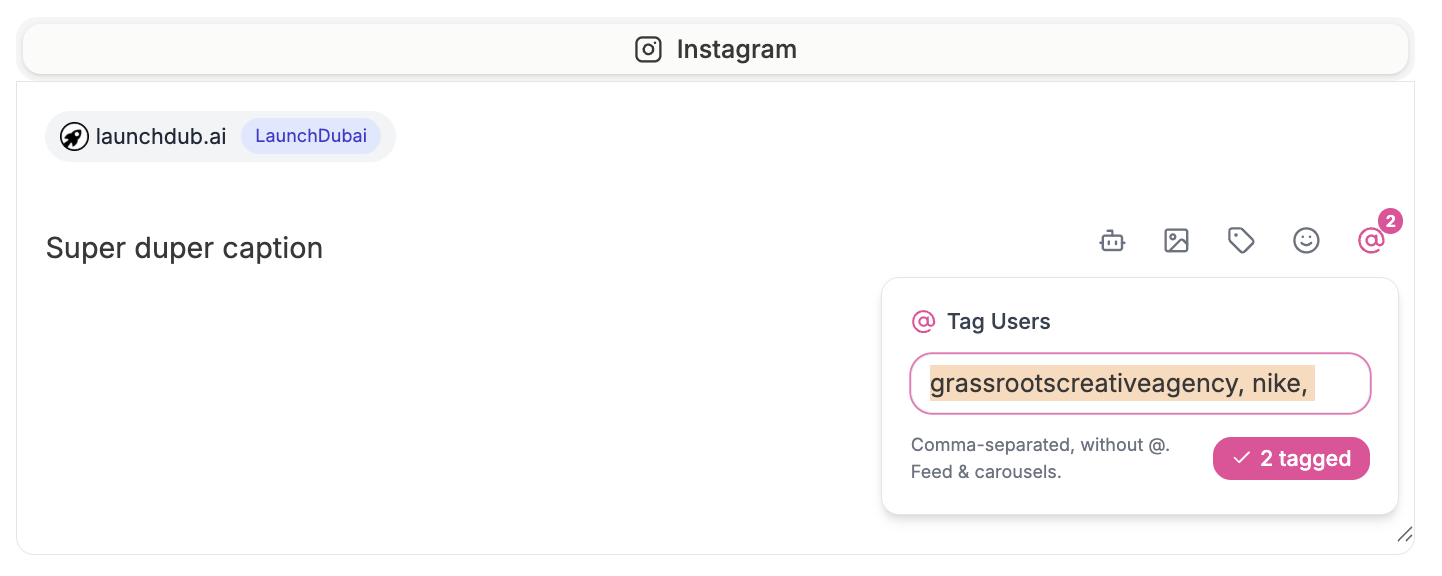
Instagram User Tagging, Tag @usernames directly from the composer. Enter comma-separated usernames and they'll be applied when your post publishes. Works on feed image posts and carousels.
Facebook Colored Backgrounds, Choose from 8 gradient presets to give your text-only Facebook posts a bold, colorful background. Perfect for announcements, quotes, and engagement posts.
Live Preview, Both features update in real time in the post preview panel so you can see exactly how your post will look before publishing.
In the Facebook tab, click the palette icon in the caption toolbar
Click a color swatch to select a gradient, or click ✕ to remove it
Write your caption and publish. The background only applies to text-only posts (posts with media use the standard layout)
Good to know
Instagram tagging works on feed image posts and carousels. Reels and stories don't support user tags via the API.
Facebook colored backgrounds only apply to text-only posts. If your post has an image or video, the background setting is ignored.
No additional permissions or reconnection needed, both features work with your existing connected accounts.
New
Pause & Resume Scheduled Posts
2026.03.23
Put any scheduled post on hold with one click. Resume when you're ready, your scheduled time is preserved.
feature
Hold Posts Without Losing Your Schedule
Ever needed to hold a post while you wait for approval, finalize copy, or simply aren't sure about the timing? Previously your only options were to save as draft (losing the scheduled time) or delete it entirely.
Now you can pause any scheduled post to put it in a holding pattern. The original scheduled time is preserved, and the post won't publish until you resume it.
What's new
Pause button on scheduled posts across all views (list, table, calendar, card)
Resume button to bring paused posts back to scheduled, if the time has passed, you'll be prompted to pick a new one
Bulk pause & resume in table view for managing multiple posts at once
Paused status filter in the dashboard to see all held posts
Paused posts can still be edited, duplicated, or saved as draft
How to use it
Find a scheduled post in any view
Click Pause (or the ⏸ icon in table view)
The post moves to "Paused" status, it won't publish
When ready, click Resume to bring it back
That's it. No confirmation dialogs, no lost data.
New
Multi-Page Designs & Unsplash in Design Studio
2026.03.22.3
Create multi-page designs like Canva, add, duplicate, reorder pages with per-page undo/redo, and browse millions of free Unsplash photos directly from the canvas.
feature
Design Studio Just Got a Major Upgrade
Two big additions to Design Studio that bring it much closer to a full design tool like Canva.
Multi-page designs
You can now create designs with multiple pages, perfect for carousel posts, slide decks, or story sequences.
Add pages using the "+" button in the new page strip on the left
Duplicate any page to reuse a layout with different content
Reorder pages by moving them up or down
Delete pages you no longer need (minimum one page always remains)
Per-page undo/redo, each page has its own independent history, so undoing on page 2 won't affect page 1
Per-page background colour, set a different background for each page
PageUp/PageDown keyboard shortcuts to quickly flip between pages
Multi-page export
When exporting a multi-page design, you can choose to download or use in a post:
Current page, exports just the active page
All pages, exports every page as separate images, perfect for carousel posts
Unsplash integration
Browse millions of free, high-quality stock photos without leaving Design Studio.
Click the Image tool and switch to the Unsplash tab
Search for any topic, landscapes, food, people, textures, anything
Filter by orientation, landscape, portrait, or square
Click to add any photo directly to your canvas at full resolution
Proper attribution included as required by Unsplash
Backward compatible
Existing single-page designs load exactly as before. The new multi-page format is stored alongside your existing designs with no migration needed.
New
New Platform Features: Polls, Alt Text, Reply Controls & More
2026.03.22.2
X/Twitter polls and reply settings, Threads reply controls, alt text for accessibility, and Google Business Profile event and offer posts.
feature
More Power Across Your Platforms
A batch of features that unlock capabilities the platform APIs support but posterly didn't expose yet, until now.
X/Twitter Polls
Create polls directly from the composer. Add 2-4 options, set a duration (5 minutes to 7 days), and publish. Polls and media are mutually exclusive per the X API, and polls can't be used in threads, the composer enforces both automatically.
Who Can Reply (X/Twitter & Threads)
Control who can respond to your posts on both X and Threads:
Everyone (default)
People you follow
Mentioned only
The setting appears in the composer toolbar for both platforms and applies to every post type, single posts, threads, and polls.
Alt Text for Accessibility
Add descriptive alt text to your images when posting to Instagram, X/Twitter, and Threads. The alt text input appears below your media preview (single images) or below each carousel item. Screen readers use this text to describe your images to visually impaired users.
Google Business Profile Events & Offers
GBP posts now support three post types:
Standard, the default, same as before
Event, add an event title, start/end date and time, and a call-to-action button (Book, Order, Shop, Learn More, Sign Up, or Call)
Offer, add a coupon code, redemption URL, and terms & conditions
Select the post type from the dropdown that appears when composing for a Google Business Profile account.
New
New Platforms: Telegram & Bluesky
2026.03.22.1
posterly now supports 11 platforms. Schedule and publish to Telegram channels/groups and Bluesky, no API keys or OAuth apps needed.
feature
posterly Now Supports 11 Platforms
Two new platforms join the lineup. Both use simple credential-based connections, no developer portals, no OAuth apps, no API keys.
Telegram
Post to Telegram channels and groups directly from posterly. Create a bot via @BotFather, add it as an admin to your channel or group, and paste the token in Accounts.
Text, photos, videos, and GIFs
Media groups, up to 10 photos/videos in a single message
HTML formatting in captions (bold, italic, links, code)
Public channel links generated automatically for published posts
Bluesky
Schedule posts to Bluesky with the same composer you use for everything else. Connect with your handle and an App Password.
Text and images, up to 4 images per post
Automatic rich text links, URLs in your caption are converted to clickable links
Custom domain support, works with any PDS, not just bsky.social
Session auto-refresh, tokens are refreshed automatically, with app password fallback
How to Connect
Head to Accounts in your dashboard. You'll see Telegram and Bluesky in the platform list. Both open a simple dialog, no redirects, no OAuth screens.
New
In-App Documentation
2026.03.19.1
Browse 40+ help articles covering every feature in posterly, with search, navigation, and keyboard shortcuts.
feature
docs
Every Feature, Documented
posterly now has a built-in documentation centre at Dashboard > Docs. Browse 40 articles across 12 categories covering every feature in detail.
Scheduling, Composer, calendar, list, table, and bulk upload
AI Features, AI Agent, captions, image generation, video creation
Creative Studio, Design Studio, media library, LinkedIn carousels, Google Drive import
Workspaces, Teams, roles, client approval flows
Google Business, Reviews, profile auditor, review request campaigns
Integrations, REST API, MCP server, Canva import
And more, Analytics, billing, labels, keyboard shortcuts, platform-specific guides
Search everything
Press ⌘/ while in docs to search across all articles instantly. Results show titles, descriptions, and categories.
Navigate naturally
Each article has previous/next links, breadcrumb navigation, and a collapsible sidebar. On mobile, the sidebar becomes a slide-out menu.
Always up to date
Every new feature ships with a corresponding docs page. As posterly grows, so does the documentation.
Find it in Settings > Docs in the sidebar.
New
Link in Bio Pages
2026.03.19.2
Create a shareable link page at poster.ly/u/your-name, with your links, social icons, recent posts, and click analytics.
feature
link-in-bio
One Link for Everything
Your Instagram bio only has room for one link. Now that link can be a page that shows everything, your links, social profiles, and recent posts, all hosted on poster.ly.
How it works
Go to Link in Bio in the sidebar
Pick your URL (poster.ly/u/your-name) and add a display name and bio
Add as many links as you need, drag to reorder, toggle visibility on each one
Choose from 8 themes to match your brand
Share your link in your Instagram, TikTok, or any other bio
What's included
Social icons auto-populate from your connected accounts, no manual setup
Recent posts grid shows your latest published content with platform badges
8 preset themes including Dark, Coral, Sunset, Minimal, Forest, Ocean, and Lavender
Click analytics with page views, link clicks, CTR, and top referrers
Custom avatar upload for your profile photo
SEO-optimized with Open Graph tags for rich previews when shared
Why this matters
Competitors charge extra for link-in-bio pages. posterly includes it on every plan. Your scheduling tool, your content hub, and your bio link, all in one place.
New
Browse Posts with Arrow Navigation
2026.03.10
Navigate between posts using arrow keys or clickable buttons, no need to close and reopen the preview modal.
feature
improvement
Flip Through Posts Without Closing the Modal
When you're reviewing scheduled content, closing and reopening the preview modal for every post slows you down. Now you can navigate between posts directly from the modal.
How it works
Open any post from the calendar, list, table, or card view
Use the left and right arrow buttons on either side of the modal to move between posts
Or press the left/right arrow keys on your keyboard for hands-free browsing
Smart details
Arrow keys are disabled while you're editing a caption, so you won't accidentally navigate away mid-edit
Navigation buttons only appear when there's a previous or next post to move to
Your scroll position and any open menus reset cleanly between posts
Why this matters
If you're managing a week of content across multiple accounts, you can now review every post in sequence, checking captions, media, and scheduling times, without touching the close button once. It turns a repetitive click-open-close workflow into a smooth, continuous review.
New
Event Days on Calendar, Holiday Toggle, and Dashboard Tips
2026.03.09
Browse 370+ themed event days for content inspiration, toggle country holidays on and off, and discover new features right from your dashboard.
calendar
dashboard
Three quality-of-life updates that make planning content easier and help you get more out of posterly.
370+ event days, right on your calendar
Your calendar now includes fun and themed event days, World Pizza Day, National Coffee Day, International Dog Day, and hundreds more. Browse by category (Food & Drink, Animals, Tech & Science, Health & Wellness, and others) and toggle the ones you care about.
These show up directly on your calendar view, so you can spot content opportunities without leaving posterly.
Country holidays toggle
Public holidays for your country were already on the calendar, but now you can turn them off with a single toggle in the calendar toolbar. Useful when you want a cleaner view focused on your own scheduled content.
Dashboard tips and what's new
The dashboard welcome section now rotates helpful tips and latest feature announcements. Whether you are new to posterly or have been here a while, this keeps useful shortcuts and new capabilities visible without getting in the way.
New
AI Video Presets: One-Click UGC Templates
2026.03.08.1
Pick a preset, customise the prompt, and generate scroll-stopping UGC-style videos in seconds, powered by Veo.
feature
ai
video
ugc
Creating social-ready video content just got a lot faster. We added 6 ready-to-go video presets to AI Video, each designed around a proven UGC format.
Pick a style, hit generate
Instead of writing a prompt from scratch, tap a preset card and we pre-fill the prompt, aspect ratio, duration, and model for you. Tweak it to match your product, then generate.
Product Review preset
6 presets available now
Product Review, Person talking to camera, reviewing a product. Classic UGC format.
Testimonial, Authentic customer testimonial, warm home setting, direct-to-camera.
Unboxing, Overhead ASMR-style unboxing with elegant packaging reveals.
Day in the Life, Cinematic lifestyle montage, morning routine, golden hour lighting.
Product Showcase, Clean, rotating hero shot with studio lighting. Great for ads.
Hover over any preset card to see a video preview of the style. Click the play button to watch it full-size in a modal, then hit "Use this preset" to load the settings.
What changed under the hood
Preset cards show hover-to-play video previews so you can see the style before generating
All preview videos are compressed thumbnails (under 1MB total), page loads stay fast
Videos now appear in your AI Images history with proper type labels and prompts from the Veo job
How to access
Go to AI Video in the sidebar. The presets appear at the top of the page, click any card to load it.
New
Workspaces Are Live: Team Seats, Clients, Guests, and Local Timezones
2026.03.08.2
Manage your agency setup in one place: team seats with roles, client/group containers, guest approval links, and client-level timezone scheduling (stored in UTC).
feature
workspace
collaboration
approvals
timezone
You can now run client work inside a proper Workspace in posterly.
A workspace is your top-level container for people, clients, and approvals.
What a workspace gives you
Team seats with roles (Owner, Admin, Publisher, Editor, Viewer)
Client/Group structure inside the workspace
Guest reviewers per client (non-paying users)
Client approval flow with comment, approve, request changes, and reject
Timezone defaults at workspace level, with client-level overrides
Why this matters
If you run an agency, you can now keep internal teammates and external clients separated while still collaborating in one system.
Team members get role-based access
Guests only see the client review scope you invite them to
Scheduling stays consistent across regions (UK, UAE, US, etc.)
Timezone model (important)
posterly stores schedule timestamps in UTC internally
Each client/group can have its own IANA timezone (for example Europe/London, Asia/Dubai)
Scheduling and review screens display times in that client timezone
Where to find it
Go to Dashboard → Workspace to:
Set workspace defaults
Invite team members
Create clients/groups
Invite guest reviewers
Configure timezone per client
Current rollout
For now, plans include one workspace with plan-based limits on seats and clients/groups. This keeps setup simple while still enabling agency workflows.
New
MCP Server & Public API: Schedule Posts from Your AI
2026.03.04
Connect posterly to Claude, ChatGPT, Cursor, or any MCP client and schedule posts with natural language.
feature
api
mcp
integrations
posterly now has an MCP server and a public REST API, so you can schedule posts directly from the AI tools you already use.
Talk to your AI, posts appear on your socials
Connect posterly to Claude Desktop, ChatGPT, Cursor, Windsurf, or any MCP-compatible client. Then just say what you want:
"Post this photo to my Instagram tomorrow at 9am"
"Write a LinkedIn post about our product launch and schedule it for Monday"
"Show me my scheduled posts for this week"
What's included
List accounts, see all your connected social accounts
Create posts, schedule to any platform with captions, media, and platform-specific settings
Native controls, use Instagram collaborators, YouTube privacy and thumbnails, TikTok interaction settings, Pinterest boards, Google Business events/offers, X polls, Threads reply controls, and Bluesky alt text from API or MCP
Upload media, images up to 10MB, videos up to 50MB
Find available slots, smart scheduling finds gaps in your calendar
List posts, check what's scheduled, published, or in draft
Easy setup
Install the MCP server with one command:
npx posterly-mcp-server
Add your API key, and you're ready to go. Full setup instructions for every client are on the MCP page.
Pricing
API access is a $3/month add-on to any posterly plan. Enable it from your API & MCP page.