
GitHub Webhooks for Social Media Updates
GitHub Webhooks for Social Media Updates

GitHub Webhooks for Social Media Updates
GitHub webhooks can automate your social media updates by instantly sending repository event data - like commits, releases, or pull requests - to your chosen endpoint. This eliminates manual posting, ensures timely updates, and avoids delays caused by traditional API polling. For teams in the UAE, this setup helps streamline announcements, keeping your audience informed without the hassle of late-night updates.
Key Takeaways:
- What are webhooks? Event-driven triggers that send JSON data when specific actions occur in your GitHub repository.
- Why use them? Faster updates, reduced API calls, and real-time social media automation.
- Common use cases: Announcing releases, sharing milestones, and showcasing contributions.
- Setup essentials: Admin access, an HTTPS endpoint, and a social media tool like Posterly.
- Security tips: Use HTTPS, validate webhook signatures, and filter events to prevent irrelevant updates.
By connecting GitHub webhooks to tools like Posterly, you can turn technical updates into engaging posts tailored for platforms like LinkedIn, Instagram, or X. Posterly’s AI features even help craft region-specific captions and schedule posts in Gulf Standard Time, starting at AED 25.70/month.
Quick Steps to Get Started:
- Configure a webhook in GitHub for events like
releaseorpush. - Set up an HTTPS endpoint to handle JSON payloads.
- Use tools like Posterly to transform data into social media content.
- Test your setup with GitHub’s delivery logs before going live.
This approach simplifies social media automation, ensuring your updates are timely, secure, and tailored to your UAE audience.
::: @figure 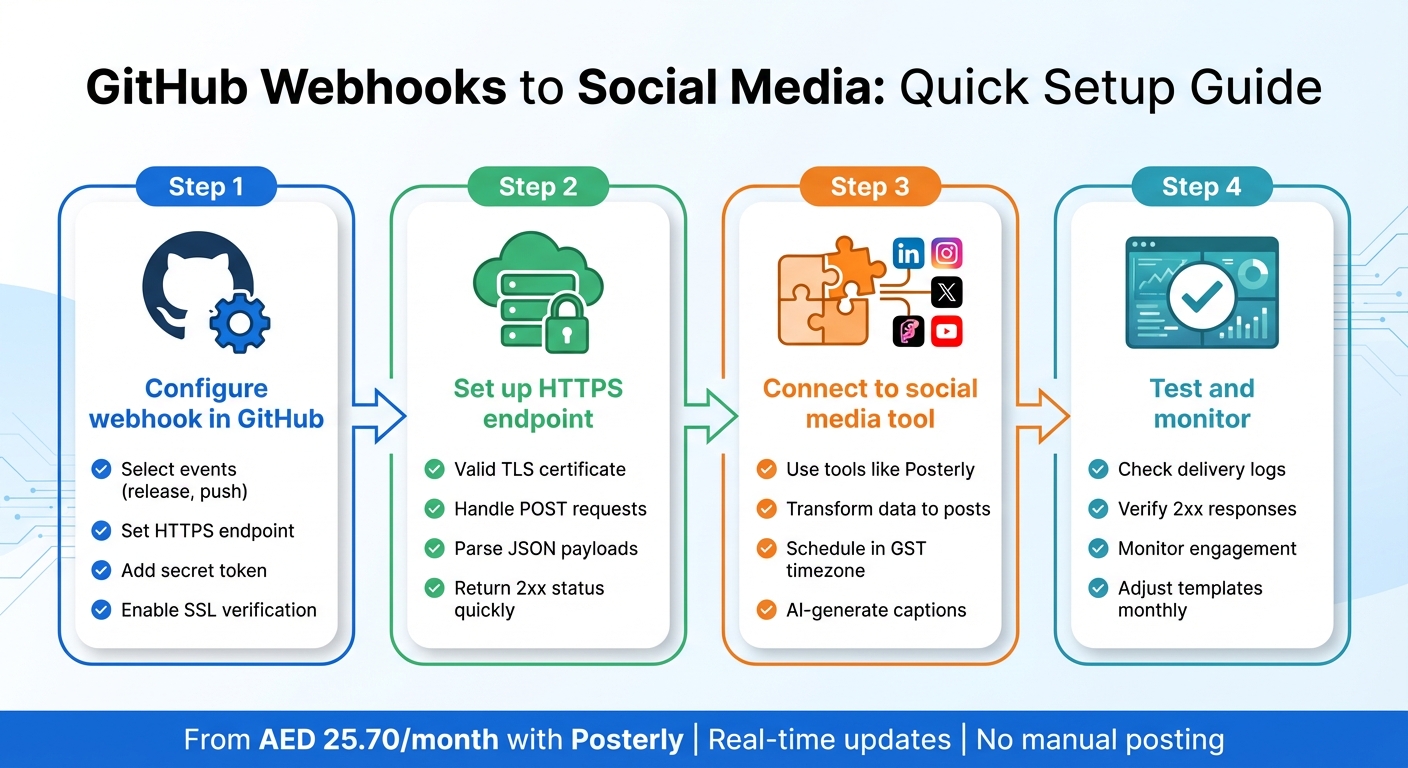 {GitHub Webhooks to Social Media: 4-Step Setup Process}
:::
{GitHub Webhooks to Social Media: 4-Step Setup Process}
:::
Getting Started With Github Webhooks
::: @iframe https://www.youtube.com/embed/hWlwQ69cHeU :::
Setting Up Your GitHub Webhook Environment
To automate social media updates from GitHub, you'll need a few essentials: admin access to configure repository webhooks, an HTTPS endpoint to handle POST requests, and a solid understanding of HTTP POST, JSON payloads, and headers [3][4][7]. Once set up, this environment allows you to connect GitHub events seamlessly with your social media tools.
Prerequisites for Webhook Configuration
First, ensure your endpoint is publicly accessible via HTTPS with a valid TLS certificate [3][4]. If you're working locally, perhaps in Dubai or Abu Dhabi, you can use a tunnelling tool to create a temporary public URL that forwards requests to your local machine [4][5]. This setup is especially useful during development.
You'll also need access to your preferred social media management tool - whether it's a custom integration or a platform like Posterly. Make sure it's configured to work with Gulf Standard Time and reflects regional formatting preferences [3]. This connection is critical for turning GitHub events into timely and relevant social media posts, as highlighted by tools like Posterly.
Selecting Events for Social Updates
GitHub supports over 70 repository events, but for social media automation, it's best to focus on events that align with your communication strategy [3][1][6]. For example:
- The
releaseevent is perfect for announcing new versions or changelogs. pushevents are great for sharing quick updates, such as commits pushed to your main branch.- To showcase collaboration or new feature rollouts, subscribe to
pull_requestevents and filter for themergedaction [3][4][6].
By subscribing only to specific events, you can reduce unnecessary noise and maintain a clear, focused update schedule [4][5].
Security and Reliability Setup
To ensure security, configure a secret token and validate the HMAC-SHA256 signature included in the X-Hub-Signature-256 header. Use a constant-time comparison to verify the signature before processing the request [3][7]. Always serve your webhook endpoint over HTTPS, with SSL verification enabled to keep payloads encrypted during transit [3][4].
For reliability, your webhook handler should quickly return a 2xx status code. Offload complex tasks, like calling social media APIs, to a background job or queue [7][4]. This approach avoids timeouts and ensures that GitHub's retry mechanism works effectively if your downstream systems face temporary issues [4][5].
Configuring GitHub Webhooks for Social Media
To get started, head to Settings → Webhooks → Add webhook in your GitHub repository. Enter your HTTPS endpoint (like Posterly's URL), select application/json as the content type, and set a secure secret for HMAC verification. Make sure SSL is enabled for added security.
Adding a Webhook in GitHub Settings
When deciding which events should trigger your webhook, choose "Let me select individual events" under the event selection options. Pick specific events such as push, release, pull_request, and issues to focus on key milestones. This approach ensures your social media updates highlight only the most important activities. Mark the webhook as Active and click Add webhook to save your settings. GitHub will then send a ping event to check if your endpoint is reachable. You can review this under Settings → Webhooks → Recent Deliveries. Once your webhook is added, the next step is to verify the payload contents.
Inspecting and Parsing Webhook Payloads
Head to the Recent Deliveries section to inspect the JSON payload and ensure the data being sent is accurate. For instance, a push event will include fields like commits[].message, commits[].author.name, commits[].url, and a compare URL. A release event will provide details such as release.name, release.tag_name, release.body, and release.html_url. For pull requests, you'll find pull_request.title, pull_request.user.login, pull_request.html_url, along with the merged or action field. Capturing these details allows you to craft concise, link-rich updates for platforms like LinkedIn and X, which are widely used in the UAE. If a delivery fails, you can use the Redeliver button to replay the event after fixing your handler. Once you’ve confirmed the payload data, you’re ready to integrate it with your social media automation tool.
Connecting Webhooks to Social Media Automation Tools
After verifying the payload, link your webhook to an automation tool to turn the data into scheduled social posts. Tools such as Posterly can process webhook payloads and transform them into posts that are either scheduled or published instantly. Posterly’s Ship & Share feature automatically parses GitHub commit data, uses AI to translate technical updates into engaging marketing content, and formats it for multiple platforms like Instagram, TikTok, LinkedIn, and YouTube - all from a single event.
For UAE-based teams, Posterly’s support for Gulf Standard Time (UTC+4) makes it easy to schedule posts at optimal local times, such as weekday mornings at 09:00 GST, rather than publishing at odd hours when a commit occurs. This keeps your social feeds in sync with audience activity while still enabling real-time updates for urgent announcements. Posterly offers three pricing tiers: the Starter plan (AED 25.70/month) includes one Ship & Share integration per month, the Pro plan (AED 55.10/month) provides ten integrations, and the Power User plan (AED 91.80/month) allows unlimited integrations - perfect for teams that frequently update their feeds.
Before going live, test your setup by directing the webhook to a staging endpoint or enabling dry-run mode to generate drafts instead of publishing immediately. Use GitHub’s Recent Deliveries panel to confirm that all events return 2xx responses. Address any errors before moving to production. Once your setup is stable, connect it to your live social accounts. Keep an eye on GitHub’s delivery logs and your social media tool’s dashboard to catch any issues with publishing or unexpected content early on.
sbb-itb-f7b3a33
Creating Social Media Content from GitHub Events
Translating GitHub Events into Social Content
With your webhook configuration in place, the next step is transforming technical GitHub events into engaging social media posts. The goal is to convert raw data - like commit hashes or pull request IDs - into updates that resonate with your audience by focusing on the benefits they bring.
For Instagram, craft visually appealing stories with images or short clips that highlight key updates. On LinkedIn, use a professional tone to underline the business impact of these changes. Meanwhile, on X, keep the messaging concise and focused on metrics or quick insights [3]. While each platform has its unique style, the core idea remains: make technical updates relatable by showcasing their practical value.
Using AI for Content Creation
AI tools can help simplify the process by analysing commit messages, pull request titles, and release notes from webhook payloads. These can then be categorised into themes like "performance upgrades", "UI tweaks", or "bug resolutions." Tools like Posterly's AI Caption Assist can draft platform-specific captions and suggest hashtags tailored to the region, such as #DubaiTech, #GCCDevelopers, or #MENAStartups [2].
Additionally, the AI can recommend optimal posting times based on Gulf working hours. For example, a streamlined workflow for UAE-based teams might look like this: GitHub sends a release event through a webhook, your backend compiles the data, Posterly's AI generates draft captions, and your team in Dubai or Abu Dhabi reviews and schedules the posts via Posterly's dashboard. This approach lets engineers stay focused on their work while AI and marketing teams refine the messaging for public platforms.
Mapping GitHub Data to Social Media Fields
Webhook payloads are packed with structured data that can be directly mapped to social media post elements. For a push event, fields like repository.full_name and pusher.name can form the introduction, commits[].message can highlight the main benefits, and the compare URL can serve as the link [1][3]. In a release event, elements such as release.name, release.tag_name, release.body, and release.html_url can shape the headline, benefits list, and link preview [3].
To enhance visuals, your automation system should link repositories or tags to stored assets like brand imagery, changelog templates, or screenshots. Hashtags can be inferred from commit messages; for example, if "performance" or "latency" is mentioned, include tags like #Performance or #DubaiCloud. Don’t forget to append UTM parameters to your links, such as ?utm_source=github&utm_medium=social&utm_campaign=release_v1_5_0_uae, to track engagement from UAE-based audiences [3][4].
Best Practices for Webhook-Based Social Media Automation
Optimising Event Selection and Filtering
Focus on sharing only the most relevant updates. Subscribe to events that truly matter, such as release events, main branch push events, and merged pull requests. To refine this further, apply filters by matching the ref field to your target branch and looking for markers like [announce] or #social. This two-step method ensures your feed stays clean, avoiding clutter from feature branches or internal changes, while giving developers a way to flag updates worth sharing.
You can also use an allow-list to maintain a polished social feed. For instance, only post merged pull requests tagged with a public-changelog label. To keep improving, track engagement metrics to see what resonates most with your UAE audience. This data helps fine-tune your filters over time, ensuring your workflow is ready for the security and compliance steps outlined below.
Security and Compliance Considerations
Secure your webhook by validating each incoming request with a strong secret token set in your webhook settings. Always use HTTPS endpoints with valid certificates, and for extra protection, restrict inbound traffic to GitHub's known IP ranges. Store all credentials securely, rotating them every 90 days or after any team changes.
For organisations in the UAE, it’s crucial to ensure automated posts meet local content regulations and respect cultural norms. Before publishing, sanitise payloads to remove sensitive details like internal branch names, developer email addresses, or confidential project references. Avoid any messaging that could touch on political or religiously sensitive topics, and maintain a professional tone that aligns with expectations in GCC markets. Additionally, format dates as 27/04/2025, 15:30 GST and display prices in AED, e.g., AED 1,250.00. Once these security and compliance measures are in place, consistently monitor webhook performance to maintain efficiency.
Monitoring and Adjusting Webhook Performance
Keep an eye on GitHub's "Recent Deliveries" log to quickly detect failed deliveries, latency issues, or misconfigurations. Use infrastructure monitoring tools - or solutions like Posterly’s real-time queue monitoring - to set up alerts when failure rates or response times exceed acceptable levels, allowing you to address issues promptly. Track delivery IDs to ensure idempotency, so your handler can safely ignore duplicate events if GitHub retries a request.
On the social media side, monitor key metrics like click-through rates on shared links, engagement rates (likes, comments, shares), and follower growth, especially around major releases. Compare these metrics with your webhook logs to determine which repositories or branches generate the most interest. Reviewing this data monthly allows you to refine your content templates. You might shorten technical text, improve headlines, or tweak hashtags to better connect with your UAE audience. Tools like Posterly’s unified dashboard and AI Caption Assist make it easy to adjust templates and scheduling rules without needing to modify your webhook code.
Conclusion and Next Steps
With the setup and configuration steps outlined earlier, GitHub webhooks can now serve as a real-time bridge between your repository and social media platforms. This means every key update - whether it's a new release, a merged pull request, or a critical security fix - can be shared almost instantly across your social channels. No more manual posting, delays, or missed opportunities. This system grows with you, making it easier for engineering and marketing teams in the UAE to focus on strategic goals rather than repetitive tasks.
To get started, pick a repository and configure a webhook for events like release or push. Send payloads to a test endpoint, validate signatures, and refine delivery logs. Use the first 24 hours to experiment with post templates. Over the next week, integrate the webhook with a social posting layer - whether through custom code or a tool like Posterly - and test automated updates to ensure accuracy and alignment with regional preferences.
Posterly's Ship & Share feature simplifies this process by turning GitHub commits into social media-ready content for platforms like Instagram, LinkedIn, TikTok, and YouTube. With AI Caption Assist, it generates tailored captions for each platform. Plus, its unified dashboard allows you to schedule or publish directly without juggling multiple tabs. Pricing starts at AED 25.70/month for the Starter plan (1 Ship & Share) and scales up to AED 91.80/month for the Power User plan (unlimited Ship & Share), offering flexibility to match your automation needs without investing in custom infrastructure.
Keep an eye on engagement metrics - click-through rates, likes, and follower growth - and cross-reference them with your webhook logs to see which events resonate most with your audience. This feedback loop, established through your webhook setup, helps fine-tune your social media strategy. Rotate your webhook secrets every 90 days, monitor delivery logs regularly, and update your templates monthly based on feedback from your UAE audience. With secure configurations, precise event filtering, and the right tools, webhook-driven automation can become a dependable and efficient way to keep your community informed and engaged.
FAQs
::: faq
How can GitHub webhooks simplify social media updates?
GitHub webhooks simplify managing social media updates by automating tasks such as scheduling and publishing content. Whenever a code commit happens, the webhook activates actions that update your social media posts instantly, ensuring your audience stays informed and connected.
This process not only saves valuable time but also maintains consistency across your platforms, ensuring a polished and timely online presence. :::
::: faq
What steps can I take to ensure secure use of GitHub webhooks?
To keep your GitHub webhooks secure, always ensure your webhook URLs use HTTPS. This encrypts the data during transmission, protecting it from interception. It's equally important to verify payload signatures to ensure that incoming requests are genuine. Store your webhook secrets in a secure location to avoid exposure.
For added security, restrict access by limiting IP addresses and using strong authentication methods. Regularly rotating your secrets and keeping an eye on webhook activity can help you spot any unusual or unauthorised actions. These steps are essential for maintaining the safety of your webhook integrations and avoiding potential security risks. :::
::: faq
How can Posterly help transform GitHub events into social media content?
Posterly leverages AI-driven tools to transform GitHub events - like code commits - into shareable and engaging social media content. By analysing commit messages and updates, it crafts customised marketing copy, generates visuals, and even suggests fitting hashtags. This streamlines the process for teams, saving time while ensuring technical updates are shared across platforms in a polished and creative manner. :::
Related Articles
How to Create 30 Days of Social Media Content Using AI Images in posterly
A practical guide to generating a full month of original social media images with posterly's AI image tool, writing captions for each one, and scheduling everything in a single session.
Read moreHow to Find the Best Time to Post on Social Media Using posterly's AI Scheduler
Stop guessing when to post. This guide explains how posterly's AI Scheduler analyses your audience activity and automatically picks the best posting times so your content gets seen by more people.
Read moreHow to Manage Google Business Reviews on Autopilot With posterly
A step-by-step guide to responding to Google reviews with AI, automatically requesting new reviews from customers, auditing your profile for local SEO, and turning your best reviews into social media content.
Read moreHow to Manage Multiple Client Social Media Accounts With posterly Workspaces
A practical guide for agencies and teams on using posterly Workspaces to organise client accounts, assign roles, get content approved, and schedule posts across dozens of social profiles without things getting messy.
Read more