
How Unified Dashboards Simplify Social Media Management
How Unified Dashboards Simplify Social Media Management
How Unified Dashboards Simplify Social Media Management
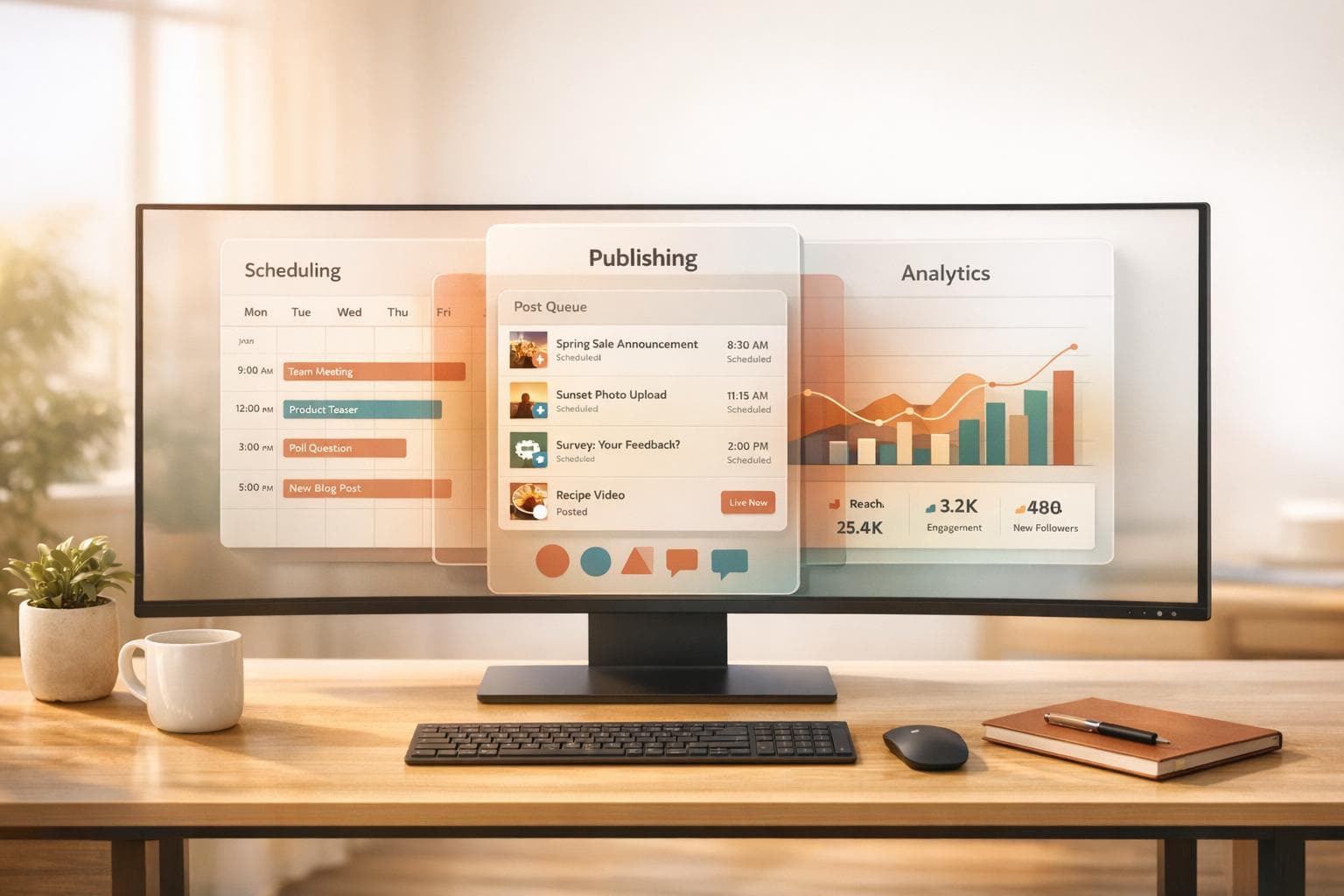
Managing multiple social media accounts can be overwhelming, especially when switching between platforms like Instagram, LinkedIn, and TikTok. Unified dashboards solve this by centralizing tasks such as scheduling, posting, and analytics into one interface. They save time, reduce errors, and improve consistency across platforms. Key benefits include:
- Time Savings: Cut posting time from 30–45 minutes per platform to just 3–5 minutes, saving teams 15–20 hours weekly.
- Automation: Features like bulk scheduling, smart timing, and AI-powered tools streamline workflows.
- Consistency: A single content calendar ensures regular posting and brand alignment across platforms.
- Centralized Analytics: View and compare performance metrics across platforms in one place, enabling quick adjustments.
Posterly's unified dashboard is an example of how these tools simplify social media management. It supports over 10 platforms, offers AI-powered content creation, and includes features like real-time monitoring and automated reporting. Plans start at AED 25.70/month, with a 7-day trial for AED 3.67.
Unified dashboards are ideal for creators and teams aiming to simplify workflows, save time, and maintain a polished presence across social media.
::: @figure 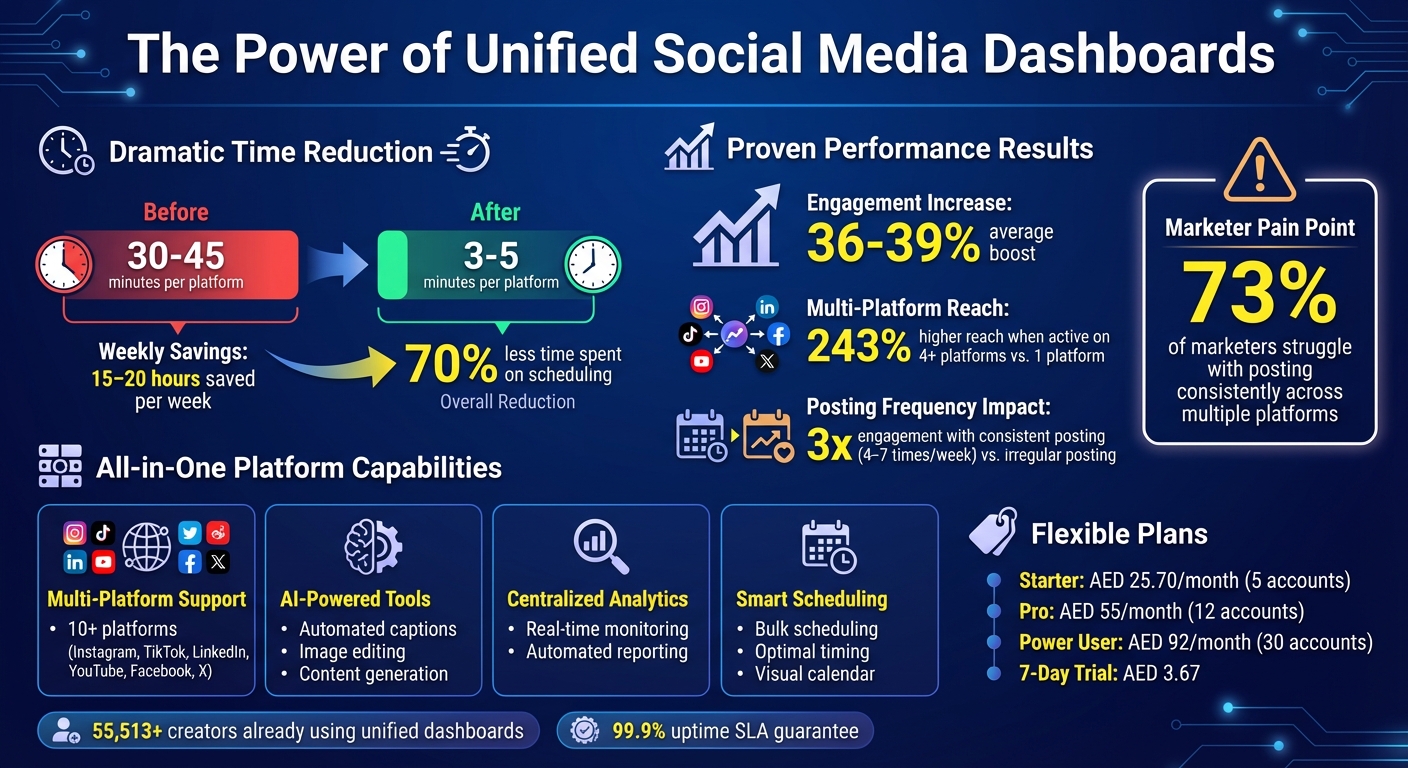 {Key Benefits of Unified Social Media Dashboards: Time Savings and Performance Metrics}
:::
{Key Benefits of Unified Social Media Dashboards: Time Savings and Performance Metrics}
:::
What Unified Dashboards Are and How They Function
Understanding Unified Dashboards
A unified dashboard brings all your social media management tasks together in one place. Instead of juggling between Instagram, LinkedIn, TikTok, and other platforms, you manage everything through a single interface. These dashboards combine tools for scheduling, publishing, analytics, and engagement into one streamlined workspace. With features like a unified composer, you can create content once, and the system adjusts it automatically to fit the technical specs of each platform. For example, a 9:16 video can be optimised for TikTok, Instagram Reels, and YouTube Shorts without extra effort. This setup not only simplifies the process of content creation but also integrates scheduling, data, and engagement into one cohesive system, making campaign management much more efficient.
Main Purpose and Functions
Unified dashboards are designed to save time and improve campaign management by consolidating essential functions. They pull data from multiple platform APIs into a single, easy-to-read reporting view. This allows you to compare campaign performances across platforms like LinkedIn and Instagram seamlessly, without the hassle of switching between apps or manually gathering data. Features like a visual content calendar give you a clear overview of your posting schedule, while a unified inbox ensures you can manage audience interactions and collaborations without missing a beat. This comprehensive setup helps you maintain a consistent posting schedule while staying on top of audience engagement.
Benefits of Using Unified Dashboards for Social Media Management
Saving Time Through Automation
Unified dashboards can cut the time spent on posting from up to 45 minutes per platform to just a few minutes. For teams managing multiple accounts - typically posting five or more times a week across four to six platforms - this can save an impressive 15–20 hours every week [2].
Features like bulk scheduling allow you to upload and queue several posts in one go, letting you plan weeks or even months of content in advance. Smart scheduling takes this a step further by analysing audience activity patterns and automatically publishing posts at the best times for each platform. This ensures your content gets maximum visibility without requiring constant manual effort.
AI-powered tools make it even easier by transforming a single idea into multiple posts tailored for different platforms. These tools adjust the tone, length, and hashtags to match each network's style, while also resizing images and validating video formats - whether it’s 9:16 for Instagram Reels or 16:9 for LinkedIn.
"The bulk scheduling feature saves hours of work, allowing me to plan content across multiple platforms efficiently" - JC Casagan [1]
Besides saving time, these tools help ensure your brand looks polished and consistent everywhere.
Maintaining Brand Consistency
Keeping a consistent presence across platforms is a major challenge - 73% of marketers say their biggest struggle is posting regularly on multiple platforms [4]. Unified dashboards address this with a visual content calendar, giving you a clear overview of your entire strategy. This helps you avoid gaps or uneven posting schedules.
The smart adaptation feature ensures your brand voice remains consistent. You can create one base piece of content, and the dashboard adjusts it to fit the tone, format, and media requirements of each platform - all while staying true to your brand’s message. This prevents common errors like using Instagram-specific hashtags on LinkedIn or uploading media in the wrong format. Brands active on four or more platforms typically achieve 243% higher reach compared to those on just one [2], and consistent posting - 4 to 7 times per week - can triple engagement rates compared to irregular posting [4].
By maintaining this consistency, you also set the stage for more effective performance tracking.
Centralised Analytics and Reporting
When time is saved and content is consistent, centralised analytics become the key to refining your strategy. Unified dashboards pull all your metrics into one place, allowing you to view and compare performance across platforms - like how a post fares on Instagram versus LinkedIn - in real time. This enables teams to make quick, informed adjustments to their strategies.
Shared visibility of metrics improves collaboration, ensuring everyone is aligned on key performance indicators (KPIs).
"A social media dashboard is one of the most powerful tools for streamlining workflows, managing multiple accounts, and making data-driven decisions" - Freya Laskowski, SEO Consultant [6]
You can also set specific goals for each platform - such as prioritising reach on TikTok or lead generation on LinkedIn - while monitoring all progress from one interface. Automated reporting tools generate professional reports instantly, saving you the hassle of manually compiling data from various sources.
Unified Dashboards
::: @iframe https://www.youtube.com/embed/QO_-gG5STwo :::
Core Features of Effective Unified Dashboards
Unified dashboards simplify social media management, cutting down on manual tasks and centralising essential tools. The right features can completely change how you approach scheduling, engagement, and content creation.
Multi-Platform Scheduling and Publishing
Posterly’s dashboard lets you schedule posts across multiple platforms with ease, while still allowing for platform-specific tweaks like captions, hashtags, and metadata. It supports over 10 platforms, including Instagram, TikTok, LinkedIn, YouTube, Facebook, and X - all from a single interface.
With its visual, drag-and-drop content calendar, you can customise your schedule in calendar, list, or table views. This ensures you avoid posting gaps and hit peak engagement times - for example, mornings on LinkedIn or evenings on TikTok [2][3][7].
Real-Time Monitoring and Engagement
Instead of juggling multiple apps, Posterly’s real-time monitoring feature consolidates everything into a single inbox. You can track post statuses, mentions, and comments all in one place [5][7].
By following the 80/20 rule - scheduling 70–80% of your content in advance while leaving 20–30% open for trending topics - you maintain a balance between consistency and flexibility [2].
AI-Powered Content Creation
Posterly’s AI tools are designed to streamline content creation. They can generate captions, edit images (like removing backgrounds), and even turn GitHub commits into marketing posts - all through natural language commands [7]. The “Hey Posterly” feature makes scheduling posts as simple as typing a command.
These tools are a lifesaver when creative energy runs low.
"The AI Writer tool is particularly remarkable, helping me overcome creative blocks and generate engaging content quickly." - JC Casagan [1]
Additionally, smart media optimisation takes care of technical details like resizing images and validating video formats. Whether it’s TikTok’s 9:16 aspect ratio or YouTube’s 16:9, Posterly ensures your content fits perfectly without extra effort [5].
These standout features make Posterly’s unified dashboard both user-friendly and highly effective for managing social media workflows.
sbb-itb-f7b3a33
How to Set Up and Use Posterly's Unified Dashboard
Posterly is designed to make social media management simple, secure, and efficient. Here's how to get started with its unified dashboard in just four steps:
Step 1: Connect Your Social Media Accounts
To begin, connect your social media accounts securely through the Social Accounts tab. Posterly only uses official APIs, ensuring your connections are safe and align with each platform's privacy rules [8][9]. For a smoother setup, clear your browser cache or use incognito mode before linking accounts, and make sure to accept all necessary permissions to avoid errors [8].
Keep in mind that Facebook and Instagram require Business or Creator accounts (personal profiles aren't supported). LinkedIn, however, works with both personal profiles and company pages [8]. For platforms like Instagram and TikTok, which don’t allow multiple logins, open each account in a separate browser tab before connecting [8][9]. Additionally, ensure you have the correct access level for each platform:
| Platform | Required Access Role | Supported Channels |
|---|---|---|
| Admin | Facebook Pages | |
| Account Login | Professional/Creator Accounts | |
| Super Admin | Profiles & Pages | |
| TikTok | Account Login | User Profiles |
| YouTube | Manager (Owner channels only) | YouTube Channels |
| X (Twitter) | Account Login | User Profiles |
Most platform tokens last for 60 days, but Posterly can automatically refresh connections where supported. To keep accounts active, publish something at least once every six weeks [8].
Step 2: Configure Scheduling and AI Tools
With your accounts linked, it's time to organise your content calendar. Posterly's drag-and-drop interface offers multiple views, including calendar, list, and table formats [11]. Use the AI Scheduler (Hey Posterly) to describe your posts, and it will take care of the queueing process [11].
For content creation, Caption Assist generates tailored captions, hashtags, and variations for platforms like Instagram, LinkedIn, and TikTok [11]. Need visuals? The Nano Banana Pro tool lets you create images, remove backgrounds, or enhance existing media [11]. Plus, the dashboard's smart validation feature ensures all your media meets the technical specifications of each platform before publishing [11].
"As a solo creator managing 5 accounts, Posterly cut my scheduling time by 70%. The multi-platform publishing is seamless." - Marcus Johnson [11]
If you're working with a developer tool or SaaS product, enable the Ship & Share GitHub integration. This feature automatically transforms code commits into polished marketing content [11].
Step 3: Set Up Monitoring and Analytics
Posterly's command centre offers real-time tracking of your post statuses across all platforms [11]. To ensure reliability, enable automatic retries and features that prevent duplicate posts [11].
For local businesses, the Google Business Profile Auditor checks your profile's completeness score and NAP (Name, Address, Phone) consistency. It also provides actionable SEO tips you can implement right away [11]. You can even use Posterly to manage and respond to Google Business reviews with AI-generated responses [11].
Organise your content library by applying filters and labels, making it easier to track and manage your assets [11]. The built-in media analysis tools can help you identify which types of content perform best on different platforms [11].
Step 4: Publish and Optimise Content
Keep an eye on your queue to ensure posts are published as planned. Posterly guarantees a 99.9% uptime SLA for its publishing services, so you can trust your content will go live on time [8][10][12].
"The queue monitoring gives me peace of mind. I know my posts will go out exactly when they should. Reliable and easy to use." - James Park [11]
Use the real-time insights from your dashboard to adjust your posting schedule. Posterly users have reported an average engagement increase of up to 39% by fine-tuning their posting times [12]. Agencies and teams often save over 10 hours a week on social media management once their workflows are fully set up [8][10][12].
With everything configured, you’re ready to explore how Posterly's plans can further streamline your social media management.
Selecting the Right Posterly Plan
Finding the right Posterly plan depends on your specific needs, such as the number of accounts you manage, how often you post, and whether you require AI tools like video generation. Posterly offers three pricing tiers tailored for different stages of growth, with costs that adjust as your requirements expand.
The Starter Plan is ideal for individual creators managing up to 5 accounts. At AED 25.70/month (around $7), it includes 30 AI-generated caption suggestions, 10 AI images using Nano Banana, and access to the Google Business Profile Auditor. This plan is perfect for solo entrepreneurs focusing on a few platforms, offering essential automation without unnecessary extras.
For growing teams, the Pro Plan builds on the Starter Plan's basics. Priced at AED 55/month (approximately $15), it supports up to 12 accounts and offers unlimited AI-generated captions, 30 AI images monthly, and priority email support. Alex Chen, a Pro Plan user, shared:
"The caption generation alone saves me hours every week. Game changer for my content workflow."
If you're managing multiple clients or producing high volumes of content, the Power User Plan is designed for you. At AED 92/month (around $25), it accommodates up to 30 accounts and provides unlimited AI captions and images, along with 14 Veo AI Video credits each month (a paid add-on for lower tiers). This plan also includes priority support and unlimited GitHub integrations via Ship & Share, making it a comprehensive solution for agencies and high-volume creators.
Posterly also offers a 7-day trial for just $1 (about AED 3.67), allowing you to explore its unified dashboard. Keep in mind that "unlimited" features operate under fair-use policies. With these flexible options, Posterly ensures smooth social media management at every stage of growth.
Conclusion
Managing multiple social media platforms no longer needs to feel like an overwhelming task. With Posterly's unified dashboard, what used to take hours can now be done in just minutes, cutting scheduling time by an impressive 70% [13].
This isn't just about saving time - it’s about improving the quality of your content. Posterly combines centralised control with AI-powered automation, seamlessly adjusting content for different platforms without the need for manual edits. Over time, its AI learns your brand's voice, ensuring a consistent tone across all 10+ supported platforms [13].
The platform also offers centralised analytics and maintains a 99.9% uptime SLA, taking the guesswork out of social media management. By optimising posting times and ensuring reliability, Posterly helps creators achieve better results with less effort [10][12].
The pricing plans are designed to suit a range of needs, starting at AED 25.70/month for the Starter Plan and going up to AED 92/month for the Power User Plan. These plans more than pay for themselves with the time saved and the growth achieved. With over 55,513 creators already using the platform and reporting engagement increases of 36% to 39% on average, the benefits are clear [10][12]. This streamlined approach allows creators to focus on what they do best - creating meaningful content.
For those who want to try it out, the 7-day trial is available for just AED 3.67, offering a risk-free way to see how Posterly can revolutionise your social media workflow [13].
FAQs
::: faq
How can a unified dashboard help maintain a consistent social media presence?
A unified dashboard makes handling multiple social media platforms much easier by bringing scheduling, publishing, and tracking together in one place. This setup helps reduce missed posts or inconsistent updates, ensuring your audience receives content regularly and on time.
It also allows you to tailor posts for various platforms without switching tools, helping you maintain a consistent brand voice while meeting the specific needs of each platform. With features like smart scheduling and AI-driven tools, the process becomes more efficient, saving you time and effort while keeping your posting schedule steady - leading to better engagement and audience growth. :::
::: faq
How does a unified dashboard save time in managing social media?
A unified dashboard makes handling social media a breeze by letting you plan, schedule, and publish content across multiple platforms - all from one place. No more jumping between accounts or juggling multiple tabs. With just one upload, you can tailor your posts for each platform and schedule them all at once, making your workflow much smoother.
Features like AI-assisted content creation, automatic scheduling during peak times, and real-time monitoring keep your accounts active without constant manual effort. Plus, tools like auto-formatting for different media specs and post previews help you avoid mistakes and cut down on last-minute fixes. By automating these repetitive tasks, you and your team can spend more time creating standout content instead of worrying about logistics. :::
::: faq
How do AI tools in unified dashboards improve social media content creation?
AI tools integrated into unified dashboards make content creation easier by automating essential tasks like brainstorming ideas, crafting captions, and designing visuals. This not only saves time but also helps creators maintain a consistent brand voice across various platforms by customising content to suit each platform’s format and audience preferences.
These tools also suggest the best times to post for maximum audience engagement and enable batch content creation. For instance, they can generate multiple versions of a post or automate recurring content. By using these features, creators can dedicate more time to strategy and creativity while managing their social media efforts more efficiently. :::
Related Articles
How to Create 30 Days of Social Media Content Using AI Images in posterly
A practical guide to generating a full month of original social media images with posterly's AI image tool, writing captions for each one, and scheduling everything in a single session.
Read moreHow to Find the Best Time to Post on Social Media Using posterly's AI Scheduler
Stop guessing when to post. This guide explains how posterly's AI Scheduler analyses your audience activity and automatically picks the best posting times so your content gets seen by more people.
Read moreHow to Manage Google Business Reviews on Autopilot With posterly
A step-by-step guide to responding to Google reviews with AI, automatically requesting new reviews from customers, auditing your profile for local SEO, and turning your best reviews into social media content.
Read moreHow to Manage Multiple Client Social Media Accounts With posterly Workspaces
A practical guide for agencies and teams on using posterly Workspaces to organise client accounts, assign roles, get content approved, and schedule posts across dozens of social profiles without things getting messy.
Read more