
Ultimate Guide to Snapchat Story Scheduling
Ultimate Guide to Snapchat Story Scheduling
Ultimate Guide to Snapchat Story Scheduling
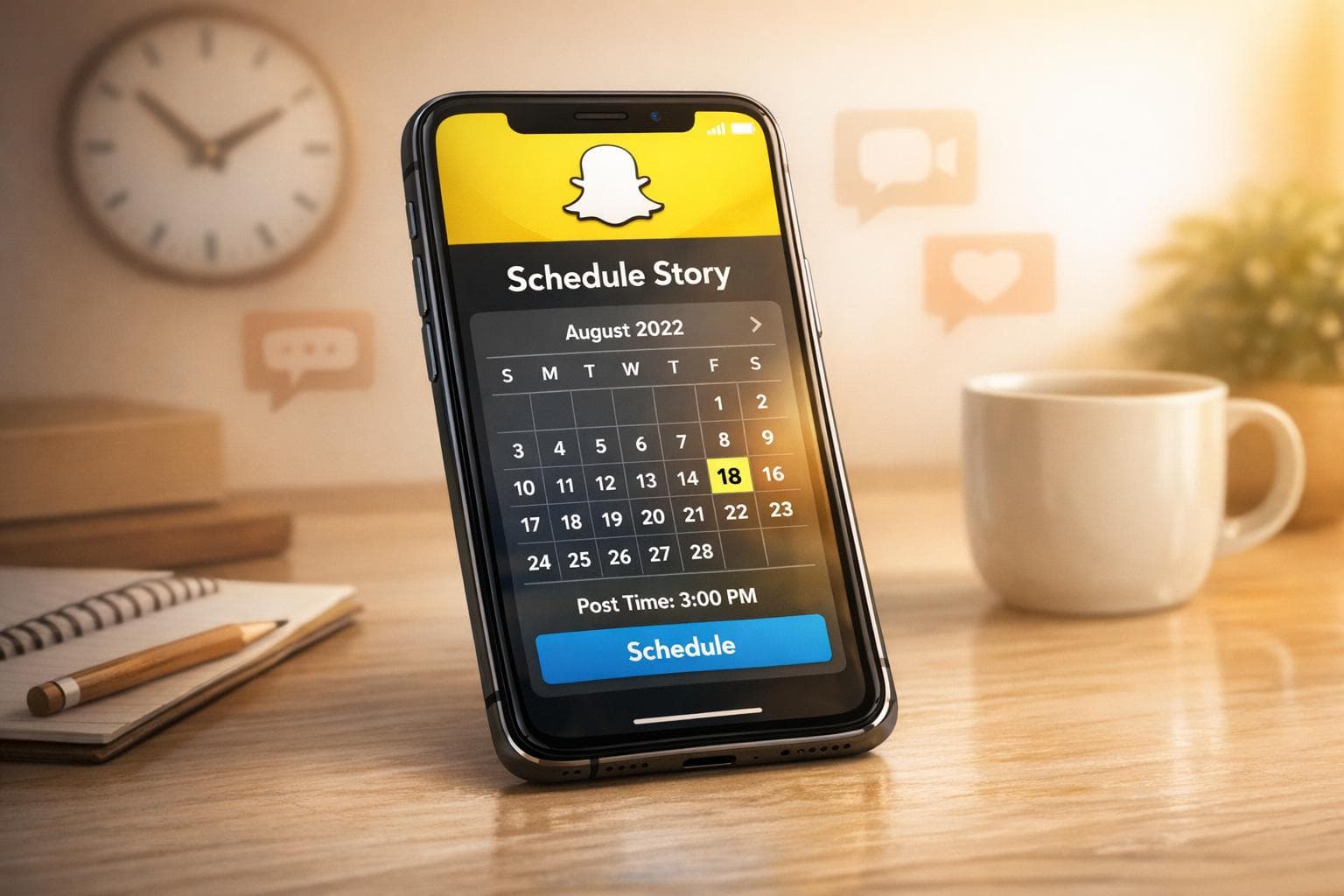
Snapchat Stories vanish after 24 hours, making consistent posting a challenge. Scheduling Stories can help you stay active, save time, and engage your audience during peak hours. Here's what you need to know:
- Why Schedule Snapchat Stories: It saves time, ensures posts go live at the best times (e.g., 10 PM–1 AM), and helps maintain a steady presence.
- Who Benefits: Creators, marketers, and small teams juggling multiple platforms can streamline workflows and reach Snapchat’s unique audience.
- Snapchat Features: Standard users have a 24-hour Story limit, while Snapchat+ subscribers can extend it up to 1 week.
- Best Times to Post in UAE: Peak hours are 9 PM–1 AM for younger users and 7 PM–9 PM for professionals.
- Scheduling Tools: Use Snapchat’s built-in scheduling feature or third-party tools like Posterly for automation.
Pro Tip: Use Snapchat Insights to track audience behaviour, optimise posting times, and refine your content strategy. Whether you're sharing behind-the-scenes clips or interactive Stories, planning ahead ensures your content stays relevant and engaging.
How to Schedule Snaps on Snapchat | 2024 Guide
::: @iframe https://www.youtube.com/embed/jYUjydweiUI :::
sbb-itb-f7b3a33
How Snapchat's 24-Hour Story Window Works
When you post a Snap to 'My Story', it automatically disappears after 24 hours [3]. Once the 24-hour period ends, the Story is removed from the feed. However, you can still save it to your private Memories or set it to auto-save to your Public Profile [1].
If you're a Snapchat+ subscriber, you get even more control. The 'My Story Timer' feature allows you to customise how long your Stories stay live. You can choose from durations like 1 hour, 6 hours, 12 hours, 24 hours, 2 days, 3 days, or even up to 1 week [3]. This flexibility gives you more options for managing and planning your content.
| Feature | Standard User | Snapchat+ Subscriber |
|---|---|---|
| Default Expiration | 24 Hours | 24 Hours |
| Minimum Expiration | 24 Hours | 1 Hour |
| Maximum Expiration | 24 Hours | 1 Week |
| Timer Options | N/A | 1h, 6h, 12h, 24h, 2d, 3d, 1w |
Snapchat also lets you schedule Public Story posts directly in the app. On the 'Send To' screen, you can pick a specific date and time to publish your Story [1]. This scheduling feature makes planning easier, even with Snapchat's fleeting content format. It’s a handy tool for creators looking to stay consistent while working within the platform’s ephemeral nature.
Challenges of Temporary Content
The 24-hour lifespan of Stories means you need to post regularly. If you skip a day, your profile can appear inactive since followers won’t have older content to revisit. One way to tackle this is by batching your content creation - plan and schedule Stories for the week ahead [2][4].
Because each Snap disappears after a day, it’s crucial to create a cohesive narrative. Without proper planning, your Stories might feel disconnected or lose their impact [2].
"By visually planning your Snapchat content in advance, you gain an end-to-end view of how your stories will flow together - so you can tell the strongest story and maximise opportunities for engagement." – Team Later [2]
There are also technical hurdles to consider. Some scheduling tools don’t support interactive elements like polls, stickers, or custom audio tracks [2]. These limitations require extra effort to ensure your content remains engaging and aligned with Snapchat's interactive style.
Snapchat Stories vs Other Platform Stories
Although many platforms now feature Stories, Snapchat’s version stands out. It focuses on raw, unfiltered content, staying true to its original vibe. Unlike Instagram or Facebook Stories, which often complement feed posts, Snapchat Stories are the main attraction. With nearly 15 billion daily interactions between creators and fans, its ephemeral format feels natural and even expected [2].
When preparing your content, make sure it meets Snapchat’s technical requirements: a 9:16 aspect ratio, a minimum resolution of 540x960 pixels, and video lengths between 5 to 60 seconds [7][5]. These details ensure your Stories look polished and perform well on the platform.
Finding the Best Times to Post
::: @figure 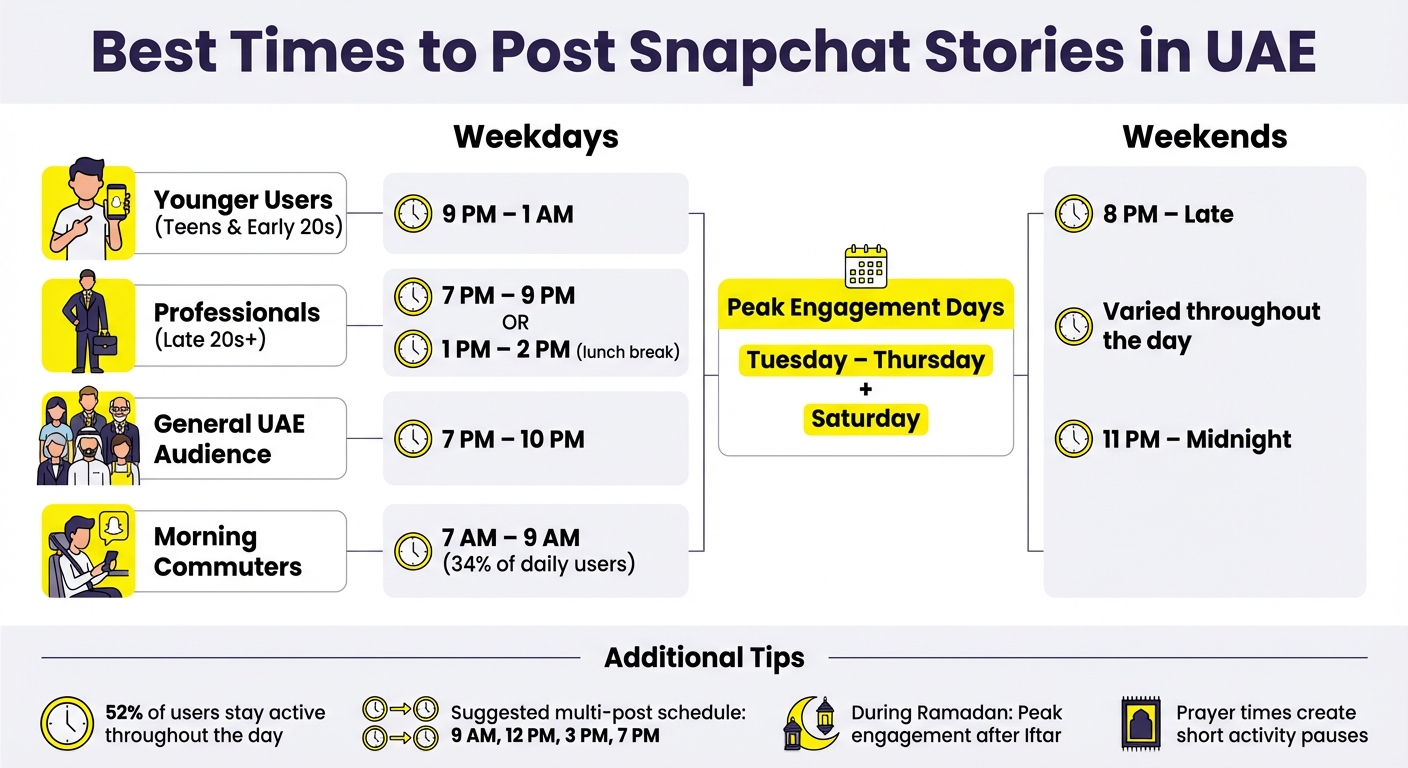 {Best Times to Post Snapchat Stories in UAE by Audience Segment}
:::
{Best Times to Post Snapchat Stories in UAE by Audience Segment}
:::
When Audiences Are Most Active
In the UAE, Snapchat tends to come alive at night. The most active hours are between 9 PM and 1 AM, especially for younger users like teens and those in their early twenties [8][10]. For professionals and older audiences, the best times to post are either 7–9 PM or during the lunch break, around 1–2 PM [8].
Mid-week days, from Tuesday to Thursday, see the highest engagement, along with certain weekends like Saturday [8][10][16]. However, weekends generally show a dip in activity, with engagement peaking later in the evening, around 11 PM [8][11].
Mornings shouldn’t be ignored either. Around 34% of daily Snapchat users in the UAE start their day with the app, making the 7 AM to 9 AM window a great opportunity to reach commuters [9]. Since 52% of users stay active throughout the day, posting multiple Stories at staggered times - such as 9 AM, 12 PM, 3 PM, and 7 PM - can help keep your content visible [9][12].
| Audience Segment | Best Weekday Times (UAE) | Best Weekend Times (UAE) |
|---|---|---|
| Younger (Teens & Early 20s) | 9 PM – 1 AM [8] | 8 PM – Late [8] |
| Older (Late 20s & Professionals) | 7 PM – 9 PM [8] | Varied throughout the day [8] |
| General UAE Audience | 7 PM – 10 PM [11] | 11 PM – Midnight [11] |
During Ramadan, user behaviour shifts significantly. Engagement peaks after Iftar as daily routines adjust [17]. Prayer times throughout the day also create short pauses in activity, followed by spikes when users return to their devices [15].
Next, we’ll explore how Snapchat’s built-in tools can fine-tune your posting schedule.
Using Snapchat Insights to Find Your Best Times
Snapchat’s Insights tab, available for free on Public Profiles, is a goldmine for understanding your audience’s activity [13]. By swiping up on any Story, you can check hourly view counts. For example, if a Story posted at 9 AM sees a spike in views at 7 PM, you might want to consider posting later [12].
The 28-day summary and engagement graphs help identify patterns in your posting strategy. You can filter past Stories by metrics like Snap Views, Average View Time, and Total View Time to figure out which time slots deliver the best results [13][14]. For profiles with over 200 followers, demographic data - broken down by age and gender - can further refine your approach.
To test different posting times, Snapchat’s native scheduling tool is your go-to. On the "Send To" screen, tap the three dots, select your preferred date and time, and hit "Done" [1]. If you’re a Snapchat+ subscriber, the "My Story Timer" feature allows you to experiment with Story durations ranging from 1 hour to 1 week, ensuring your content gets views even during quieter periods [3].
Creating a Snapchat Content Calendar
A well-planned content calendar is your secret weapon for keeping Snapchat Stories engaging and aligned with your marketing goals. Instead of scrambling for ideas every day, you can map out themes, set clear objectives for each Story, and ensure every snap contributes to your bigger picture. This approach is especially useful in the UAE, where audience habits often shift during Ramadan or around prayer times. Planning ahead allows you to adapt seamlessly to these changes without losing momentum [18].
Start by defining your content themes. Break your calendar into key categories like industry updates, product tutorials, company highlights, or behind-the-scenes glimpses [20]. For example, Everlane’s recurring Snapchat series, "Transparency Tuesday", answers audience questions with personal videos, building trust through consistent, themed content [19]. Similarly, photographer Jeff Mindell created a daily 5:00 PM segment featuring his dog, encouraging followers to share their own pet stories [19].
Structure your calendar with weekly and monthly themes to maintain variety. For example:
- Mondays: Product Tips
- Wednesdays: Behind-the-Scenes
- Monthly Blocks: Week 1 focuses on "New Arrivals", Week 2 on "Tutorials", Week 3 on "Customer Success Stories", and Week 4 wraps up with "Limited-Time Offers" [18].
Here's a quick guide to balancing content types:
| Content Type | Suggested Frequency | Primary Goal |
|---|---|---|
| Behind-the-Scenes | 2–3 times per week | Build trust and relatability [18][19] |
| Product Promotions | 1–2 times per week | Highlight features and drive sales [18] |
| Interactive (Polls/Q&A) | Weekly/Monthly | Boost community engagement [18][19] |
| Educational/Tips | 1–2 times per week | Add value and establish authority [18] |
| Real-time/Trending | Spontaneous | Stay relevant and timely [18] |
Make room for viral trends and key moments like Eid [18]. Batch create content to stay consistent [2]. Use Snapchat Insights to track which formats (polls, product previews, or behind-the-scenes clips) get the most engagement, and tweak your calendar accordingly [18].
Planning Content Themes and Story Arcs
Once your schedule is set, focus on building strong themes and narratives. Start by identifying core topics like product launches, customer success stories, or industry insights [20]. Map these onto a monthly calendar, assigning each week a specific focus.
Balance your content mix with 40% original and 60% curated material [20]. Original content might include product shots, team updates, or exclusive announcements, while curated content could feature user-generated posts, industry updates, or memes that resonate with your UAE audience. This balance keeps your feed dynamic without overwhelming your team.
Tie your themes to local moments. During Ramadan, for example, shift your Story arcs to reflect the season by posting after Iftar, when engagement tends to peak. Content focused on family, charity, or reflection will resonate more strongly during this time.
Mixing Entertainment and Promotional Content
Striking the right balance between fun and promotional content is key. Snapchat users prefer raw, unfiltered content over polished sales pitches. Use personal, off-the-cuff snaps to make your brand feel authentic.
"If you use Instagram as a place to showcase the perfect finished product, use your Snapchat account to showcase everything that you're not sharing elsewhere!" – Jeff Mindell [19]
Alternate between value-driven and promotional content to keep your audience engaged [18]. A simple "Good morning" snap or an emoji can bump your Story to the top of followers' feeds without feeling intrusive [19]. This "greeting" strategy keeps your brand visible without overwhelming your audience.
Recurring series are another great way to build anticipation and loyalty. For instance, a weekly behind-the-scenes segment or a monthly Q&A gives followers something to look forward to [19]. Keep an eye on your completion rates to identify where viewers drop off. If promotional snaps are causing high exit rates, adjust the balance by adding more engaging, casual content before your call-to-action [18].
Authenticity matters - 86% of social shoppers say creator content on Snapchat has influenced their purchases, but only when it feels genuine [2]. By staying true to your brand and focusing on what resonates with your audience, you can maximise engagement and build a lasting connection in the UAE market.
Tools and Methods for Scheduling Stories
Scheduling Snapchat Stories can save you the hassle of adjusting your schedule every evening. Whether you prefer automated tools that work from a desktop or manual scheduling directly in the Snapchat app, there’s a solution to fit your workflow, budget, and need for native features. Let’s dive into how automated tools like Posterly can help, and when manual scheduling might be the better choice.
Using Posterly for Automated Scheduling

Posterly takes care of publishing your Public Stories at the exact time you choose, so you don’t have to do it manually. This is especially handy in the UAE, where the best times to post are often late at night, between 22:00 and 01:00 [6]. With Posterly, you can plan your content during regular business hours and schedule it to go live when your audience is most active.
The drag-and-drop visual calendar makes it easy to organise your Snapchat strategy, allowing you to quickly adjust your posting schedule and maintain a steady flow of Stories. Plus, Posterly’s multi-platform functionality means you can repurpose your vertical 9:16 content for Snapchat, Instagram Reels, and TikTok - all from a single dashboard.
Another standout feature is Posterly’s AI Caption Assist, which helps craft short, engaging captions and hashtags that fit Snapchat’s 160-character limit. As JC Casagan, a verified user, shared:
"The AI Writer tool is particularly remarkable, helping me overcome creative blocks and generate engaging content quickly" [21].
The bulk scheduling feature is a game-changer for teams, enabling them to upload dozens of Snaps simultaneously. Social media managers report saving over 10 hours per week using automated tools [21]. Some agencies have even cut down manual work by 75% while boosting revenue by 15% [6].
Before using Posterly, make sure your Snapchat profile is set to "Public" and has at least one existing public post. Stick to the recommended 9:16 aspect ratio (1,080 × 1,920 pixels for images; minimum 540 × 960 pixels for videos) to avoid unwanted cropping. Keep in mind that third-party tools like Posterly don’t support Snapchat’s native edits, such as polls, GIFs, or location tags.
For those moments when interactive features or spontaneous updates are essential, manual scheduling remains a solid option.
Manual Scheduling Methods
Snapchat’s native scheduling feature is designed specifically for Public Stories. To manually schedule a Snap, capture your content, go to "Send To", select "My Story • Public", tap the three dots, pick your desired date and time, and hit "Done." If you’re a Snapchat+ subscriber, you can also customise how long your Story stays visible using the "My Story Timer." Options range from 1 hour to 1 week.
This method works best when you need to include interactive elements or post real-time content that doesn’t fit a pre-planned schedule. While automated tools are great for regular updates, manual scheduling ensures your real-time, interactive Stories align with your daily goals. However, for creators and brands posting 4 to 7 Snaps daily [6], manually scheduling each one can become time-consuming. Many UAE-based creators find success by blending automated scheduling for routine posts with manual updates for time-sensitive or interactive content.
Making Your Snapchat Stories More Engaging
Once your Snap schedule is sorted, the next step is creating content that grabs attention and sparks action. With Snapchat's 24-hour story lifespan, you're vying for attention in a world where the average attention span has dwindled to just 8.25 seconds [27]. Smart design choices and effective tagging can make all the difference. Let’s dive into some practical tips to make your Snapchat Stories stand out.
Design Tips for Better Stories
Raw, unpolished content works best on Snapchat. While platforms like Instagram are perfect for showcasing polished, picture-perfect posts, Snapchat thrives on authenticity. Think of it as a behind-the-scenes pass. Photographer and Snapchat expert Jeff Mindell puts it perfectly:
"If you use Instagram as a place to showcase the perfect finished product, use your Snapchat account to showcase everything that you're not sharing elsewhere! People love behind-the-scenes." [19]
Keep it dynamic with quick, varied cuts. Instead of filming one long clip, try shooting shorter segments from different angles and stitching them together. Mindell explains:
"The same concept applies to Snapchat, so I try to do that whenever I can because it changes up the rhythm of your story and makes it really interesting to watch." [19]
Take full advantage of Snapchat’s creative tools like Lenses, Filters, Sounds, and Timed Captions [22]. Stick to the 9:16 aspect ratio to avoid awkward cropping, and keep videos between 5 and 60 seconds. Remember, 64% of Snapchat ads are watched with sound on [28], so audio is a key element.
Text overlays are another must. They not only add context but also keep viewers engaged, especially if they’re watching without sound. If you're using scheduling tools like Posterly, keep in mind the 160-character limit [5][4]. To minimise drop-offs, hook viewers in the first three seconds with bold colours and dynamic motion [23][26].
Once your design game is strong, strategic tagging can help amplify your Story’s reach.
Increasing Visibility with Tags and Keywords
Snapchat’s algorithm favours content with high completion rates, screenshots, shares, and replies [23]. To make sure your Stories reach the right audience, use hashtags, location tags, and topic tags. Posting to Spotlight with relevant tags can even push your content beyond your current follower base [24][25].
Geo-filters and location tags are especially effective in the UAE. These allow you to connect with users at specific places like stores, campuses, or events. On-demand geo-filters are an affordable option, starting at around AED 18 [23], and they often encourage user-generated content when people share snaps using your custom filter [24][27].
Interactive stickers - such as polls, Q&A boxes, and countdown timers - are another great way to increase engagement. These tools not only boost interaction but also signal Snapchat’s algorithm to give your content more visibility [23][24]. They’re perfect for creating urgency during flash sales or events, making the most of Snapchat’s fleeting nature [23][28].
With 86% of social shoppers saying that creator content on Snapchat has influenced their purchases, and the platform reaching 90% of 13- to 24-year-olds in over 25 countries [2], nailing your tags and interactive elements can significantly expand your audience and drive results.
Using Analytics to Improve Your Strategy
Creating great content is only part of the equation - analytics are what truly drive growth. Snapchat Insights offers a wealth of data to help you fine-tune your scheduling strategy. But to make it work, you need to focus on the metrics that matter most. Let’s dive into the key numbers that can help you improve your Snapchat scheduling game.
Key Metrics to Track
Unique Viewers (Reach) measures how many individual users opened the first Snap in your Story and watched it for at least one second [32][34]. To get a rough idea of your follower count, multiply your highest Story view count by 1.5 [32][34].
Story View Percentage (Completion Rate) indicates the percentage of viewers who watched your Story from beginning to end [30][31]. If this rate is low, it could mean your Story is too long or loses its appeal halfway through. Similarly, Average View Time tells you how long people stay engaged. If viewers tend to drop off after about 10 seconds [29][31], consider keeping individual Snaps or sequences within that time frame.
Screenshots are another strong indicator of engagement on Snapchat [30][32]. When users save a Snap, it shows they found it valuable - whether it’s a checklist, discount code, or an inspiring quote. Look for patterns in what triggers screenshots and incorporate similar content in future Stories. Fallout (Drop Rate) helps you identify where viewers lose interest in your Story. Calculate it using this formula: ((Views of Snap A - Views of Snap B) / Views of Snap A) × 100 [34].
For paid campaigns, pay attention to Swipe-ups and Clicks. Snapchat’s average swipe-up rate is around 1.9%, while a healthy Click-Through Rate (CTR) for ads starts at 0.35%, with 1.5% considered strong [33]. Additionally, review Audience Demographics - such as age, gender, location, and interests - to ensure your content resonates with the right audience [29][31].
By analysing these metrics, you can adjust your posting schedule and content length to better engage your viewers.
Adjusting Your Schedule Based on Data
Use Reach by Day to identify when your audience is most active [31][32]. If engagement spikes on specific weekdays, consider scheduling your key content releases during those high-traffic periods.
Average View Time is another critical metric. If viewers consistently drop off after about 10 seconds, keep your Stories concise and grab attention early with a strong hook in the first few Snaps [30][31][32].
Make use of Top Locations data - particularly relevant in the UAE - to time your posts for peak activity in cities like Dubai, Abu Dhabi, or Sharjah. If your audience shows strong interest in categories like beauty, gaming, or fashion, align your content with those themes [29].
Keep an eye on Screenshots and Replies to identify your most engaging content [29]. If formats like how-to guides or discount codes consistently perform well, include more of them in your Stories. On the other hand, if a specific Snap has a high Drop Rate, revisit and tweak it to maintain viewer interest [34].
Snapchat Insights typically offers data summaries over 7-day, 28-day, or year-to-date periods [13][31]. The 28-day view is particularly useful for spotting long-term trends. As Claire Beveridge explains:
"If you see a downward trend in your Story Views and View Time, this is a signal that you need to refine your Snapchat content strategy... You can also tweak the length, pacing, tone, and frequency of Snaps" [32].
For even more detailed tracking, tools like Posterly offer analytics over a 12-month period, making it easier to identify patterns and adjust your strategy [2][4]. By aligning your content with these insights, you can optimise your Snapchat Story schedule to maximise engagement and growth.
Conclusion
This guide has highlighted how thoughtful scheduling can significantly enhance Snapchat engagement. By applying these strategies, you can create a consistent and captivating presence on one of the most interactive platforms out there. With nearly 15 billion daily interactions between creators and fans [2] and 86% of social shoppers acknowledging that creator content on Snapchat has influenced their purchases [2], the potential for growth is undeniable.
Here’s a quick recap of the essentials: Batch your content to save time while staying efficient, use analytics to identify the best times for engagement, and stick to the 9:16 format for a polished and optimised display. Whether you’re sharing how-to guides, exclusive discount codes, or a behind-the-scenes look at your brand, planning ahead helps ensure your Stories flow seamlessly and keep your audience hooked [2].
To take it further, link your Snapchat Public Profile to Posterly, fine-tune your media to a resolution of 1,080 × 1,920, and schedule posts during peak engagement hours. Posterly’s unified dashboard simplifies managing Snapchat alongside other platforms like Instagram, TikTok, and LinkedIn, helping you maintain a cohesive brand presence across channels.
Start small - plan one week of content, keep an eye on your Insights, and tweak your approach based on performance. Consistency is the cornerstone of growing your reach [35]. With the right tools and a well-thought-out strategy, Snapchat can become a powerful driver of audience engagement and conversions.
FAQs
::: faq
How can I use Snapchat Insights to optimise my Story scheduling?
Snapchat Insights offers a treasure trove of data to help you understand how your audience interacts with your Stories. With metrics like total viewers, Snap views, average view time, and engagement patterns over the past 28 days, you can uncover the optimal days and times to post. It also provides insights into your audience's most engaged age groups and top locations.
By diving into this data, you can strategically time your Stories to go live when your followers are most active. Plus, it allows you to tweak your content to boost clicks, replies, and completion rates. Tools like Posterly make this even easier by letting you schedule Stories for specific dates and times - say, 15 March 2026 at 14:00 - so your content reaches the right people at just the right moment. :::
::: faq
What advantages does Snapchat's scheduling feature offer for Stories?
Snapchat's scheduling tool lets you choose a specific date and time for your public Stories to go live. This helps you plan ahead and automate your content, ensuring your posts are shared when your audience is most likely to engage.
Scheduling in advance means you can keep a steady presence on Snapchat without the need to post manually in real-time. It’s a great way to save time and focus on other priorities while still connecting with your audience effectively. :::
::: faq
How does Snapchat’s 24-hour Story duration influence your content strategy?
Snapchat Stories vanish after 24 hours, so timing is everything when it comes to connecting with your audience. To make the most of it, aim to post during peak engagement hours and keep your content short and to the point. Relevance is key - grab attention quickly.
If you're a Snapchat+ subscriber, you get an extra perk: the My Story Timer feature. This lets you extend a Story's visibility beyond the usual 24 hours, giving creators more leeway to keep important content available for longer. :::
Related Articles
How to Create 30 Days of Social Media Content Using AI Images in posterly
A practical guide to generating a full month of original social media images with posterly's AI image tool, writing captions for each one, and scheduling everything in a single session.
Read moreHow to Find the Best Time to Post on Social Media Using posterly's AI Scheduler
Stop guessing when to post. This guide explains how posterly's AI Scheduler analyses your audience activity and automatically picks the best posting times so your content gets seen by more people.
Read moreHow to Manage Google Business Reviews on Autopilot With posterly
A step-by-step guide to responding to Google reviews with AI, automatically requesting new reviews from customers, auditing your profile for local SEO, and turning your best reviews into social media content.
Read moreHow to Manage Multiple Client Social Media Accounts With posterly Workspaces
A practical guide for agencies and teams on using posterly Workspaces to organise client accounts, assign roles, get content approved, and schedule posts across dozens of social profiles without things getting messy.
Read more