
Ultimate Guide to AI Visual Content for Social Media
Ultimate Guide to AI Visual Content for Social Media

Ultimate Guide to AI Visual Content for Social Media
AI is reshaping how we create social media visuals, making it faster and easier to produce professional-quality content. Instead of relying on photographers or designers, AI tools can generate images, videos, and graphics in seconds using simple text prompts. This saves time, reduces costs, and boosts engagement - posts with visuals get 650% more interaction than text-only ones.
Here’s why AI is a game-changer for creators, small businesses, and marketers:
- Time-Saving: AI tools cut production time by 30–50%, freeing up 10–15 hours per week.
- Cost-Effective: Solo creators and small teams can achieve agency-level results without high expenses.
- High Engagement: Visuals improve memory retention (65% with images vs. 10% with text) and drive more likes, shares, and saves.
- Multi-Platform Ready: Tools like Posterly and Midjourney create visuals tailored for Instagram, TikTok, LinkedIn, and YouTube, ensuring optimal performance on each platform.
AI tools like Posterly offer features such as automated scheduling, text-to-image generation, and analytics to streamline workflows. Whether you’re a solo creator or part of a marketing team, AI simplifies content creation, enabling consistent, high-quality posts that resonate with your audience.
The Latest AI-Powered Content Creation Workflow for Business (Speed Challenge!)
::: @iframe https://www.youtube.com/embed/XQL6zV8aRFk :::
AI Tools for Creating Social Media Visuals
The right AI tool can save you hours of work, turning what could be a time-consuming task into a streamlined process. Whether you're focusing on creating visuals or managing posts, choosing the right tool depends on your specific challenges. Let's take a closer look at Posterly, a platform that combines visual creation and scheduling in one place.
Posterly: AI-Powered Social Media Tool
Posterly is a great example of how a single platform can simplify the process of creating and managing social media content. Posterly offers a unified dashboard that combines visual creation, scheduling, and analytics. One standout feature is Nano Banana, which allows you to generate images from text prompts. For example, you can type in "minimalist product mockup on marble surface", and it will instantly create a matching visual. Another feature, Hey Posterly, takes care of smart scheduling by analysing your audience's activity patterns and automatically posting content across platforms like Instagram, TikTok, LinkedIn, and more [2][3].
Posterly also offers a unique integration with GitHub through its Ship & Share feature. This transforms code commits into marketing content, making it an excellent choice for brands in the developer space. Pricing starts at AED 26/month (~US$7) for individual users with the Starter plan, while the Power User plan at AED 92/month (~US$25) supports teams managing up to 30 accounts [website data].
"86% of content marketing pros say AI saves them more than one hour every single day, mainly by accelerating idea generation and content production." – Postbae [4]
AI Tools for Different Visual Requirements
If your needs go beyond what Posterly offers, there are other tools tailored to specific visual requirements. Midjourney, for instance, is perfect for creating custom illustrations and artistic visuals. Starting at AED 29/month (US$8/month), it's ideal for brands that want unique imagery instead of standard stock visuals. Canva, on the other hand, is a user-friendly option with a free tier. Its template-based design system works well for teams with some design expertise.
For those who need fully autonomous visual generation, PostNitro is worth exploring. This tool can turn raw notes or URLs into ready-to-post carousels and infographics, cutting content creation time by as much as 70% to 85% [5].
The main distinction between these tools lies in how much manual input they require. Generic AI tools typically need prompts for every post, while specialised platforms like PostNitro can generate complete visuals automatically [4].
How to Choose the Right Tool
Start by identifying your biggest challenge. If your struggle is with design, focus on tools that excel in visual generation, such as Posterly or Midjourney. If keeping up with a consistent posting schedule is your issue, prioritise platforms with automation features like Hey Posterly. Tools with Brand Kits are also invaluable - they let you save your logos, colour palettes, and fonts, ensuring your visuals stay consistent across platforms [7].
For occasional custom illustrations, Midjourney's AED 29/month plan is a solid choice. Individual creators looking for an all-in-one solution might prefer Posterly's AED 26/month Starter plan. And remember, tools that allow full editing can make a huge difference - 73% of businesses using AI for social media report higher engagement when they add a personal touch to AI-generated content [4].
Optimising AI Visuals for Social Media Algorithms
::: @figure 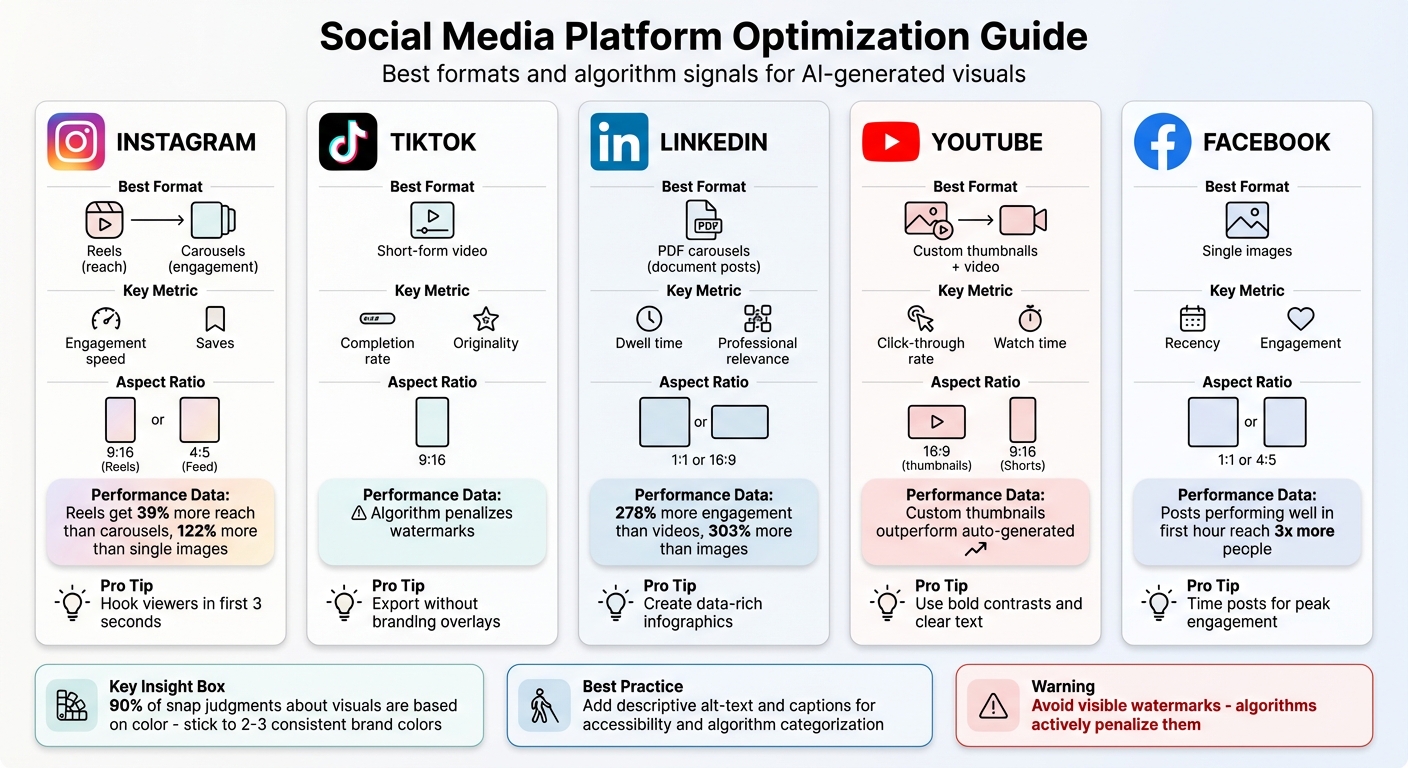 {Social Media Platform Optimization Guide for AI Visual Content}
:::
{Social Media Platform Optimization Guide for AI Visual Content}
:::
Creating AI visuals is just the first step; ensuring they actually reach your audience is where the real challenge lies. Each social media platform operates with its own set of rules and signals to promote content. To maximise your reach, it’s essential to understand these signals and tailor your AI visuals accordingly.
Platform-Specific Optimisation Methods
Instagram prioritises Reels for discovery, with data showing they achieve 39% more reach than carousels and a whopping 122% more than single-image posts [12]. To optimise AI visuals for Instagram, ensure they’re sized correctly - use 9:16 for Reels and 4:5 for Feed posts to avoid awkward cropping. Adam Mosseri, Head of Instagram, notes:
"People tend to look for their closest friends in stories, use explore to discover new content and creators, and be entertained in reels" [10].
This means AI-generated Reels should focus on entertainment, with a compelling hook in the first three seconds. While Reels boost discovery, carousels are better for engaging your existing followers and nurturing your audience.
TikTok thrives on completion rates and watch time. The platform’s algorithm penalises content with watermarks from other platforms, so always export AI visuals without branding overlays [11]. Originality is key - unique AI-generated visuals consistently outperform recycled content.
LinkedIn has become a strong contender for visual content, particularly with PDF carousels (document posts). These posts generate 278% more engagement than videos and 303% more than standard images [12]. Use AI to create data-rich infographics or multi-slide presentations that encourage users to spend more time on your content.
YouTube focuses on click-through rates for its algorithm. AI can help you design custom thumbnails with bold contrasts and clear text, which are far more effective than auto-generated thumbnails. For YouTube Shorts, stick to the 9:16 vertical format and apply the same three-second hook strategy as TikTok.
Here’s a quick breakdown of the best formats and key algorithm signals for each platform:
| Platform | Best AI Visual Format | Key Algorithm Signal | Optimal Aspect Ratio |
|---|---|---|---|
| Reels (reach), Carousels (engagement) | Engagement speed, Saves | 9:16 (Reels), 4:5 (Feed) | |
| TikTok | Short-form video | Completion rate, Originality | 9:16 |
| PDF carousels | Dwell time, Professional relevance | 1:1 or 16:9 | |
| YouTube | Custom thumbnails + video | Click-through rate, Watch time | 16:9 (thumbnails) |
| Single images | Recency, Engagement | 1:1 or 4:5 |
Best Practices for Algorithm Performance
Timing is everything. Posts that perform well in the first hour can reach up to three times more people on Instagram [11]. Tools like Posterly’s Hey Posterly feature can analyse your audience's activity patterns and schedule your content for peak engagement times, giving it the best chance to succeed.
Colour selection also plays a huge role. Studies show that up to 90% of snap judgements about visuals are based on colour [14]. Stick to 2–3 consistent brand colours when generating AI visuals. Frequent changes in style can confuse the algorithm and hurt your reach [11].
Adding descriptive alt-text to AI-generated images and captions to videos serves a dual purpose. It enhances accessibility for users while also providing platforms with additional data to categorise your content [9][13]. This is especially important in markets like the UAE, where around 50% of users rely on voice search, often blending Arabic and English. Including keyword-rich captions ensures your content is easier to discover [16].
Finally, avoid visible watermarks at all costs. Algorithms actively penalise content with watermarks from other platforms or low-resolution visuals [11]. Always export your AI visuals in high quality and remove any branding overlays to stay on the algorithm’s good side.
sbb-itb-f7b3a33
Step-by-Step Workflow Using Posterly for Multi-Platform Visuals
Posterly makes it easy to turn AI-generated visuals into polished, multi-platform posts. With its suite of integrated tools, you can simplify the entire process - from creating designs to publishing them. Here’s how the workflow breaks down into three straightforward steps.
Creating Visual Content with Nano Banana
The Nano Banana Pro image model within Posterly is designed to generate high-quality visuals tailored to your exact needs. Whether you’re working on product photography, infographics, or UI/UX designs, this tool delivers precision and flexibility. To get the best results, provide detailed prompts that include the subject, composition, action, setting, style, editing preferences, and the aspect ratio. For instance:
- 1:1 for Instagram Feed
- 9:16 for Reels or TikTok
- 16:9 for YouTube thumbnails
- 3:4 for LinkedIn infographics [18].
Consistency across your visuals is easy to maintain thanks to the built-in Brand Kit [17]. Once your visuals are ready, the next step is scheduling them for publication.
Scheduling and Monitoring Content with Hey Posterly
After creating your visuals, Posterly’s AI-powered scheduling tool, Hey Posterly, takes over. This system automates the entire publishing process. Simply upload a template file (such as a PDF, CSV, or JSON), set your desired posting frequency, and let the AI handle the rest. It will generate captions, hashtags, and even alt text automatically [17]. This is especially handy for recurring content like daily updates or weekly summaries.
For more control, you can use the Post Creator to make quick edits. Add your visuals and captions, choose your target platforms (like Instagram, TikTok, or LinkedIn), and select Schedule for Later to set a specific date and time. Posterly even optimises the formats for each platform, saving you the hassle of manual resizing [6]. By aligning posting times with audience activity, you can maximise engagement. Over 57,013 creators have reported saving more than 10 hours per week using these automation features [6].
Connecting AI Tools for a Smooth Workflow
Posterly integrates seamlessly with external tools to eliminate repetitive tasks. For instance, the Ship & Share feature connects directly to GitHub, transforming code commits into ready-to-share marketing content. This is particularly useful for developers and SaaS teams who need to announce updates without leaving their workflow [6]. Additionally, Google Drive integration allows you to import assets directly, skipping the need for downloads.
The Content Library further streamlines your workflow by archiving every AI-generated post - whether it performed well or not. This lets you review past performance, mark top-performing visuals as favourites, and reuse them in future campaigns [17]. With a 99.9% uptime SLA, Posterly ensures your content gets published reliably across all 29+ supported platforms [6]. These integrations tie everything together, offering a smooth and efficient end-to-end process for managing AI-powered visual content.
Measuring the Performance of AI-Generated Visual Content
AI-generated visuals are only as effective as their measurable impact. By tracking the right metrics, you can pinpoint which designs truly resonate and refine your strategy for better results.
Key Metrics to Track
When assessing the success of AI visuals, focus on engagement-driven metrics like saves, shares, and completion signals, rather than just reach or impressions. Since 2025, Meta has shifted platforms like Instagram and Facebook towards a unified "Views" metric, prioritising completion signals - such as finishing a Reel or scrolling through a carousel - over raw visibility numbers [20].
- Saves: These show your visual holds lasting value and is worth revisiting [20][21].
- Shares: A strong indicator of virality potential.
- Comments: Meaningful comments reflect genuine audience connection.
- Swipe-Through Rate (STR): For carousels, an STR of 70–80% ensures your full message is being seen [22].
- Completion Rates and Watch Time: With 78% of consumers preferring short-form videos for product discovery, these metrics are key for video content [24].
For business impact, metrics like click-through rate (CTR) and conversion rate tie visuals to revenue. Calculate content ROI using the formula: (Profit – Investment) / Investment × 100 [23][24]. For paid campaigns, Return on Ad Spend (ROAS) reveals how many dirhams you earn for every dirham spent on AI visuals [21][23]. Additionally, tracking follower growth and your share of voice - how often your brand is mentioned compared to competitors - ensures your community grows authentically [21].
| Business Goal | Primary Metric | Implications |
|---|---|---|
| Brand Awareness | Reach & Views | Tracks how many unique users saw the visual [23] |
| Community Health | Engagement Rate | Measures audience interaction with content [23] |
| Content Utility | Save Rate | Indicates if the visual is worth revisiting [21] |
| Sales Impact | Conversion Rate | Shows how effectively viewers become customers [23] |
| Ad Efficiency | ROAS | Revenue earned per dirham spent [21] |
"What gets measured gets managed." - Peter Drucker [21]
To trace conversions back to specific visuals, add UTM parameters to links [20][23]. For 2026, engagement benchmarks generally range from 1–3% on Instagram and 2–3% on LinkedIn [21].
Using Posterly Analytics for Data Insights
Posterly simplifies performance tracking by consolidating data from over 46 platforms into a single dashboard under Insights → Analytics [19][25]. Instead of juggling multiple tools for TikTok, Instagram, LinkedIn, and others, you can view key metrics like engagement rates, reach, CTR, and follower growth in one place [19]. Since Posterly pulls data directly from platform APIs, the insights align perfectly with native analytics [25].
The platform’s AI-powered summaries transform raw numbers into actionable insights. For example, if an AI-generated post performs well, Posterly can explain whether factors like timing, format, or topic contributed to its success - eliminating the need for manual analysis [25]. You can even ask natural language questions like, "Which AI post had the most shares last week?" and get instant answers [25].
To refine your strategy further, use campaign tags and labels to group visuals by theme. Features like Best Time to Post analyse historical engagement data to ensure your visuals go live when your audience is most active [25]. Posterly users have reported an average engagement boost of 188%, thanks to predictive suggestions that make the creative process more efficient [19].
Performance reports are exportable as CSV files or branded PDFs, ideal for team reviews or client presentations [19][25]. The Audience Insights tab breaks down demographics like age and location, helping you confirm that your visuals resonate with your target audience [25]. With over 55,513 creators and teams using Posterly as of early 2026, the platform continuously improves its recommendations based on aggregate data [19].
"Postly offers excellent pricing, fast and committed support, and leadership that delivers on promises." - Alex T., Creator [19]
Improving Content Based on Performance Data
Data is only useful if it drives action. Identify top-performing content types and adjust your approach accordingly [26][7]. For instance, if interactive posts consistently generate higher engagement, tweak your AI prompts to produce more polls or open-ended questions [28]. Posterly's comparison tools can help you track trends over time and spot patterns you might otherwise miss [19].
A/B testing is another powerful tool - create multiple versions of the same AI visual with variations in colours, layouts, or tones, then see which one performs better in terms of CTR or conversions [27][8]. If carousel engagement drops after the third slide, review slide-specific data to identify where viewers lose interest, and adjust your hooks [22]. For videos with low completion rates, consider shortening the script or making the opening seconds more attention-grabbing [26].
"Your best source of social media content inspiration is your own data. To be able to create business content for social media, you need to understand what works and what doesn't." - Elena Cucu, Content & SEO Manager, Socialinsider [26]
Set a weekly schedule to review analytics and determine which AI visuals met your branding goals. Use these insights to plan your next batch of content [8]. While monthly reviews are useful for tracking broader trends, weekly check-ins allow for quick adjustments. Beyond likes, focus on saves and shares as indicators of emotional resonance, and track watch time for video retention [26]. Repurpose successful ideas into multiple formats, such as turning a high-performing Instagram carousel into a LinkedIn article or a TikTok script [28].
Ensure consistency across all AI-generated visuals by maintaining your logos, brand colours, and fonts, even as you adapt styles based on performance data [8]. This feedback loop ensures each round of AI content improves based on measurable results.
Conclusion: Using AI for Visual Content
Key Takeaways for Creators and Marketers
AI is revolutionising the way social media visuals are created, turning what used to take hours into tasks completed in just minutes. Did you know that social media teams typically spend about 60% of their week crafting content manually? With AI tools, that workload can be slashed by 30% to 50%, saving between 10 to 15 hours every week [1].
But it’s not just about speed. AI brings consistency to the table. It ensures your content is posted at the best possible times, keeps your brand voice intact across platforms, and even generates multiple variations for A/B testing - all without having to start from scratch [29]. Take Posterly, for instance: it combines design, scheduling, and analytics into a single dashboard, allowing users to manage content across more than 10 platforms effortlessly. And with pricing starting at just AED 25.70 per month (around $7), it’s an affordable option for solo creators while offering scalability for larger teams [29].
"AI is a force multiplier for creative expression." – David Raichman, Creative Director, Ogilvy [15]
The key is to see AI as your creative partner rather than a replacement. While AI takes care of repetitive tasks like removing backgrounds or drafting captions, you can channel your energy into strategic thinking and genuine creative expression. In the UAE, where social media usage exceeds 115% and ad spending is set to reach AED 1.64 billion (approximately $447.60 million) by 2025, leveraging AI can give you a competitive edge [30].
With these benefits in mind, let’s discuss how to seamlessly integrate AI into your visual content workflow.
Next Steps for Using AI Visual Content
Now that the advantages are clear, here’s how to get started. First, identify the biggest bottleneck in your content workflow. Is scheduling eating up your mornings? Try Posterly’s 7-day trial for AED 3.67 and see how its conversational interface simplifies posting across multiple platforms [29]. If creating visuals is where you’re stuck, explore Nano Banana’s 4K image generation feature to produce high-quality assets [29]. Upload your brand guidelines and use analytics to track metrics like saves, shares, and conversions.
Start small. For example, transform a single blog post into an Instagram carousel or a LinkedIn update. Use AI to experiment with different captions for your next content batch. Then, review your weekly analytics to uncover patterns and refine your prompts and posting schedule. The goal isn’t to automate everything, but to free up your mental bandwidth for the creative insights only you can bring to the table. With over 55,513 creators already using Posterly as of early 2026, the platform continuously improves based on user feedback, making each update more user-friendly and effective [19].
FAQs
::: faq
How can AI help improve engagement with visual content on social media?
AI takes social media visuals to the next level by diving deep into audience preferences, analysing past performance, and tracking platform trends. It suggests the best design elements - like colours, layouts, and styles - so every visual grabs attention and works seamlessly with platform algorithms.
With AI, creators can churn out top-notch visuals in no time, keep their branding consistent, and schedule posts for the best times to maximise visibility. Tools like Posterly go even further. They automatically create eye-catching images and videos, offer data-backed layout recommendations, and ensure content matches local cultural nuances while hitting peak engagement times. For creators in the UAE, this means delivering visually stunning content that connects with their audience, boosts interaction, and saves hours of work. :::
::: faq
What tools does Posterly provide for scheduling and analysing social media content?
Posterly provides a range of AI-driven tools designed to simplify social media management for creators and teams. With its smart scheduling feature, users can plan and post content seamlessly across platforms like Instagram, TikTok, LinkedIn, and YouTube - all from one centralised dashboard. It also offers analytics insights to monitor performance, helping you fine-tune your content strategy and create posts that truly connect with your audience. :::
::: faq
How can I make AI-generated visuals look great on different social media platforms?
To make AI-generated visuals shine on social media, it's crucial to match the dimensions and formats required by each platform. For instance, TikTok works best with vertical videos (9:16) at 1,080 × 1,920 px, while YouTube thumbnails should measure 1,280 × 720 px and stay under 2 MB. Using the correct specifications ensures your visuals appear polished and avoids problems like unwanted cropping or distortion.
When targeting an audience in the UAE, it's important to align your designs with local preferences. This might include using modest imagery, Arabic-friendly fonts, and incorporating regionally inspired elements, such as warm desert hues or Arabic calligraphy. Provide your AI tool with clear, detailed style prompts to achieve these results. Experiment with variations to discover what resonates most effectively with your audience.
To boost engagement, focus on consistent branding, keep text concise, and post at times when your audience is most active - for example, 06 Jan 2026, 18:30. Tools like Posterly can make this process easier by automatically resizing visuals and tailoring them for different platforms, saving you time while ensuring high-quality results. :::
Related Articles
How to Create 30 Days of Social Media Content Using AI Images in posterly
A practical guide to generating a full month of original social media images with posterly's AI image tool, writing captions for each one, and scheduling everything in a single session.
Read moreHow to Find the Best Time to Post on Social Media Using posterly's AI Scheduler
Stop guessing when to post. This guide explains how posterly's AI Scheduler analyses your audience activity and automatically picks the best posting times so your content gets seen by more people.
Read moreHow to Manage Google Business Reviews on Autopilot With posterly
A step-by-step guide to responding to Google reviews with AI, automatically requesting new reviews from customers, auditing your profile for local SEO, and turning your best reviews into social media content.
Read moreHow to Manage Multiple Client Social Media Accounts With posterly Workspaces
A practical guide for agencies and teams on using posterly Workspaces to organise client accounts, assign roles, get content approved, and schedule posts across dozens of social profiles without things getting messy.
Read more