
Ultimate Guide to Automated Content Publishing Workflows
Ultimate Guide to Automated Content Publishing Workflows

Ultimate Guide to Automated Content Publishing Workflows
Automated content publishing workflows simplify managing social media in 2026. These systems handle repetitive tasks like scheduling, formatting, and publishing posts across platforms, saving time and boosting efficiency. For UAE marketers juggling regional and global campaigns, automation ensures consistent posting during peak hours (7–9 AM and 7–9 PM GST) without constant manual effort. Tools like Posterly streamline tasks such as resizing images, tailoring captions, and managing approval chains, ensuring content aligns with brand identity.
Key benefits of automation:
- Saves up to 10 hours weekly by automating repetitive tasks.
- Boosts engagement by 76% through consistent multi-platform posting.
- Handles platform-specific requirements (e.g., TikTok's 9:16 videos, LinkedIn's 5GB file size limit).
- Simplifies multi-account management via centralised dashboards.
Automation isn’t just about saving time - it ensures consistency, reduces errors, and allows teams to focus on strategy and audience interaction. With tools like Posterly offering plans starting from AED 25.70/month, automation is both accessible and practical for businesses in the UAE.
AI System to Automatically Create and Publish Social Media Content
::: @iframe https://www.youtube.com/embed/NV8SozrkZD4 :::
sbb-itb-f7b3a33
Core Components of an Automated Publishing Workflow
Creating a smooth automated workflow hinges on three key elements: a centralised dashboard, smart scheduling, and automated formatting. These elements work together to simplify managing multiple channels, saving time while ensuring high-quality output. Here's a closer look at how they function.
Centralised Dashboard for Multi-Platform Management
A centralised dashboard allows you to oversee all your accounts from one place, eliminating the hassle of switching between platforms. This reduces errors like posting incorrect content or missing scheduled updates. Many dashboards also feature a visual content calendar with drag-and-drop functionality, making it easy to adjust your strategy on the fly. For UAE-based teams handling regional campaigns, workspace-specific time zones ensure posts go live at optimal times, such as 7–9 AM GST for local audiences, while simultaneously scheduling updates for other regions like Europe or Asia.
Some tools even include Brand Kits, which ensure consistency across all content - whether it's AI-generated or manually created. This means your voice, tone, and visual style remain unified across all formats. As Posterly puts it:
The real win isn't 'AI can write posts.' The win is consistency at speed: your voice, your tone, your visual style - applied across text, images, carousels, and video captions. [1]
Smart Scheduling and Queue Management
Scheduling is at the heart of an efficient workflow. Smart scheduling automates your posting routine, keeping your channels active without requiring constant manual updates. This frees you up to focus on strategy and creativity, while the system handles the technicalities.
For example, bulk scheduling allows you to upload up to 500 posts in one go using a CSV file, saving agencies and teams over 10 hours each week [5]. The system also validates each post against platform-specific rules, such as X's 280-character limit, TikTok's 10-minute video cap, or LinkedIn's 5GB file size restriction. This reduces the chance of errors and ensures posts meet platform requirements seamlessly.
A visual content calendar provides an overview of your scheduled posts, while features for recurring content ensure your channels remain active. Interestingly, users of automated publishing tools report an average engagement increase of 76% [5].
Content Formatting for Multi-Platform Compatibility
Each social platform has its own technical requirements, and automated formatting ensures your content meets these standards without extra manual effort. For example, Image Auto-Fix resizes visuals to fit platform-specific dimensions, such as 1080×1080 pixels for Instagram, 1200×627 pixels for LinkedIn, or 1000×1500 pixels for Pinterest [2]. Video validation ensures your content adheres to aspect ratios, durations, and resolutions for smooth uploads.
Take Instagram Reels, for instance - they require vertical videos (9:16) between 3 and 90 seconds, with a maximum file size of 4GB. Meanwhile, LinkedIn accepts horizontal videos up to 10 minutes and 5GB in size [2]. Automated tools handle these differences effortlessly, converting a single piece of content into platform-optimised versions.
Features like Preview Per Platform let you see how your post will look on each network before it goes live. This allows you to tweak hashtags for Instagram, adjust tone for LinkedIn, or add trending elements for TikTok - all from one centralised post. The system also manages tagging differences (e.g., @username for X versus @PageName for Facebook) and disables tags where unsupported, ensuring your mentions remain intact [2]. This level of automation guarantees that your content feels native to each platform, driving better engagement while cutting down on manual work.
How to Set Up Automated Workflows: Step-by-Step
::: @figure 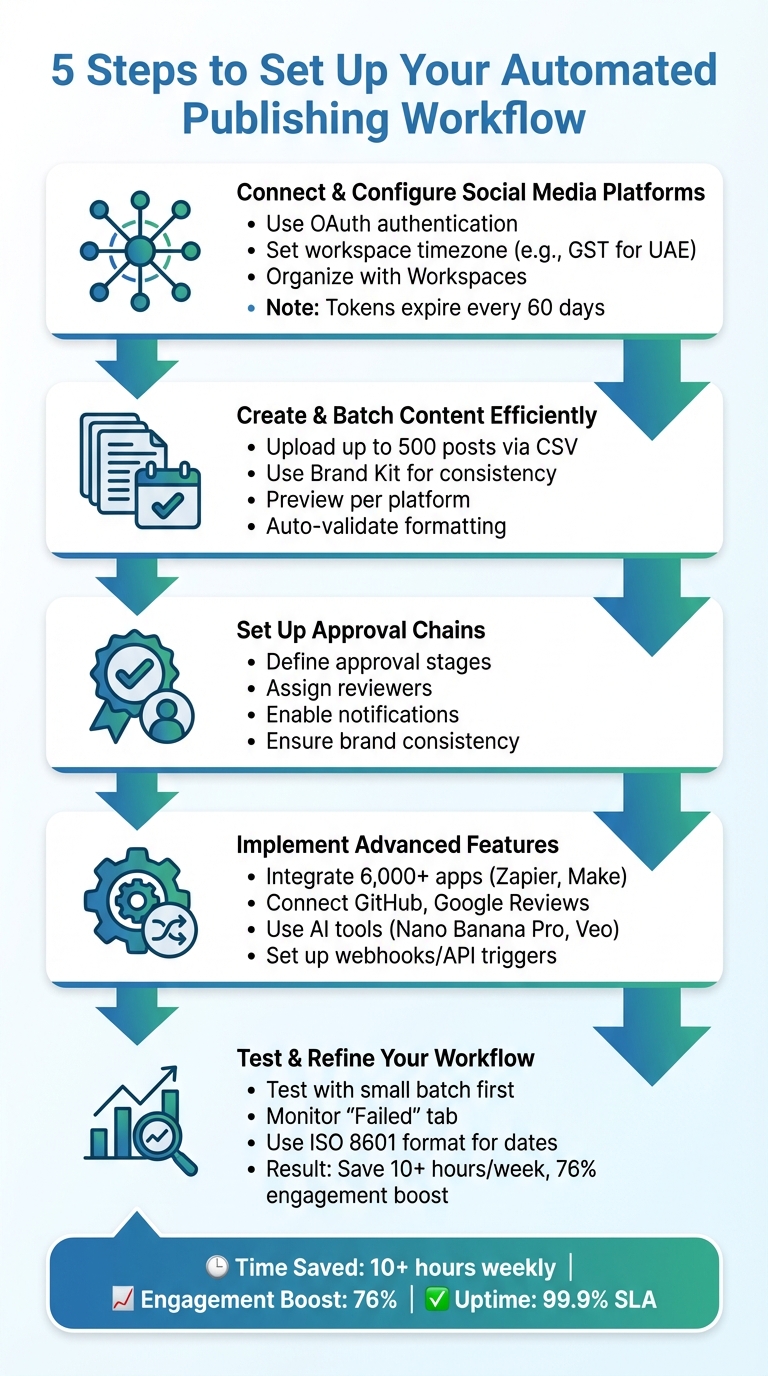 {5-Step Automated Content Publishing Workflow Setup Guide}
:::
{5-Step Automated Content Publishing Workflow Setup Guide}
:::
You don’t need to be a tech wizard to set up an automated workflow. With a clear plan and the right sequence, you can create a system that works seamlessly from the start. Here’s how creators and teams managing multiple platforms can get it done.
Step 1: Connect and Configure Social Media Platforms
Start by going to the Social Accounts section in your dashboard’s sidebar. Choose the platform you want to connect - whether it’s Facebook, Instagram, TikTok, LinkedIn, or YouTube - and follow the secure OAuth authentication process. This involves logging into your social account and granting permissions. Be careful not to modify these permissions (especially for Facebook and Instagram), as it could lead to post failures or expired connections. Only users with Admin or Owner access on the native platform can complete this step.
If you’re managing multiple accounts on the same platform (like several Facebook Pages), it helps to open each account in a separate browser tab before connecting. Organise your workflow by setting up Organisations and Workspaces to categorise brands and manage team access. Make sure the workspace timezone is correct (e.g., GST for UAE-based teams).
Remember that most social media access tokens expire after 60 days. Advanced systems can refresh these tokens automatically if you publish at least one post every six weeks. Also, avoid disconnecting social accounts with active scheduled posts, as these posts won’t transfer to a new account.
Once your accounts are connected, you’re ready to focus on creating content efficiently.
Step 2: Create and Batch Content Efficiently
Batching content is a huge time-saver. Use the bulk scheduling feature to upload up to 500 posts at once using a CSV template. This template should include fields like text, platform selection, scheduled dates, and media URLs. To avoid errors, download the official CSV template, which ensures proper formatting and validation.
For media uploads, use Posterly Cloud to create stable, public URLs - temporary links aren’t reliable. To maintain consistency, leverage AI tools and the Brand Kit for content creation. As Posterly puts it:
The real win isn't 'AI can write posts.' The win is consistency at speed: your voice, your tone, your visual style - applied across text, images, carousels, and video captions, then placed directly into publishing workflows.
The platform’s validation tools will automatically adjust videos and images to meet platform-specific requirements. Use the "Preview Per Platform" feature to check and fine-tune formatting, hashtags, and links for each network before publishing.
Step 3: Set Up Approval Chains and Automations
For teams or client-based work, approval chains are essential. Define clear stages, like an "Approval Required" step, and assign specific approvers to review content before it’s published. Visual previews can help ensure posts look right across multiple platforms, while notifications keep team members or clients updated when content is ready for review. This structured process reduces errors and keeps your brand messaging consistent.
Once approval chains are in place, you can explore advanced integrations to enhance your workflow.
Step 4: Implement Advanced Features
With the basics covered, it’s time to add more functionality. For instance, you can integrate tools like GitHub or Google Reviews to turn technical updates and customer feedback into social media posts automatically.
For content creation, tools like Nano Banana Pro (for AI-powered images) and Veo (for video creation) can help. You can also connect with over 6,000 apps using platforms like Zapier, n8n, or Make. Use API keys or webhooks to trigger actions based on real-time events, such as when a post is created, scheduled, published, or fails.
Step 5: Test and Refine Your Workflow
Before rolling out your workflow fully, test it with a small batch of posts. Use the "Validate" step during bulk uploads to catch and fix any errors in specific rows or columns. Keep an eye on the "Failed" tab in your dashboard to identify recurring issues, and adjust your posting schedule based on real-time analytics.
To avoid timezone errors, use ISO 8601 formats (e.g., 2025-10-17T14:30:00Z) for CSV uploads. If you prefer using a local date format, double-check that your workspace timezone matches your location (e.g., UAE time). Automated workflows can save teams over 10 hours a week, and consistent posting often leads to a 76% boost in engagement [5]. Posterly’s publishing engine also offers a 99.9% uptime SLA, so your content is almost guaranteed to go live as planned [5].
How Posterly Simplifies Content Publishing and Creation
Posterly takes the hassle out of content creation and publishing by combining scheduling and creative tasks into one seamless platform. It doesn’t just help you plan your posts - it helps you create them too, thanks to its powerful AI tools.
AI-Powered Scheduling and Content Creation
Posterly’s AI Scheduler simplifies the scheduling process through a conversational interface. For example, you can type, "Schedule a LinkedIn post about our new feature for tomorrow at 2 PM GST", and the AI will handle the rest. This eliminates tedious data entry and saves time.
When it comes to creating content, tools like Caption Assist generate platform-specific captions and hashtags, while Nano Banana Pro lets you create and edit images directly within the platform. Marcus Johnson, a solo creator managing five accounts, shared his experience:
As a solo creator managing 5 accounts, Posterly cut my scheduling time by 70% [7].
For video content, Veo AI Video provides scalable solutions while learning your brand’s tone over time. This means the more you use it, the better the AI suggestions become. Lisa Thompson highlighted this feature:
Love how it learns my brand voice over time. The AI suggestions keep getting better the more I use it [7].
This approach reduces editing needs and speeds up approval processes, especially for teams juggling multiple brands. And it doesn’t stop there - Posterly’s all-in-one design makes managing content across platforms effortless.
Unified Management for 10+ Platforms
Managing content for various platforms can be a juggling act, but Posterly simplifies it by consolidating everything into a single dashboard. Instead of switching between Instagram, TikTok, LinkedIn, YouTube, Facebook, Threads, and X, you can monitor, plan, and schedule posts from one place. David Kim summed it up perfectly:
TikTok, Instagram, LinkedIn - all from one dashboard. This is what social media management should be [7].
The Smart Upload feature ensures your media is optimised for each platform automatically. For teams in the UAE managing both regional and international audiences, this means you can adapt content without starting from scratch. A drag-and-drop calendar provides a clear visual of your schedule, while list and table views offer alternative ways to organise posts based on your workflow.
Posterly’s backend, built on Redis/BullMQ, ensures smooth operations with real-time queue monitoring, automatic retries for failed posts, and prevention of duplicate content. Even during high-traffic times, your posts are published reliably.
Google Reviews and GitHub Integration
Posterly goes beyond social media by enhancing local SEO and developer communications. The Profile Auditor checks for NAP (Name, Address, Phone) consistency and provides a completeness score with actionable tips to improve local SEO. This is particularly handy for UAE businesses managing locations across Dubai, Abu Dhabi, and other emirates.
The unified inbox lets you manage Google Reviews directly from the dashboard. AI-generated responses ensure your replies are on-brand and save you time. You can even turn glowing customer reviews into social media posts, making your feedback work double duty as marketing content.
For developers, the Ship & Share feature transforms GitHub commits into ready-made marketing posts. It automatically detects code changes, interprets technical details, and creates AI-optimised content for multiple platforms. This is ideal for SaaS products and developer tools aiming to showcase their progress efficiently. As Posterly explains:
Ship & Share automatically transforms your GitHub commits into ready-to-post marketing content. Perfect for developer tools, SaaS products, and technical teams who want to showcase their progress [7].
Common Automation Mistakes and How to Avoid Them
Over-relying on automation can reduce engagement by as much as 40% [8]. The good news? Most of these pitfalls are entirely avoidable with the right setup.
Over-Automation Leading to Reduced Engagement
One of the biggest mistakes is treating automation like a "set it and forget it" system. Social media platforms thrive on active engagement, rewarding accounts that interact with their audience. Simply broadcasting content without responding can slash your reach by up to 50% [8]. Imagine scheduling an entire month’s content and then stepping away - you’d miss real-time conversations and risk coming across as out of touch, especially during unexpected events.
Another common error is cross-posting identical content across platforms without tailoring it to fit. For instance:
- LinkedIn posts with 25 hashtags get 30% less reach.
- Instagram captions without line breaks see 45% fewer comments.
- X (formerly Twitter) threads posted as a single block lose 60% of potential impressions [8].
A smarter approach is to follow the 70/20/10 rule:
- Schedule 70% of your content in advance.
- Post 20% manually to stay current.
- Reserve 10% for spontaneous responses.
Additionally, dedicate just 15 minutes twice a day to reply to comments and messages. Quick responses aren’t just courteous - they can boost your visibility by 25% [8]. As Dima Botezatu from Mixpost explains:
Automation handles the publishing. You handle the relationships [8].
To stay prepared for emergencies, establish a pause protocol. Assign someone to monitor breaking news and have a "pause all" button ready to stop scheduled posts during crises or global events [8]. And skip the generic bot responses - 78% of users unfollow accounts after receiving obviously automated direct messages [8]. Instead, use response templates as a starting point but personalise them with the recipient's name or relevant details.
While engagement issues are a major concern, technical errors like incorrect scheduling and formatting can also derail your automation efforts.
Timezone and Formatting Errors
Posting at the wrong time or with broken formatting can frustrate your audience. For businesses in the UAE, make sure your workspace timezone is explicitly set to avoid errors caused by default UTC settings [5].
When doing bulk uploads, use the ISO 8601 format to minimise mistakes [5]. Always preview posts before scheduling to catch any formatting issues [4].
Each platform has its quirks, so pay attention to their specific requirements. For example:
- TikTok carousels should include at least two images.
- Videos for Reels and TikTok need to meet a 1080x1920 pixel aspect ratio.
Tools like Posterly’s Smart Upload feature can handle these adjustments, but if you’re uploading manually, double-check the media specs to avoid dreaded "Post Failed" errors [2][6].
Another key tip: refresh your API tokens regularly, as they typically expire every 60–90 days [3][4]. And don’t limit your posts to peak hours. Staggering posts across various time zones can help you reach a global audience while avoiding the competition of oversaturated feeds [8].
Conclusion
Automated content publishing workflows go beyond just saving time - they create a system that keeps your social media active without overwhelming your team. The numbers back this up: users report reducing scheduling time by 70%, saving over 10 hours each week, and experiencing engagement increases of up to 76% [5][7]. It transforms social media management from a daily struggle into a well-oiled, dependable process.
One of the key benefits is centralised management. Imagine managing over 10 platforms from a single dashboard, scheduling up to 500 posts in one go with CSV uploads, and letting AI handle tasks like resizing images and tweaking captions for each platform [1][5][7]. This eliminates the need to juggle multiple tabs or log in and out of accounts, consolidating your workflow into a single, efficient system. This kind of efficiency not only saves time but also allows your team to focus on creative strategies and meaningful audience interactions.
Automation also enables creators to prioritise human-driven engagement. Tools like Posterly take care of repetitive tasks, leaving room for strategic thinking and creativity. Features like AI Studio ensure brand-consistent content, approval chains maintain quality control, and a 99.9% uptime SLA guarantees that posts go live as planned [1][5]. For teams managing multiple clients or creators handling several accounts, this level of reliability is essential.
With plans starting at AED 25.70/month for the Starter option and scaling up to AED 91.75/month for the Power User plan, the investment quickly pays off in saved time and improved results [7]. By automating routine tasks, Posterly allows teams to focus on what truly matters: building strategies, fostering creativity, and engaging with audiences - all while maintaining brand consistency and ensuring timely execution. Remember, consistency - not perfection - is what keeps your brand relevant and trusted. Fine-tune your workflows, track engagement regularly, and let automation handle the heavy lifting.
FAQs
::: faq
How do I decide what to automate versus post manually?
Automating routine content - like updates, promotions, and evergreen posts - can save you a lot of time while keeping your messaging consistent. However, manual posting is ideal when you need to engage in real-time, respond to trends, or add a more personal touch. The best strategy? Strike a balance. Use automation to handle repetitive tasks and scale efficiently, but switch to manual posting when immediacy or a human connection matters. This way, you can achieve both efficiency and meaningful engagement. :::
::: faq
How can I avoid timezone mistakes when scheduling in the UAE?
To ensure accurate scheduling in the UAE, make sure your scheduling tool is set to the correct timezone: UTC+4. Since daylight saving time does not apply in the UAE, there’s no need to adjust for seasonal changes. Pay extra attention when uploading bulk posts - double-check that the timezone matches your intended local publishing time. It's also a good idea to review your workspace settings regularly to prevent any timing errors. :::
::: faq
What should I do when a scheduled post fails to publish?
If a scheduled post doesn't go through, start by checking your account permissions and connection status. You might need to reconnect your account or re-authorise posting access. If the issue is related to timing, try rescheduling the post or tweaking your queue rules. Pay close attention to any error messages or logs - they can provide insights into the problem. For instance, token errors often require disconnecting and reconnecting your account. To stay on top of things, consider setting up alerts to monitor and quickly address failed posts. :::
Related Articles
How to Create 30 Days of Social Media Content Using AI Images in posterly
A practical guide to generating a full month of original social media images with posterly's AI image tool, writing captions for each one, and scheduling everything in a single session.
Read moreHow to Find the Best Time to Post on Social Media Using posterly's AI Scheduler
Stop guessing when to post. This guide explains how posterly's AI Scheduler analyses your audience activity and automatically picks the best posting times so your content gets seen by more people.
Read moreHow to Manage Google Business Reviews on Autopilot With posterly
A step-by-step guide to responding to Google reviews with AI, automatically requesting new reviews from customers, auditing your profile for local SEO, and turning your best reviews into social media content.
Read moreHow to Manage Multiple Client Social Media Accounts With posterly Workspaces
A practical guide for agencies and teams on using posterly Workspaces to organise client accounts, assign roles, get content approved, and schedule posts across dozens of social profiles without things getting messy.
Read more