
How Unified Dashboards Simplify Social Media
How Unified Dashboards Simplify Social Media
How Unified Dashboards Simplify Social Media
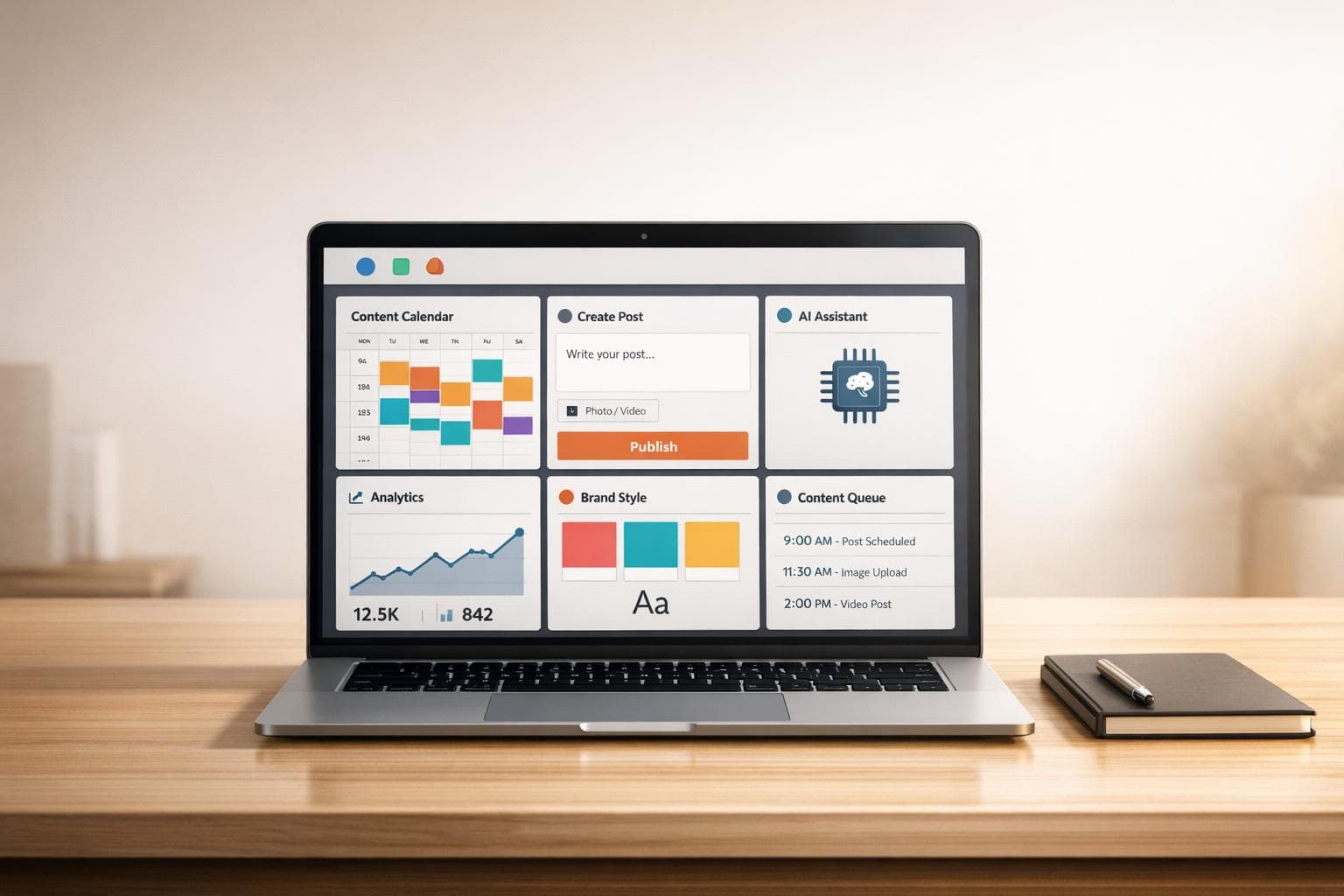
Unified dashboards save time and reduce stress for social media managers in the UAE. Instead of switching between platforms, these tools let you create, schedule, and publish content for multiple networks from one place. They also automatically adjust visuals and captions to meet platform-specific requirements like Instagram’s 1:1 images or TikTok’s 9:16 videos.
Here’s why they matter:
- Time Savings: Posting manually takes 30–45 minutes per post. Dashboards cut this to 3–5 minutes.
- Better Reach: Brands on 4+ platforms see 243% higher reach compared to single-platform brands.
- Integrated Analytics: View all performance metrics in one report instead of logging into each platform.
- Team Collaboration: Shared calendars and approval workflows make teamwork smoother.
- AI Tools: Generate captions, hashtags, and resize visuals automatically.
For UAE businesses juggling global audiences, tools like Posterly can manage up to 30 accounts, support over 10 platforms, and start at just AED 26/month. If you’re tired of repetitive tasks, a unified dashboard could transform your workflow.
::: @figure 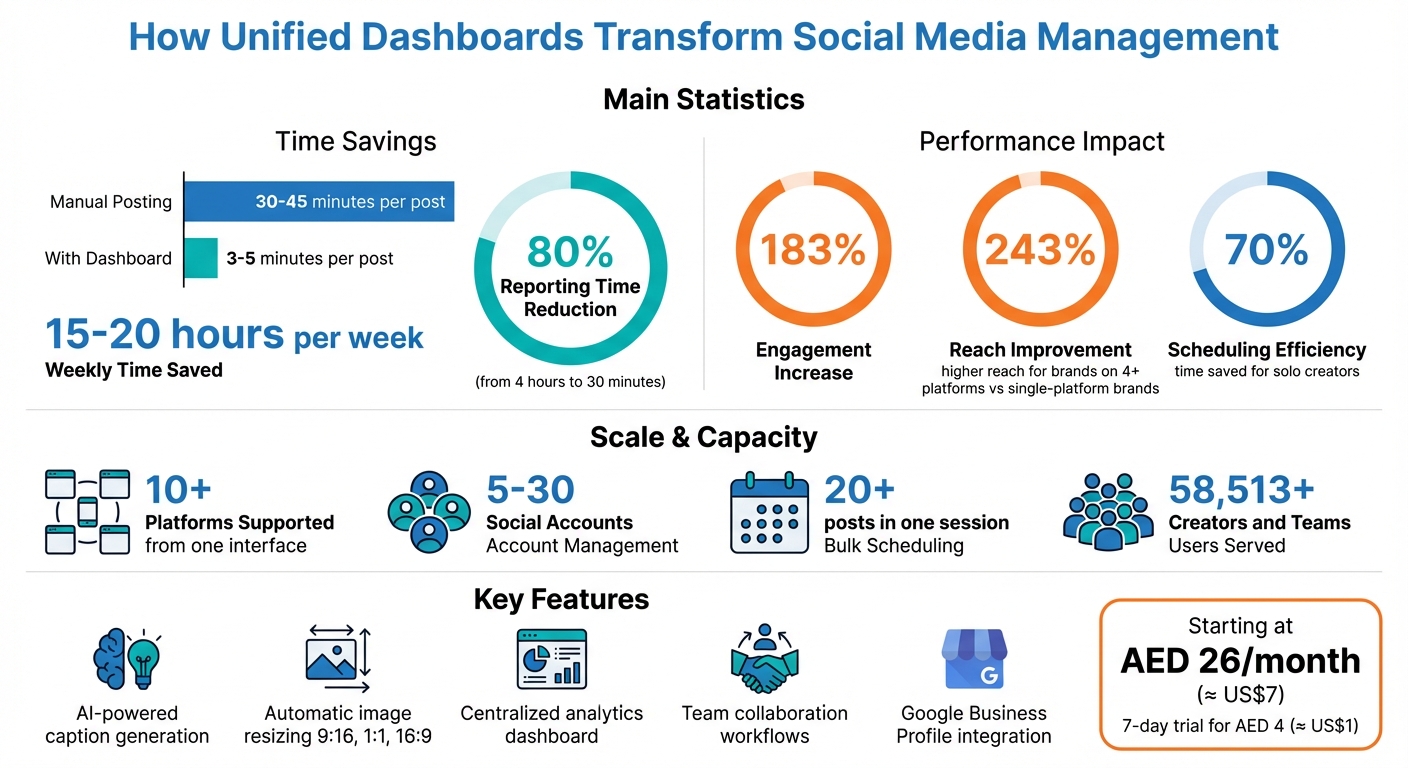 {Unified Social Media Dashboards: Time Savings and Performance Statistics}
:::
{Unified Social Media Dashboards: Time Savings and Performance Statistics}
:::
How A Good Social Media Analytics Tool Can Really Boost Your Growth | SocialPilot Webinars
::: @iframe https://www.youtube.com/embed/PO_aDlDveJo :::
sbb-itb-f7b3a33
How Unified Dashboards Simplify Social Media Management
Unified dashboards bring order to the often chaotic world of social media management. By combining scheduling, analytics, and collaboration tools into one platform, they make it easier to manage multiple social media accounts efficiently.
Instead of juggling six different platforms to post the same content, a unified dashboard lets you upload once and tailor posts for each network - all from a single workspace.
Centralised Scheduling and Publishing
One of the standout features is the unified composer, which allows you to upload a single piece of content and customise it for different platforms without switching tabs. For instance, you can upload a product image once, and the dashboard automatically resizes it to fit TikTok Reels (9:16), Instagram feed (1:1), and LinkedIn (16:9). You can then tweak captions, add hashtags, and adjust mentions for each platform’s audience - all while seeing everything side-by-side.
Visual content calendars make it easy to spot posting gaps. With drag-and-drop functionality, you can quickly rearrange or fill empty slots. Bulk scheduling is another time-saver, letting you upload and schedule 20+ posts in one go. This is especially useful for UAE-based teams managing campaigns across multiple time zones. Teams posting frequently across various platforms can save 15 to 20 hours per week with these tools by using a multi-platform social media scheduler [4].
But the benefits don’t stop at scheduling. Integrated analytics provide real-time insights to fine-tune your content strategy.
Integrated Analytics for Performance Tracking
Unified dashboards simplify performance tracking by consolidating metrics from all platforms into one report. Instead of logging into each platform’s analytics tool, you can view reach, engagement, and follower growth across networks in a single snapshot. This makes it easier to identify what’s working and what isn’t.
For example, Posterly offers real-time analytics that show how your content is performing, helping you adjust your strategy on the fly [3]. Some dashboards even use AI to interpret data trends, offering insights like, “Your LinkedIn posts on Tuesday mornings get 40% higher engagement than other days” [7]. These automated summaries save you from manually analysing data and help you spot patterns quickly. When it’s time to update stakeholders, you can generate branded reports in PDF or CSV formats within minutes [7].
Team Collaboration Tools
Collaboration becomes seamless with shared calendars and built-in approval workflows. These tools allow everyone on the team to see the content schedule in one place, making coordination much smoother. Managers can assign specific tasks, ensuring each team member knows their responsibilities.
Drafting and approval processes are also streamlined. Posts can be created and reviewed within the same dashboard, ensuring brand consistency and reducing the chance of errors. Role-based access further enhances security by letting interns draft posts while restricting publishing rights to senior staff. This eliminates the need to share passwords for multiple platforms, keeping your accounts secure [10] [11].
Features That Save Time and Improve Content Quality
AI-Assisted Content Creation
AI-powered tools are a lifesaver when it comes to overcoming content creation hurdles. They can generate platform-specific captions, hashtags, and hooks tailored to your audience on each network [1][8]. Instead of staring at a blank screen, these tools help you draft engaging copy while automatically adjusting the tone. For example, they might use a formal style for LinkedIn while adopting a casual, emoji-filled approach for Instagram [1][2].
But it doesn’t stop at text. AI also takes care of visual optimisation by resizing images to fit platform requirements and validating video specifications like aspect ratio, duration, and resolution before publishing. This can save solo creators up to 70% of their scheduling time [8].
"The caption generation alone saves me hours every week. Game changer for my content workflow." – Alex Chen [8]
These AI-driven features make managing content across multiple networks much easier.
Multi-Platform Management
Once your content is ready, unified dashboards simplify the process of distributing it across various platforms. Instead of logging into each network individually, you can manage over 10 platforms from a single interface. Posterly supports Instagram (including Reels and Stories), TikTok, YouTube Shorts, LinkedIn, Facebook, X, Threads, and Bluesky - all in one place [8]. This centralised system ensures seamless publishing and saves time.
The benefits are hard to ignore. Teams have reported saving over 10 hours per week, while users have seen engagement rates increase by an average of 183% [1][11]. Additionally, batch-upload features let you schedule over 20 posts in one session, making it possible to plan an entire month’s content in just a few hours [8][11].
Google Business Profile Integration
Managing local marketing efforts is now easier with tools integrated directly into your dashboard. Posterly’s Google Business Profile integration lets you handle local search strategies alongside your social media efforts. From a single inbox, you can manage Google Reviews, use AI to draft responses to customer feedback, and even audit your profile for SEO accuracy - all without needing a separate Google login [8].
The built-in Profile Auditor ensures your NAP (Name, Address, Phone) information is consistent and offers actionable suggestions to improve your local search visibility. Positive customer reviews can also be repurposed into social media posts, turning testimonials into credibility-boosting assets. This feature is especially handy for UAE businesses managing multiple locations, as the dashboard helps differentiate between branches (e.g., Downtown vs. Midtown) [8][9].
Maintaining Consistent Branding Across Platforms
Unified dashboards do more than just simplify scheduling and analytics - they help ensure your brand identity stays aligned across all channels. Managing your brand's voice and visual style on platforms like X, LinkedIn, and Instagram can be tricky since each has its own quirks, such as character limits, image dimensions, and audience preferences. A unified dashboard tackles this by allowing you to draft your content once and automatically tailor it for each platform. This approach keeps your core message intact while adapting the presentation to suit individual platform requirements, saving time and keeping your brand consistent [1][6].
Visual Content Planning and Scheduling
A drag-and-drop content calendar offers a bird's-eye view of your entire social media plan. With real-time previews, you can tweak image crops, spacing, and hashtags, ensuring every post aligns with your brand's style [1][3][12]. This feature lets you see how your content flows across platforms, helping you avoid repetitive patterns, spot gaps, and maintain a cohesive aesthetic.
By providing this consolidated view and precise previews, the chances of content errors drop significantly.
Preventing Duplicate Posts and Errors
Posting duplicate content or links that don’t work can harm your credibility. Built-in duplicate prevention tools keep an eye on your publishing queue, ensuring no post is accidentally published twice [8]. Validation features also check for potential issues like character limit breaches or unsupported media formats before anything is scheduled [1].
Platform-specific previews allow you to catch and fix formatting mistakes, broken tags, or visual inconsistencies before your audience sees them [12]. For teams, approval workflows add an extra layer of quality control, ensuring content meets your brand standards and is error-free before posting [1][3].
"The queue monitoring gives me peace of mind. I know my posts will go out exactly when they should." – James Park [8]
Scaling Social Media Management with Unified Dashboards
As your social media presence expands, managing multiple accounts can become overwhelming. Unified dashboards streamline this process by automating tasks and consolidating data, making it easier to handle a growing number of platforms.
With features like bulk scheduling and AI-driven tools, you can quickly adapt captions to suit each platform’s tone and character limits, ensuring your content remains consistent and aligned with your brand identity [2][13]. Automation tools like Image Auto-Fix and Video Validation take care of platform-specific requirements - adjusting aspect ratios, resolutions, and video durations automatically [1]. These tools build on earlier scheduling and analytics capabilities, offering smarter ways to manage your social media efforts at scale.
Automated Reporting and Real-Time Insights
Creating reports manually is time-consuming and inefficient. Analyst Shayna Tyler found that automation reduced her reporting time by 80%, cutting it from four hours to just 30 minutes. This allowed her to handle reporting for multiple clients single-handedly [14].
Real-time dashboards offer a comprehensive overview of engagement, reach, and other critical metrics across platforms like Instagram, LinkedIn, TikTok, and X [2][3]. These dashboards make it simple to compare performance across channels, identify which platforms deliver the best ROI, and ensure scheduled posts go live as planned. Automated retries ensure posts are published even if the first attempt fails [5][8].
"Reports that used to take hours now only take about 30 minutes. We're reporting for significantly more clients, even though it is only being handled by a single person. That's been huge for us." – Shayna Tyler, Analyst, Signal Theory Inc. [14]
These insights don’t just save time - they also guide smarter resource allocation.
Better Resource Allocation
Unified dashboards make it easier to identify underperforming content and reallocate resources accordingly [14][15]. This prevents wasted spending on posts with low engagement and allows teams to focus on content that resonates with their audience. Maintaining consistency across platforms becomes far more manageable when resources are optimised in real time.
Posterly’s dashboard is a prime example of this efficiency. Supporting anywhere from 5 to 30 social accounts, it offers unlimited AI-assisted content creation and has helped over 58,513 creators and teams save significant time [1][8]. By automating tasks like media optimisation, content adaptation, and reporting, Posterly allows teams to shift their focus from administrative work to strategy and creativity. This approach not only saves hours each week but also enhances overall productivity and impact.
Conclusion
Managing social media doesn’t have to take over your day. Unified dashboards bring together essential tasks like scheduling, analytics, content creation, and collaboration into one centralised platform. This shift allows you to move away from repetitive tasks and focus more on strategy and creativity. The result? A more efficient and productive workflow.
In fact, teams using unified dashboards often save 15 to 20 hours per week [4].
Take Posterly, for example. This platform combines AI-powered tools with smart scheduling and automated features to simplify social media management. It supports anywhere from 5 to 30 social accounts across more than 10 platforms. With plans starting at AED 26/month (about US$7) and a 7-day trial available for just AED 4 (about US$1) [8], Posterly is an affordable option for both solo creators and growing teams.
Still juggling multiple platforms or stuck in manual tasks? It might be time to rethink your approach. The right tools can streamline your workflow, increase engagement, and give you more time to focus on what matters most.
FAQs
::: faq
Which platforms can I manage from one dashboard?
Managing various social media platforms doesn't have to be a juggling act. With Posterly, you can handle Instagram, TikTok, LinkedIn, YouTube, Facebook, X (formerly Twitter), Threads, Pinterest, and Google Business Profile all from one centralised dashboard. In fact, Posterly supports over 10 platforms, allowing you to plan, publish, and track content effortlessly across all these channels. This setup streamlines social media management, making it easier for creators and teams to stay organised and efficient. :::
::: faq
How do unified dashboards keep branding consistent across channels?
Unified dashboards make it easier to maintain consistent branding across various social media platforms by bringing all your content, visuals, and messaging under one roof. With features like AI-powered content creation and Brand Kits, these tools ensure that logos, colours, and tone of voice stay uniform across every post.
By offering a single interface for planning, creating, and scheduling posts, these dashboards simplify workflows. Even when adapting content for different platforms, they help ensure everything aligns with your brand guidelines. :::
::: faq
What security controls help teams avoid sharing passwords?
Teams can maintain security and avoid sharing passwords by opting for safer alternatives, such as using official APIs to connect accounts. These APIs offer stable and compliant integrations without the risk of exposing login credentials. Tools like Posterly take it a step further by implementing OAuth authentication and admin permissions, ensuring controlled and secure access.
Additionally, reconnecting accounts after events like password changes or logouts adds another layer of protection. This approach allows teams to handle multiple accounts efficiently while keeping sensitive information private. :::
Related Articles
How to Create 30 Days of Social Media Content Using AI Images in posterly
A practical guide to generating a full month of original social media images with posterly's AI image tool, writing captions for each one, and scheduling everything in a single session.
Read moreHow to Find the Best Time to Post on Social Media Using posterly's AI Scheduler
Stop guessing when to post. This guide explains how posterly's AI Scheduler analyses your audience activity and automatically picks the best posting times so your content gets seen by more people.
Read moreHow to Manage Google Business Reviews on Autopilot With posterly
A step-by-step guide to responding to Google reviews with AI, automatically requesting new reviews from customers, auditing your profile for local SEO, and turning your best reviews into social media content.
Read moreHow to Manage Multiple Client Social Media Accounts With posterly Workspaces
A practical guide for agencies and teams on using posterly Workspaces to organise client accounts, assign roles, get content approved, and schedule posts across dozens of social profiles without things getting messy.
Read more