
How to Build SaaS Drip Campaigns
How to Build SaaS Drip Campaigns
How to Build SaaS Drip Campaigns
SaaS drip campaigns are automated email sequences tailored to user actions, designed to deliver the right message at the right time. These campaigns help businesses nurture leads, onboard users effectively, and reduce churn - all while saving time through automation. Here’s what you need to know:
- Why They Work: Drip campaigns outperform one-off email blasts by being personalized and timely, driving 320% higher revenue.
- Key Campaign Types: Onboarding, trial conversion, dunning (recovering failed payments), re-engagement, and upselling.
- Triggers: Actions like signing up, hitting usage milestones, or becoming inactive can initiate these automated sequences.
- Segmentation: Divide your audience into groups based on behavior, lifecycle stage, or customer profile for targeted messaging.
- Results: Personalized drip emails generate 4x more opens and 5x more clicks; segmented emails contribute to 58% of revenue.
The process involves setting clear goals, identifying triggers, segmenting your audience, designing email sequences, automating workflows, and continuously tracking performance. With these steps, you can create campaigns that engage users and boost conversions.
SaaS Email Marketing - How to Convert and Retain Customers
::: @iframe https://www.youtube.com/embed/ukAldsLWtwo :::
Set Campaign Goals and Identify Triggers
::: @figure 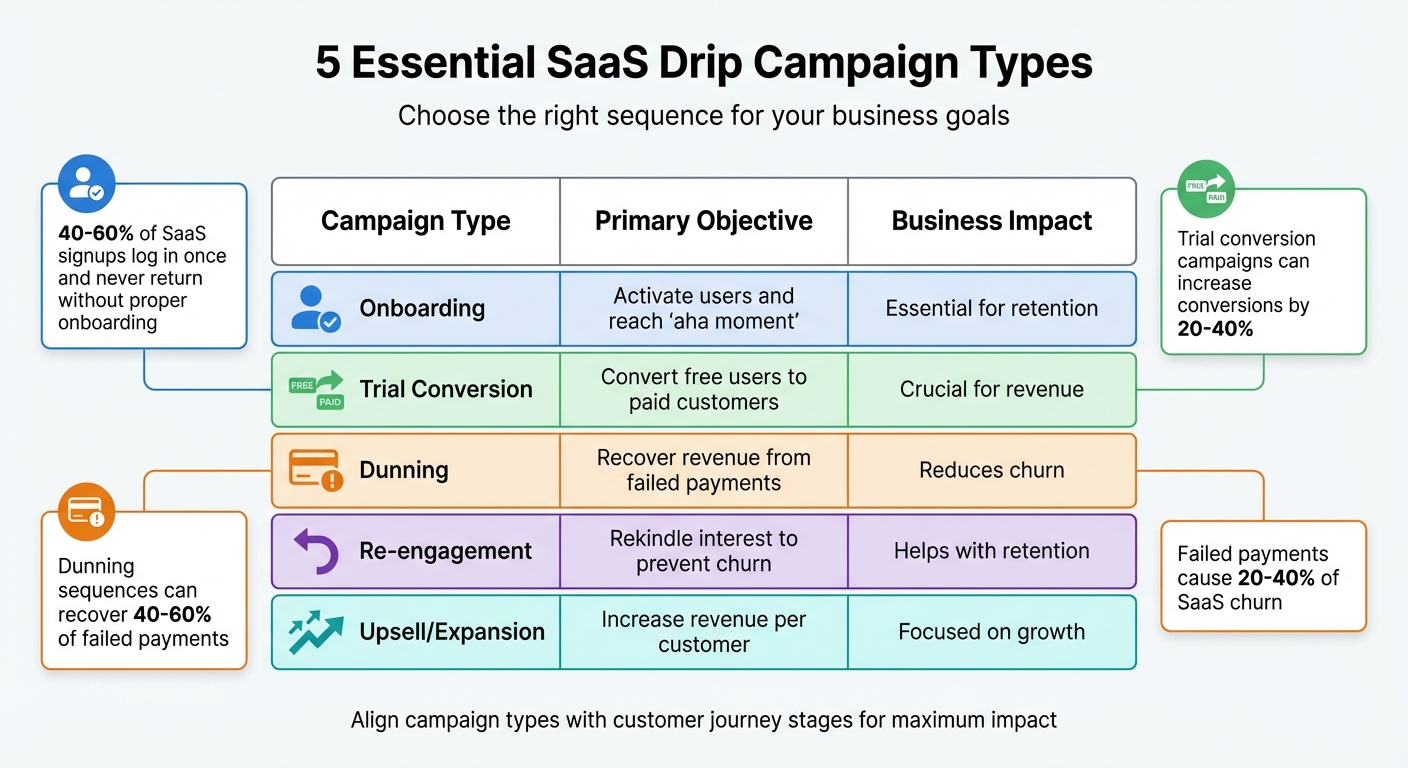 {SaaS Drip Campaign Types: Goals, Objectives and Business Impact}
:::
{SaaS Drip Campaign Types: Goals, Objectives and Business Impact}
:::
To make your drip campaigns effective, you need two things: clear objectives and well-defined triggers. Without these, your emails risk falling flat and failing to engage your audience.
Define Your Campaign Objectives
Your campaign goals should align with specific business needs at various points in the customer journey. For example, onboarding sequences aim to guide new users to their "aha moment" - that pivotal point where they see real value in your product. It's no small matter: 40% to 60% of SaaS signups log in once and never return if onboarding isn't done right [9].
Then there are trial conversion campaigns, which are designed to showcase the long-term value of your product before the trial period ends. A well-planned sequence can increase trial-to-paid conversions by 20% to 40% [9].
Before diving into other types of campaigns, focus on onboarding and trial conversion. These are key to both revenue growth and customer retention. Once those are in place, you can address dunning sequences to recover failed payments - an issue responsible for 20% to 40% of SaaS churn. The good news? You can potentially recover 40% to 60% of those payments [9]. As Ani Ghazaryan, Head of Content at neptune.ai, puts it:
"The first step is reverse-engineering the customer journey - where do people drop off, and what information would help them move forward?" [8]
Here’s a quick breakdown of common campaign types and their goals:
| Sequence Type | Primary Objective | Business Impact |
|---|---|---|
| Onboarding | Activate users and reach "aha moment" | Essential for retention |
| Trial Conversion | Convert free users to paid customers | Crucial for revenue |
| Dunning | Recover revenue from failed payments | Reduces churn |
| Re-engagement | Rekindle interest to prevent churn | Helps with retention |
| Upsell/Expansion | Increase revenue per customer | Focused on growth |
With your objectives in place, the next step is to pinpoint the exact user actions that will trigger each campaign.
Identify Key Triggers
Triggers are what kick off your campaigns. They can be time-based (e.g., sending an email three days after signup) or behavioural (e.g., when a user completes a specific action like enabling an integration or hitting 80% of their plan limit). Behavioural triggers tend to be more effective because they engage users at moments when their interest is at its peak [2][8].
Some common SaaS triggers include:
- New account creation: Starts welcome and onboarding sequences.
- Product usage milestones: For instance, completing a first project or achieving a key task.
- Inactivity patterns: Such as not logging in for 30 days.
- Subscription events: Like payment failures or trial expirations.
The numbers back it up: Welcome emails triggered by signup behaviour generate 4 times more opens and 5 times more clicks than standard marketing emails [3]. For upsell campaigns, trigger emails when users hit 80% of their plan capacity [9].
Lastly, don’t forget to define exit criteria. Once a user converts, immediately stop the campaign to avoid sending irrelevant follow-ups [10]. Companies that align their email automation with the customer journey often see 44% higher retention rates and 38% faster sales cycles [2].
Segment Your SaaS Audience
Once you've identified your triggers, the next step is segmentation - breaking down your audience into smaller, more specific groups. Why? Because personalised messaging works. In fact, segmented and targeted emails account for 58% of all revenue [13]. By addressing specific user needs, segmentation not only boosts engagement but also drives revenue growth [5].
Think about it: a user who downloaded an ebook is looking for educational content, while someone who requested a demo is ready for product-specific details [6]. Aligning your emails with these stages in the user journey can lead to 47% larger purchases [5][2]. Plus, automated segmentation allows your sales team to focus on high-priority leads, while drip campaigns nurture the rest [6][2].
But before you can segment effectively, you need to know who your ideal customers are.
Create Ideal Customer Profiles (ICPs)
The first step in segmentation is understanding your best customers. Look at those who bring in high Monthly Recurring Revenue (MRR), have strong Lifetime Value (LTV), and require minimal support [14][15]. Start by analysing factors like their industry, company size, role, and tech stack. For instance, you might discover that mid-sized fintech companies (50–500 employees) convert faster and stay longer than other groups.
To go deeper, conduct 10–30 phone interviews to uncover their pain points [14][15]. As Kelley Muhsemann, Marketing Manager at R.W. Rogé & Company, explains:
"The right software and goals are important, but if you don't know what's keeping your audience up at night and what problem you're helping them solve, your goals and email platform will be far less effective." [16]
Once you've gathered this data, organise it into three main categories:
- Firmographic: Industry, company size, and location
- Technographic: CRM, integrations, and tech stack
- Economic/Behavioural: Budget, support needs, and LTV [14]
From here, tier your ICPs into three levels - Tier A for your ideal customers, Tier B for good fits, and Tier C for experimental groups [14].
Divide Users into Segments
With your ICPs in place, use behavioural data and lifecycle stages to refine your segments further. Different users need different approaches:
- New sign-ups: Onboarding sequences to help them reach their "aha moment."
- Active users: Advanced tips and feature updates to keep them engaged.
- Dormant users: Re-engagement campaigns with "we miss you" messages or exclusive offers.
- At-risk customers: Intervention strategies for those showing signs of churn, like declining usage or expiring trials [5][7].
Behavioural triggers make segmentation even more effective. In 2023, GreenPal used behavioural data to target homeowners who hadn’t selected a vendor. Their "discounted price" drip campaign led to 10% growth, while their re-engagement drip for previous customers drove 40% of total revenue [3]. Similarly, Microsoft's enterprise division saw a 47% increase in qualified pipeline by using drip sequences tailored to specific product usage patterns [2].
For this to work seamlessly, sync real-time user behaviour data across your product, CRM, and email platform. Automation rules can then handle segment updates - like moving a user from "Lead Nurture" to "Onboarding" as soon as they sign up for a trial [6]. This ensures your messaging stays relevant and timely [12].
Design Your Email Sequences
Once you've segmented your audience, the next step is to design your email sequence. A well-structured drip campaign is key to maintaining engagement without overwhelming your subscribers. Start by sending the first email immediately, then follow up every 2–3 days. This strikes the right balance between staying top-of-mind and avoiding inbox fatigue [11].
Your sequence should align with your campaign's objective. For instance:
- Onboarding flows: These aim to guide users to their "aha moment" - that point when they truly see the value of your product [17].
- Trial conversion sequences: These often use tighter timelines, like sending a 48-hour reminder before a trial expires, to encourage free users to upgrade to paid plans [18].
- Re-engagement campaigns: Typically triggered after 30–60 days of inactivity, these are designed to win back dormant users [17].
To boost effectiveness, avoid generic messaging. Instead, use "If-Then" logic to personalise emails. For example, if a user clicks on a lead magnet, follow up with educational content. If they don't engage, try a reminder or a different angle to re-capture their interest. Why does this matter? Personalised emails are six times more likely to drive transactions compared to generic ones [2].
Structure Your Email Flows
The first step in structuring your email flow is defining the type of sequence and its timeline. Here's a quick guide:
| Sequence Type | Typical Length | Primary Goal | Timing Recommendation |
|---|---|---|---|
| Onboarding | 5–7 emails | Reach "aha moment" | Immediate, then Day 1, 2, 4, 6, 7 [17] |
| Trial Conversion | 5–7 emails | Convert to paid | Based on trial length (e.g., 14 days) [17] |
| Lead Magnet | 5–7 emails | Nurture to trial | Over 7–14 days [17] |
| Nurture | 8–12 emails | Build trust | Over 30–90 days [17] |
| Re-engagement | 3–5 emails | Reactivate user | Over 7–14 days [17] |
Eric Do Couto advises keeping each email focused:
"Define one clear goal for your series, as well as one goal for each email in that series... It's very tempting to try to jam three different CTAs or offers into a single email, but it only distracts and deters action." [16]
Use behavioural data to personalise emails based on user activity. For B2B campaigns, tailor content to the recipient's role - technical details for users and ROI-focused insights for decision-makers [2]. Additionally, automate actions like removing users from a sequence once they've converted (e.g., upgrading to a paid plan) [10]. For professional audiences, enable "Skip Weekends" to ensure emails land during work hours [11].
Add Value-Driven Content
Content quality is just as important as timing and structure. At the start of the funnel, focus on providing educational resources like industry updates, eBooks, or whitepapers [19]. As users progress, shift to content like case studies, product comparisons, and actionable "how-to" guides [22].
Real-world examples highlight the impact of thoughtful drip campaigns. In 2024, UK-based coffee chain Grind used a drip series with introductions and subscription tips to cut early-stage churn [21]. Similarly, Island Olive Oil ran a three-part welcome series that, despite accounting for just 1.22% of their email volume, drove 39% of their total email revenue [4].
Incorporate social proof mid-sequence with customer success stories or testimonials to build trust [3]. For onboarding, focus on actions that lead users to your product's core benefit within the first five minutes - their "aha moment" [17]. Did you know welcome emails alone generate four times more opens and five times more clicks than standard promotional emails? [3]
Finally, optimise emails for mobile. Use single-column layouts, fonts of at least 14px, and large buttons. With 40–55% of email engagement happening on mobile, this is non-negotiable [4]. Limit emails to one clear call-to-action to avoid overwhelming readers and improve conversion rates [22].
"Today's consumer expects personalisation. They expect you to know who they are and what they like or want... If you're not delivering on this, you'll be left behind." [21]
Set Up Automation and Timing
Once you've outlined your email sequence, automation ensures your messages reach your audience at just the right moment. Effective drip campaigns, driven by triggers, timing, and personalisation, can increase revenue by an impressive 320% [5].
Configure Triggers and Workflows
Automation begins with defining the key actions that initiate your drip sequence. These triggers can include:
- Lead acquisition triggers: Actions like signing up for a trial or attending a webinar.
- Transactional triggers: Events such as subscription renewals or payment issues.
- Behavioural triggers: Activities like visiting your pricing page, hitting feature adoption milestones, or being inactive for over 90 days [4].
It's equally important to set up unenrollment triggers to remove users who convert, ensuring they're not bombarded with irrelevant emails [16][6]. Ryan Holloway, CEO of Forge Apollo, emphasises the importance of avoiding inbox overload:
"Simultaneous campaign overlap can flood a contact's inbox and drive them to unsubscribe. As you create multiple campaigns, map out a hierarchy of which ones contacts can or should be enrolled in at which times." [16]
Use branching logic to shift leads between campaigns based on how they interact with your emails [6]. Many modern tools also allow for dynamic content, where email elements adjust based on the recipient's characteristics [6]. Don't forget to include one-click unsubscribe options in every email and ensure DMARC compliance for 2025 standards [4].
Optimise Send Times
Timing is everything in email marketing. Trigger emails based on user actions to catch them at their peak interest [16][2]. For example, send a welcome email immediately after someone subscribes, and space follow-ups 2–3 days apart [23][1].
For B2B SaaS campaigns, it's a good idea to activate "Skip Weekends" settings. This ensures emails arrive on a Monday morning rather than during the weekend, when engagement tends to drop [23]. Similarly, schedule emails according to the recipient's local timezone [23]. Research shows Tuesday is the best day for email engagement, with 27% of marketers favouring it, followed by Monday (19%) and Thursday (17%) [16].
Testing different send frequencies can reveal what works best for your audience. Simpler products may perform well with shorter sequences of 2–3 emails, while more complex SaaS solutions often benefit from a slower, educational approach over a longer cycle [7]. AI tools can further refine your strategy by analysing user behaviour and adjusting send times for specific segments in real time [3]. Additionally, enabling UTM parameter auto-generation in your automation tool lets you track website traffic and conversions tied to specific drip campaign steps via Google Analytics [23].
Track Performance and Optimise Campaigns
Once your drip campaign is live, measuring its performance is critical for making improvements. On average, B2B companies generate AED 132 for every AED 3.67 spent on email marketing - but only if you’re tracking the right metrics [2]. As Harvard Business School Professor Sunil Gupta points out:
"It isn't enough to measure the final outcome alone. You also need to track intermediate metrics to understand where consumers might be getting stuck - essentially bottlenecks in the marketing funnel." [24]
Monitor Key Metrics
Start by keeping an eye on engagement metrics. For example, welcome emails often achieve a CTR of 14.34% [4]. However, with features like Apple’s Mail Privacy Protection inflating open rates, focus on clicks and conversions for a more accurate picture [4].
Conversion metrics tied to your campaign goals are equally important. Whether you’re aiming for trial-to-paid conversions, demo requests, or higher feature adoption, these numbers will help you identify what’s working. For perspective, cart abandonment emails average a 17.12% conversion rate [20].
Deliverability is another key area. To protect your sender reputation, ensure bounce rates remain below 5% [25] and keep complaint rates under 0.3% [4]. Also, watch unsubscribe rates - sudden increases often signal issues with timing or content. As Greg Zakowicz, Senior Ecommerce Expert at Omnisend, explains:
"If the unsubscribe rate for a drip campaign is significantly higher than scheduled campaigns, it is usually a good indication that something needs to be altered, such as the message timing or the content." [16]
Make it a habit to clean your email lists by removing inactive subscribers, which helps maintain strong deliverability [4]. Don’t forget to optimise for mobile, as 40–55% of email opens happen on mobile devices [4]. These foundational steps prepare you for targeted A/B testing to refine your strategy further.
Use A/B Testing for Improvement
Once you’ve identified your key metrics, use A/B testing to fine-tune your campaign. For instance, Dell increased revenue by 109% by adding GIFs to product launch emails, visually showcasing features [25]. Similarly, Vitrazza, a glass chair mat company, revamped its welcome series with personalised testimonials, leading to a 55% revenue increase and a 20% boost in CTR [25].
To get the most out of A/B testing, change one element at a time - such as subject lines, CTAs, send times, or email length - so you can pinpoint what works best [16]. Personalisation is particularly effective; 65% of marketers use personalised subject lines to enhance engagement [16]. AI tools can also help by quickly analysing campaign responses, revealing which segments perform best at specific times [3].
Finally, track where users drop off in your sequence. Identifying these points allows you to adjust your messaging or offer to keep users engaged [2].
Conclusion
Creating effective SaaS drip campaigns boils down to four key principles: setting clear goals, precise audience segmentation, leveraging automation, and ongoing refinement. By assigning a specific purpose to each sequence and aligning triggers with real user actions - like signing up for a trial, hitting a feature milestone, or even a week of inactivity - you can shift from generic outreach to meaningful, timely interactions that deliver measurable results.
Segmentation plays a critical role in scaling these efforts. Emails tailored to specific audience segments have been shown to drive notable revenue increases[13][5]. By matching your Ideal Customer Profiles (ICPs) to lifecycle stages, your messages will resonate more deeply, reinforcing the step-by-step methods outlined earlier.
Automation takes this a step further, enabling you to handle thousands of leads while maintaining a personal touch. Use workflows that react instantly to user triggers, but don’t forget to unenrol contacts as soon as they complete the desired action. This keeps your sequences focused and avoids unnecessary clutter[16][6].
Refinement is a continuous process. As Chloe Schneider, Head of Content at Ortto, explains:
"Drip campaigns are an investment in your businesses' future. They require some upfront investment in time, and a considered approach to continuous testing and learning"[3].
To ensure success, monitor performance metrics like click-through and conversion rates. Use A/B testing to fine-tune every element of your campaigns - from subject lines to the best times to send emails. By applying these principles, you can build streamlined campaigns that consistently engage your audience and drive conversions.
FAQs
::: faq
How do I choose the best trigger for each drip email?
To pick the most effective trigger for a drip email, pay attention to user actions or behaviours that indicate the ideal moment to reach out. Popular triggers include actions like signing up for a newsletter, leaving items in a shopping cart, or submitting a form. By studying user journeys, you can pinpoint these critical moments. Use behavioural data to make sure your emails are sent at the right time, are relevant to the recipient, and feel personalised. This approach can significantly improve engagement and drive conversions. :::
::: faq
What’s the simplest way to segment users without lots of data?
The easiest way to categorise users when you have limited data is by focusing on basic factors such as demographics, behaviour, or geography. These simple approaches allow you to craft targeted email campaigns that are both effective and efficient, without needing a large amount of user information. :::
::: faq
Which metrics matter most when open rates aren’t reliable?
When open rates become less dependable, shift your attention to metrics that offer more actionable insights. Key indicators like engagement, conversion rates, revenue attribution, and campaign efficiency can paint a more accurate picture of how well your campaign is performing and the value it’s delivering. :::
Related Articles
How to Create 30 Days of Social Media Content Using AI Images in posterly
A practical guide to generating a full month of original social media images with posterly's AI image tool, writing captions for each one, and scheduling everything in a single session.
Read moreHow to Find the Best Time to Post on Social Media Using posterly's AI Scheduler
Stop guessing when to post. This guide explains how posterly's AI Scheduler analyses your audience activity and automatically picks the best posting times so your content gets seen by more people.
Read moreHow to Manage Google Business Reviews on Autopilot With posterly
A step-by-step guide to responding to Google reviews with AI, automatically requesting new reviews from customers, auditing your profile for local SEO, and turning your best reviews into social media content.
Read moreHow to Manage Multiple Client Social Media Accounts With posterly Workspaces
A practical guide for agencies and teams on using posterly Workspaces to organise client accounts, assign roles, get content approved, and schedule posts across dozens of social profiles without things getting messy.
Read more