
How Teams Manage Social Media Workflows
How Teams Manage Social Media Workflows

How Teams Manage Social Media Workflows
Social media teams face constant challenges: tight deadlines, multiple platforms, and the need for consistent branding. Without a clear system, this often leads to missed posts, duplicated work, and confusion over responsibilities. A social media workflow solves this by outlining every step - from planning to publishing - ensuring smooth collaboration and efficiency.
Key insights from the article:
- Structure matters: Defined roles and steps reduce delays and errors.
- Automation saves time: Tools can cut repetitive tasks by up to 70%.
- UAE-specific needs: Compliance with local laws and bilingual content are critical.
- Cultural alignment: Content must respect local traditions and events like Ramadan.
- Data-driven improvements: Regular analysis helps refine workflows and boost engagement.
The UAE’s fast-paced market, with 11.3 million active social media users and AED 1.65 billion in projected ad spend by 2025, demands organised workflows. Teams that implement clear processes and leverage tools like Posterly can save time, cut costs, and improve results.
The Complete Social Media Workflow Process
::: @figure 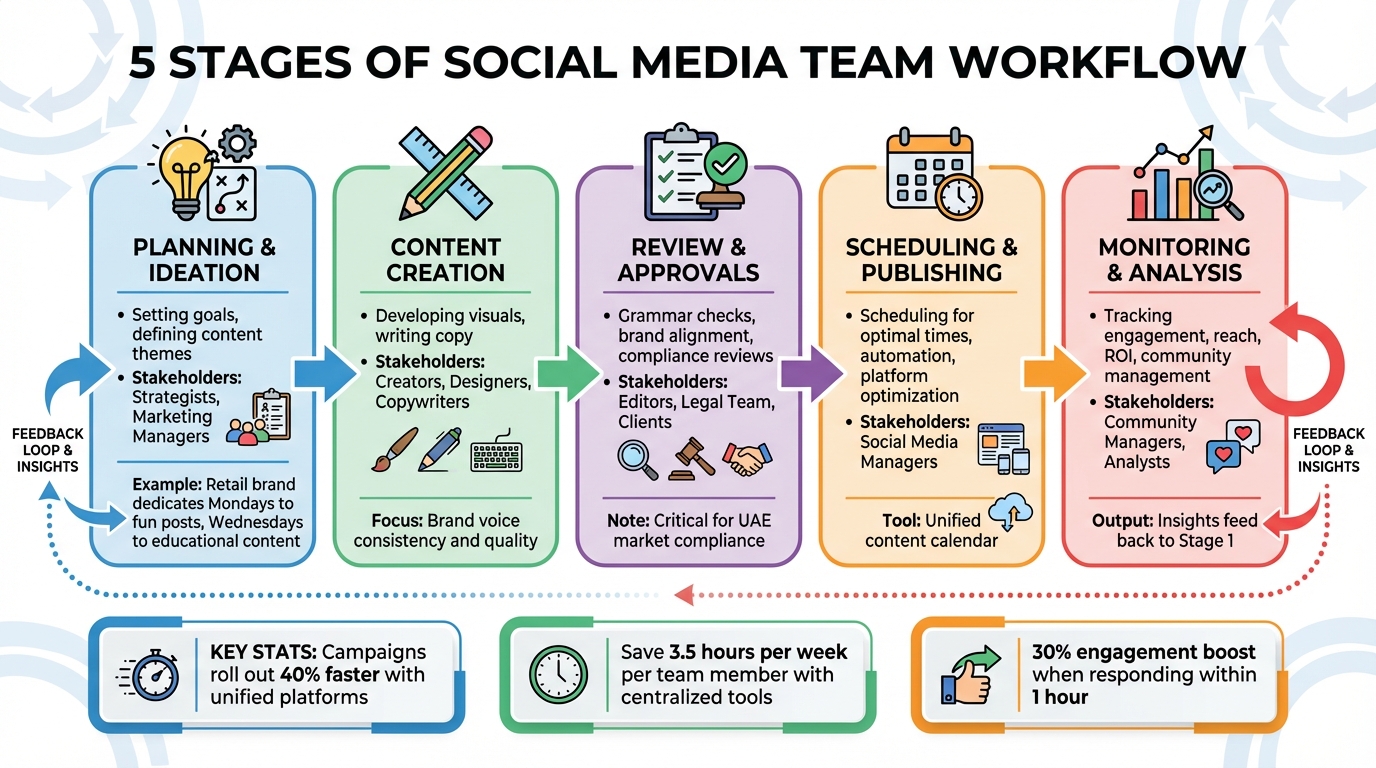 {5 Stages of Social Media Team Workflow Process}
:::
{5 Stages of Social Media Team Workflow Process}
:::
A social media workflow is essentially a step-by-step system that guides your team through creating, scheduling, publishing, and tracking content [6]. Having a well-structured process ensures your campaigns are consistent and efficient. For instance, teams using unified content marketing platforms can roll out campaigns 40% faster, while centralised communication tools save up to 3.5 hours per week for each team member [7]. This time-saving is particularly crucial in the UAE, where teams often juggle bilingual content and adhere to strict compliance rules. A streamlined workflow lays the groundwork for a reliable social media strategy that meets both global benchmarks and UAE-specific demands.
5 Stages of a Team Social Media Workflow
An effective workflow is built around five key stages, each involving specific tasks and stakeholders.
Stage 1: Planning & Ideation
This is where it all begins - setting clear objectives and defining your target audience [2, 16]. Strategists and marketing managers collaborate to outline content themes that align with business goals. For example, a retail brand in Dubai might dedicate Mondays to fun, light-hearted posts to boost impressions, while Wednesdays focus on educational content to establish expertise [2].
Stage 2: Content Creation
At this stage, creators, designers, and copywriters get to work. They develop visuals and write copy that aligns with the brand’s voice and maintains a consistent quality [15, 2].
Stage 3: Review & Approvals
Before anything goes live, content undergoes thorough checks for grammar, alignment with brand guidelines, and compliance with local laws. Campaigns like product launches or those with cultural sensitivities may require additional legal reviews - especially vital in the UAE market [2, 1].
Stage 4: Scheduling & Publishing
Using tools like a unified content calendar, social media managers schedule posts for optimal times. Automation tools help streamline publishing across various platforms [8, 16].
Stage 5: Monitoring & Analysis
This stage involves tracking metrics like engagement, reach, and ROI. Community managers also play a critical role by responding to comments and direct messages [8, 18]. Insights gained here feed back into the planning stage, creating a loop of continuous improvement [8].
| Workflow Stage | Key Activities | Primary Stakeholders |
|---|---|---|
| Planning | Setting goals, defining content themes | Strategists, Marketing Managers |
| Creation | Designing visuals, writing copy | Creators, Designers, Copywriters |
| Review | Proofreading, compliance checks, approvals | Editors, Legal Team, Clients |
| Publishing | Scheduling, platform optimisation, tagging | Social Media Managers |
| Monitoring | Analytics, community management, reporting | Community Managers, Analysts |
Defining and documenting these stages ensures clarity, avoids miscommunication, and helps maintain consistency across campaigns.
How to Document Your Workflow
To avoid delays and confusion, document every step of your workflow - from brainstorming ideas to analysing results [1]. A well-documented workflow should be accessible to all team members and detailed enough for a new hire to follow independently [1]. Think of it as your team’s Standard Operating Procedure (SOP), helping you stay organised and within budget [8, 2].
Use visual tools like flowcharts to map out roles, deadlines, and checkpoints for compliance with local regulations [19, 14]. In the UAE, this might include specific compliance requirements for bilingual content or culturally sensitive campaigns.
"A messy social media workflow costs you more than time. It drains creativity, creates bottlenecks, and makes proving results nearly impossible."
– Sabina Varga, Content Marketing Expert, Socialinsider [2]
Treat your workflow document as a living resource. Regular reviews can help you spot inefficiencies like manual data entry or slow approval processes [2, 20]. Teams that document their workflows report tangible benefits: 83% of B2B companies use social media to engage new customers, and 50% say it has enhanced their marketing efforts and customer experience [6]. By centralising your process in a shared workspace, you create a single source of truth, eliminating scattered spreadsheets and keeping everyone on the same page [1].
Setting Roles and Responsibilities
Defining clear roles within a social media team is essential for smooth operations. Without this clarity, teams can face unnecessary delays, missed deadlines, and even unauthorised posts. Most businesses typically operate with small social media teams of one to five members [9]. This makes it even more crucial for each person to understand their specific responsibilities - whether it's drafting content or giving the final green light.
Main Roles in Social Media Teams
A strong social media team features key roles that cover all aspects of the workflow:
- Social Media Manager: The leader who oversees high-level strategy, manages budgets, and ensures brand consistency by approving final content [9][11].
- Social Media Strategist: Focused on long-term goals, this role involves identifying content themes and aligning social efforts with broader business objectives [9][11].
- Content Creators: Responsible for crafting copy, designing graphics, and editing videos. In larger teams, these tasks may be split among specialists [11][14].
- Community Manager: Engages with the audience, moderates comments, and builds relationships in real time [9][11].
- Social Media Analyst: Tracks performance metrics like engagement and ROI, turning data into actionable recommendations [9][11].
- Paid Social Specialist: Manages advertising budgets and optimises campaigns for better reach and lead generation [9][11].
- Approver or Editor: Ensures quality by checking for typos, style consistency, and legal compliance before publishing [13][14].
"While social media needs a variety of skills, communication is 1,000% the most important in my opinion."
- Julie Cappiello, Founder and CEO of Pyxis Digital [11]
To avoid disruptions, it's wise to assign backup approvers for times when the primary approver is unavailable [14].
Defining roles is just the first step. To further streamline the process, it's critical to implement role-based permissions.
Using Role-Based Permissions
Clearly defined roles are only effective when paired with controlled access. Role-based permissions determine who can draft, edit, or publish content, reducing the risk of unauthorised posts. By assigning access levels such as Admin, Editor, or Contributor, teams can ensure that each piece of content undergoes proper review before going live [10][12].
Tools like Posterly simplify this process by allowing teams to assign different permission levels. For example, a Contributor can draft posts, while only an Admin can approve and publish them. This structure makes it easier to track accountability when errors occur [14]. Permissions systems also create audit trails, recording who drafted, edited, and approved content. This transparency is particularly valuable for agencies managing multiple clients, as team members can be restricted to specific accounts [13][14].
To maintain efficiency, limit the number of approvers to those necessary for ensuring brand and legal safety [12]. Additionally, use in-context comments within scheduling tools to streamline feedback, avoiding fragmented communication methods like WhatsApp or email [13][14][15].
UAE-Specific Considerations for Role Assignment
In the UAE, assigning roles must account for strict legal and cultural requirements. For instance, compliance with UAE laws such as the Cyber Crimes Law and Federal Law No. 3 of 1987 is non-negotiable. These laws penalise unauthorised tagging, publishing photos without consent, and defamation [17]. Assigning a Legal Compliance Officer - or ensuring the Editor role rigorously reviews posts against the UAE Social Media White Papers - can help avoid penalties [17].
As of April 2025, the Federal National Council requires companies to employ Emirati citizens for social media advertisements featuring national dress, cultural symbols, or the Emirati dialect. This ensures authentic representation [18]. For campaigns involving traditional attire like the Kandura or Abayah, these roles should be filled by Emirati team members.
Hierarchical decision-making is common in UAE organisations, with senior local officials or heads of family-run businesses often having the final say on major campaigns [19]. Respect this structure by involving senior stakeholders in high-stakes decisions. Additionally, adjust publishing schedules and deadlines to align with the UAE's traditional working week and Friday prayer times [4][19]. Automated reminders can help maintain communication during these periods [15].
Given that expatriates make up 89% of the UAE's population [4], teams should include roles focused on creating multilingual content, primarily in Arabic and English. Adapting global brand identities to reflect local customs is equally important. Assigning someone to monitor content for alignment with Islamic values - especially during Ramadan, Eid, and Friday prayers - helps ensure posts are respectful and culturally appropriate [4][16][17].
Building a Shared Content Calendar and Asset Library
Centralising your planning and resources with a shared content calendar and media library can simplify your workflow and keep your team on the same page. A shared content calendar acts as a roadmap, giving everyone a clear view of what’s being published, when it’s happening, and on which platform. This transparency helps avoid duplicated work and scheduling conflicts, ensuring everyone knows their responsibilities. Once your calendar is set up, you can track every post from planning through publication.
Creating Your Content Calendar
For each post, include key details like the platform, content type (e.g., Reel, Story, Carousel), copy language, assigned team member, and the publishing date/time (GST, UTC+4). Adding an approval status column - such as Draft, Pending Approval, or Scheduled - makes it easy to monitor progress. To make things even simpler, use colour-coding or dropdown menus for quick updates.
For teams in the UAE, it’s essential to align your calendar with major holidays like Eid, Ramadan, and National Day to ensure your content remains timely and resonates with your audience. It’s also helpful to maintain an evergreen content section for posts that are relevant year-round. This way, you’ll have backup content ready to fill unexpected gaps without scrambling for new ideas. Including character counters in your calendar template can also save time by ensuring your copy fits platform limits during the drafting stage.
Setting Up a Centralised Media Library
A shared media library eliminates the frustration of hunting for assets by keeping everything - images, videos, logos, templates - in one organised location. Sort assets into clear categories or content pillars, such as educational posts, product highlights, or customer stories, to maintain a balanced content mix. To make files easy to locate, establish clear naming conventions. For instance, a name like "2026-01-NationalDay-Instagram-Reel-AR" is far more useful than something vague like "Video1."
To streamline scheduling, store metadata like hashtags, captions, and links alongside your visual assets. This allows team members to prepare posts efficiently. Role-based access controls can help manage who can upload or edit assets, reducing the risk of unauthorised changes. For agencies, separating assets by client ensures there are no mix-ups. Regularly auditing your library to identify top-performing visuals can also guide future campaigns, helping you prioritise formats that deliver the best results.
Smart Scheduling for Better Results
Leverage data insights to determine when your audience is most active. Tools like Posterly can analyse behaviour and automatically schedule posts for peak engagement times. Research shows that responding to social media comments within an hour can boost engagement by 30% [5].
For UAE audiences, tailor your schedule to fit local habits and the workweek, which includes a shorter Friday. Peak engagement times might differ from global norms, so understanding these patterns is key. Bulk-uploading and queuing content across multiple platforms can save time, letting your team focus on strategy instead of repetitive tasks. Posterly and similar tools can integrate these features into your workflow seamlessly.
"Social media is probably the most chaotic channel in the whole marketing world. Compare that to email, super simple… Social is not simple, not easy."
- Emeric Ernoult, Co-Founder and CEO, Agorapulse [5]
To keep improving, conduct monthly audits to review which post types and timings perform best. Use these insights to fine-tune your scheduling strategy for even better results.
sbb-itb-f7b3a33
Using Tools and Automation for Better Workflows
The right collaboration tool can completely change how your team handles social media, cutting down on manual tasks and speeding up publishing. Studies show that using media workflow automation can reduce the time-to-publish by 20–50%, while automated systems can lower content errors by 50–75% [20]. For teams in the UAE juggling multiple platforms and tight deadlines, automation isn’t just a luxury - it’s key to maintaining both quality and consistency.
What to Look for in a Team Tool
When choosing a tool, focus on features that address your team’s specific challenges. For instance, multi-platform publishing allows you to manage platforms like Facebook, Instagram, LinkedIn, and TikTok from a single dashboard. Structured approval workflows - whether single-step, multi-step, or tiered - help ensure content is reviewed and brand-compliant before it goes live. Role-based permissions are another must-have, as they let you control what each team member can access or edit, keeping accounts secure.
Real-time collaboration tools like in-context commenting and tagging make it easier to discuss drafts directly on posts, cutting down on email chains or separate messaging apps. A shared visual content calendar ensures everyone is aligned on strategy and helps spot gaps in the posting schedule. Finally, integrated performance analytics let you track engagement, reach, and follower growth, providing insights to tweak your workflow. Tools like Posterly bring all these features together in one streamlined interface.
How Posterly Supports Team Workflows
Posterly blends AI-driven features with practical collaboration tools to simplify team workflows. Its unified dashboard supports over 10 platforms, letting you manage Instagram, TikTok, LinkedIn, YouTube, and more without constantly switching between apps. With its AI Caption Assist, you can draft posts and get editing suggestions, saving time on content creation.
For teams managing multiple accounts, the Pro plan supports up to 12 social accounts with unlimited AI Caption Assist, while the Power User plan handles up to 30 accounts and includes priority support. Posterly also offers smart scheduling, which uses data insights to publish content when your audience is most active. This is especially helpful for UAE teams targeting audiences in different time zones or adapting to local patterns during Ramadan or other key events. The platform’s drag-and-drop scheduling and real-time queue monitoring make it easy to visualise your content pipeline and avoid scheduling conflicts.
Practical Automation Examples
Start small with simple automations to see quick results. For example, set up auto-routing to send drafts directly to editors or legal teams as soon as they’re marked "ready", eliminating manual handoffs [21]. Notification triggers can send regular updates to stakeholders about pending approvals, keeping the schedule on track without constant reminders. Integrating your tool with Slack can also provide real-time alerts for pending actions, reducing the need for manual check-ins.
Heatmap-driven smart scheduling is another great feature, automatically adjusting post times to maximise audience engagement. Automated tagging can route messages with specific keywords to the right team, and batch-creating content weekly or monthly can ease the stress of last-minute posting. These strategies free up time for more strategic tasks like analysing performance or refining your content approach.
"Any tool that can save myself or one of my analysts time and brain space, I'm a big fan of."
Tracking Performance and Improving Workflows
To fine-tune your processes and identify both effective strategies and potential bottlenecks, it's essential to monitor the right data. This creates a feedback loop that strengthens the structured workflows mentioned earlier. By 2026, the focus has shifted from superficial metrics to more meaningful indicators - like saves, private shares, and thoughtful comments. Instagram, for example, now prioritises "Views" as its primary engagement metric [23]. On the workflow side, keeping tabs on metrics such as response time, resolution rate, and the number of revisions can reveal areas for improvement [22][1].
Key Metrics to Track
Teams should establish clear metrics to measure both audience engagement and operational efficiency. For content, focus on metrics like reach (unique viewers), engagement (saves, shares, comments), and conversions (click-through rates, sign-ups, cost per action). On the workflow front, track how long content spends in the approval process or how many revisions a post goes through before it’s published. For example, responding to social media comments within an hour can boost engagement rates by up to 30% [5].
Set SMART KPIs - goals that are specific, measurable, achievable, relevant, and time-bound. For instance, instead of saying "grow Instagram", aim for a target like "Increase Instagram followers by 10% in June" [22]. Historical data can also offer valuable context; comparing year-over-year performance helps identify trends [24]. Additionally, assigning weighted engagement scores - 1 point for a like, 3 for a comment, and 5 for a save or share - can help calculate a "stickiness" score, which highlights content that resonates deeply with your audience [23].
Using Data to Adjust Workflows
Data often uncovers inefficiencies in manual tasks [2]. For instance, analysing engagement by content category can reveal which themes resonate most with your audience [2][26]. If content spends too much time in review, consider streamlining the approval process by implementing tiered reviews - routine posts can undergo lighter scrutiny compared to high-stakes campaigns [2][5]. Heatmaps specific to your account can also show when your audience is most active, helping you avoid posting during low-engagement periods [2][5].
Regular Workflow Reviews
Once your metrics are defined and adjustments are made, it’s important to review workflows regularly to ensure continuous improvement. Monthly check-ins can help you make quick tactical changes, while quarterly or annual reviews are better suited for larger strategic shifts [27][2]. Use a simple diagnostic approach by asking: What’s working? What’s causing delays (like approval bottlenecks)? And what’s missing (such as a dedicated brainstorming process)? [2]. A brief audit can also help identify and eliminate unnecessary tools - on average, marketing teams juggle between 12 and 20 tools [25].
Involve cross-functional teams like Sales, Product, and Legal in these reviews to ensure workflows align with broader company goals and policies [5][3][1]. Document all workflow changes in a centralised location that’s accessible to everyone, which helps maintain consistency during staff transitions [1]. For teams in the UAE, consider tailoring workflows around important cultural moments like Ramadan, as audience behaviour and engagement patterns can shift significantly during such periods. This ensures your improvements resonate with local audience preferences, as discussed earlier.
Conclusion
In the UAE's highly competitive market, managing social media workflows as a team has become a necessity. With social media penetration reaching an impressive 115%, the competition is fierce [29][30]. Without an organised system in place, teams often fall into chaos - facing delays in posting, scattered approval processes across platforms like WhatsApp, and creative fatigue from constant last-minute efforts [5].
The key to overcoming these challenges lies in establishing clear roles, using centralised tools, and continuously refining your processes. When every team member knows their responsibilities - whether it's content creation, approval, or performance analysis - everything runs more smoothly [1][5]. Tools like Posterly can play a pivotal role in this. By consolidating platforms, automating repetitive tasks, and ensuring consistent scheduling, Posterly simplifies workflows rather than complicating them [31].
The financial benefits of efficient workflows are hard to ignore. The UAE's social media management market is expected to leap from AED 483.7 million in 2024 to AED 1.7 billion by 2030 [29]. Additionally, around 75% of consumers in the region are influenced by social media recommendations when making purchases [28]. Teams that document their workflows, centralise resources, and regularly evaluate their performance are better positioned to adapt quickly, leaving behind those still relying on outdated, manual methods.
Take a moment this week to audit your current workflow. Identify one bottleneck - like approval delays - and tackle it with solutions such as tiered reviews or scheduling tools. The UAE market particularly rewards teams that combine global efficiency with a keen understanding of local nuances, especially during key periods like Ramadan when engagement soars. By refining your workflow, you transform your strategy into tangible, measurable results.
FAQs
::: faq
How can social media teams in the UAE ensure their workflows comply with local laws?
Social media teams in the UAE need to ensure their operations align with the UAE Federal Personal Data Protection Law No. 45 of 2021. This law requires explicit consent before handling personal data, grants individuals the right to amend or restrict the use of their data, and places restrictions on transferring data outside the UAE.
Here’s how teams can stay compliant:
- Secure explicit consent: Always obtain and clearly document consent for any use of personal data.
- Limit data access: Ensure only authorised team members can access sensitive data to uphold confidentiality and security.
- Check content carefully: Review all materials to ensure they meet UAE cultural and ethical standards, and verify compliance with regulations when transferring data internationally.
Using tools like Posterly, which streamline workflows and document processes, can make it easier to manage these requirements. This approach not only simplifies compliance but also helps minimise legal risks while keeping operations running smoothly. :::
::: faq
Why is a shared content calendar essential for social media teams?
A shared content calendar is a game-changer for social media teams, offering a clear, centralised view of all content - whether it's planned, published, or still in progress. It keeps everyone on the same page, ensuring campaigns run smoothly, deadlines are met, and platform-specific needs are addressed. Plus, it helps teams stay mindful of key dates like product launches or national holidays.
By minimising duplicate efforts and avoiding content clashes, a shared calendar ensures your brand voice remains consistent across all platforms. It also makes teamwork easier by streamlining collaboration between creators, editors, and schedulers. Approvals happen quicker, and workflows become more efficient.
With tools like Posterly, this process gets even better. Features like real-time draft editing, smart scheduling, and multi-platform management - accessible from one dashboard - help UAE-based teams save time and work smarter. These tools also allow teams to maintain high-quality content while respecting local cultural nuances, ensuring their efforts resonate with the audience and deliver results. :::
::: faq
How can automation enhance social media workflows for teams?
Automation takes the hassle out of social media workflows by managing repetitive tasks like drafting, scheduling, publishing, and reporting. This frees up team members to concentrate on more impactful activities like engaging with followers, coming up with creative ideas, and refining campaigns. Tools such as Posterly make this even easier by enabling teams to create captions, schedule posts for peak engagement times, and even turn code commits into marketing updates - all through a single dashboard that works across more than 10 platforms. By automating these processes, teams can cut down routine tasks by as much as 80%, ensuring smoother and faster operations.
It also ensures greater consistency and accuracy by using pre-approved templates and publishing rules, guaranteeing that every post stays true to the brand’s identity. For teams in the UAE, automation can help fine-tune campaigns to align with local peak engagement hours (like 18:00–21:00 GST) while comparing performance against regional standards. On top of that, automated analytics deliver instant insights, enabling managers to tweak strategies and monitor ROI in AED without extra manual effort. This makes workflows not just faster but also more scalable and effective. :::
Related Articles
How to Create 30 Days of Social Media Content Using AI Images in posterly
A practical guide to generating a full month of original social media images with posterly's AI image tool, writing captions for each one, and scheduling everything in a single session.
Read moreHow to Find the Best Time to Post on Social Media Using posterly's AI Scheduler
Stop guessing when to post. This guide explains how posterly's AI Scheduler analyses your audience activity and automatically picks the best posting times so your content gets seen by more people.
Read moreHow to Manage Google Business Reviews on Autopilot With posterly
A step-by-step guide to responding to Google reviews with AI, automatically requesting new reviews from customers, auditing your profile for local SEO, and turning your best reviews into social media content.
Read moreHow to Manage Multiple Client Social Media Accounts With posterly Workspaces
A practical guide for agencies and teams on using posterly Workspaces to organise client accounts, assign roles, get content approved, and schedule posts across dozens of social profiles without things getting messy.
Read more