
How GitHub Commits Become Social Media Posts
How GitHub Commits Become Social Media Posts
How GitHub Commits Become Social Media Posts
Want to turn your GitHub commits into engaging social media posts? Here's how you can automate the process to save time and build your online presence.
- What happens? Tools like Posterly connect to your GitHub repository, use AI to rewrite commit messages into social media-friendly updates, and automatically post them to platforms like LinkedIn or X (formerly Twitter).
- Why do it? It helps developers showcase their work, build credibility, and keep their audience informed. This is particularly useful in the UAE's tech-driven market, where networking and visibility are key.
- How does it work? Clear commit messages like "Fix bug in user authentication (#123)" are transformed into posts such as: "Just squashed an authentication bug! 🔒 Users can now log in seamlessly. Commit #123. What's your toughest bug story? #BuildInPublic #WebDev."
- Save time: AI automates the entire process, from detecting commits to scheduling posts, so you can focus on coding.
With plans starting from AED 25.70/month, Posterly’s Ship & Share feature simplifies sharing your progress while growing your professional brand.
Why Convert GitHub Commits into Social Media Posts
Sharing your GitHub commits on social media is more than just a way to showcase your work - it’s an opportunity to build trust and credibility in the UAE's tech scene. Every commit you make reflects a decision, a solution, or a feature you’ve delivered. By turning these updates into social posts, you’re essentially creating a real-time portfolio that highlights your skills and expertise for hiring managers, clients, and collaborators to see.
The "build in public" trend has demonstrated that developers who share their progress regularly tend to grow their audience and engagement faster than those who only post polished project launches. Commit-based posts act as proof of progress, whether it’s cutting page load times from 1.8 seconds to 0.9 seconds, implementing JWT-based authentication, or fixing a critical bug. This transparency resonates strongly in the UAE tech market, helping you join important conversations and signalling your commitment to your craft.
Beyond personal branding, these posts also function as a changelog for your open-source users, clients, or stakeholders. Instead of digging through repositories or lengthy release notes, your audience can stay updated directly through platforms like LinkedIn or X. Seeing regular updates - like security fixes or feature rollouts - builds trust, encourages engagement, and can lead to more stars, forks, or contributions. For client projects, such updates reassure non-technical stakeholders that progress is being made, reducing the need for constant status updates.
Building Your Professional Brand
A visible portfolio of commits can elevate your professional image significantly. Each commit-based post links directly to your GitHub changes, offering a searchable and verifiable portfolio that showcases your code quality and decision-making. Over time, these posts tell a story: frequent updates about refactoring, testing, or performance improvements demonstrate a deeper level of engineering expertise, rather than just chasing features.
In the UAE, where LinkedIn networking and referrals often play a key role in hiring, a consistent stream of "what you ship" can help you stand out in competitive markets like Dubai and Abu Dhabi. Sharing specific updates - such as "Added OAuth login for UAE-based users" or "Refactored payment integration for AED pricing" - translates technical achievements into business-relevant outcomes that resonate with both technical and non-technical audiences.
Keeping Your Community Informed
For open-source projects, commit-based updates signal active development and upcoming features, encouraging more community involvement. SaaS users, for example, feel reassured when they see posts about ongoing improvements in security, performance, or functionality. These updates not only build confidence but also help maintain user engagement.
Sharing specific changes can also spark conversations. For instance, if you post about migrating to a new framework or adopting a different architecture, other developers may share their insights, benchmarks, or alternative approaches you hadn’t considered. Over time, these interactions can lead to valuable collaborations, co-maintainers for your projects, or even referrals for roles or contracts in the region.
Automating the Process with AI
While the benefits are clear, manually crafting social posts for every meaningful commit can be time-consuming. You’d need to decide which commits are worth sharing, tailor the tone for platforms like LinkedIn or X, schedule posts at optimal times in Gulf Standard Time, and maintain a consistent voice. That’s where Posterly's Ship & Share feature steps in to streamline the process.
Ship & Share connects your GitHub repositories to an AI-powered social media tool, automatically identifying commits and turning them into ready-to-post content. It uses AI-assisted content creation to rephrase technical commit messages into audience-friendly updates, adjust the tone for different platforms, and suggest relevant hashtags. For example, a single commit can generate a detailed LinkedIn post and a concise X update, all while preserving your brand’s consistency. With GitHub integration, AI-powered text generation, and smart scheduling, Ship & Share takes the heavy lifting off your plate - leaving you free to focus on coding while still building your online presence.
What You Need to Get Started
::: @figure 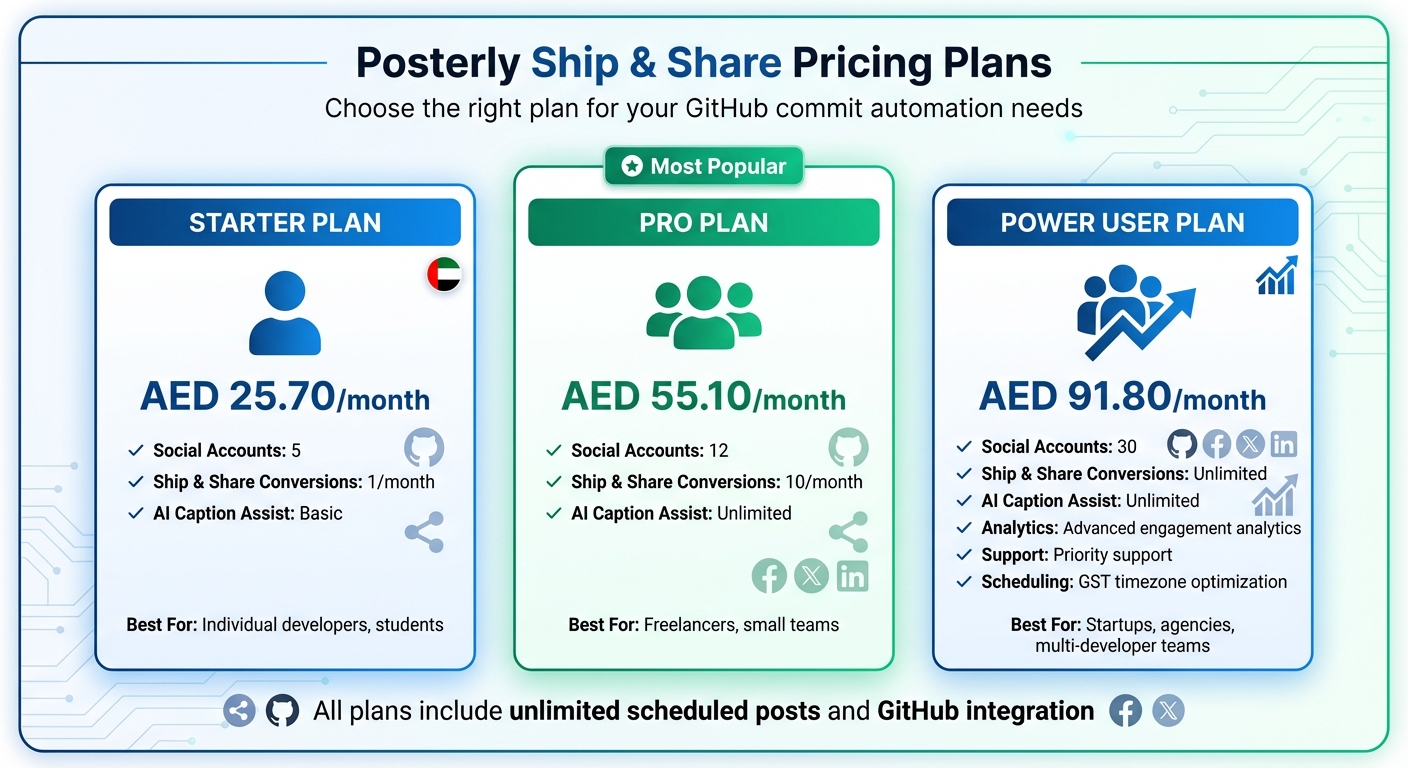 {Posterly Pricing Plans Comparison for GitHub Commit Automation}
:::
{Posterly Pricing Plans Comparison for GitHub Commit Automation}
:::
To start turning your GitHub commits into shareable posts, you'll need to set up and connect a few essential accounts.
Required Accounts
The Posterly Ship & Share feature requires three types of accounts. First, you'll need a GitHub account with at least one active repository where you regularly commit code. To connect a repository, ensure you have admin or maintainer permissions so Posterly can access commit messages and metadata through GitHub's API. For teams, it's often more efficient to use organisation-level GitHub access to centralise your commit feeds.
Next, you'll need a Posterly account on one of the paid plans that support GitHub integration. All three tiers - Starter, Pro, and Power User - include the Ship & Share feature, but each comes with different monthly limits. Finally, link at least one social media account to Posterly, such as LinkedIn, X (formerly Twitter), Instagram, or YouTube, where you want your commit-based posts to appear. In the UAE, platforms like LinkedIn and X are especially popular for professional and tech-focused content. For added security, enable two-factor authentication and use a payment method compatible with AED subscriptions.
Once your accounts are set up, pick a Posterly plan that aligns with your commit volume and the social platforms you want to target.
Posterly Plans and Pricing
Posterly offers three plans, each designed to cater to different workflows and posting needs, with transparent AED pricing.
-
Starter Plan (AED 25.70/month): Perfect for individual developers or students testing the waters with automated social posting. This plan includes 5 social accounts, unlimited scheduled posts, and 1 Ship & Share conversion per month - ideal for sharing only the most important commits.
-
Pro Plan (AED 55.10/month): Suitable for active solo developers, freelancers, or small teams who frequently ship code. It supports 12 social accounts, provides 10 Ship & Share conversions per month, and offers unlimited AI Caption Assist for crafting engaging post captions.
-
Power User Plan (AED 91.80/month): Designed for startups, agencies, or engineering teams handling a high volume of commits. This plan supports 30 social accounts and offers unlimited Ship & Share conversions, making it ideal for managing multiple repositories, sprints, and release cycles. It also includes advanced features like detailed engagement analytics, priority support, and flexible scheduling tailored to Gulf Standard Time (GST, UTC+4). If your UAE-based business manages English and Arabic pages or oversees multiple brands, this plan is a great fit.
| Plan | Price (AED/month) | Social Accounts | Ship & Share Limit | Best For |
|---|---|---|---|---|
| Starter | 25.70 | 5 | 1/month | Individual developers, students |
| Pro | 55.10 | 12 | 10/month | Freelancers, small teams |
| Power User | 91.80 | 30 | Unlimited | Startups, agencies, multi-developer teams |
When deciding on a plan, think about your commit frequency, the number of brands or accounts you manage, your team size, and whether you need analytics. If you only have one active repository and plan to post occasionally to a couple of social accounts, the Starter plan is a good starting point. You can always upgrade later if your needs grow. Freelancers juggling multiple client projects or teams with daily code pushes might find the Pro plan more practical. For startups using social media as a key marketing tool, the Power User plan offers the flexibility and features needed to keep up with a fast-paced workflow.
How to Use Ship & Share: Step-by-Step
Once your accounts are ready and your plan is set, it's time to turn your commits into social media posts. This guide walks you through the process, covering the four key stages of the Ship & Share workflow: connecting GitHub, linking your social platforms, generating posts from commits, and scheduling them.
Step 1: Connect Your GitHub Account to Posterly
Start by signing up for Posterly and completing the email verification process. Once that's done, select your subscription tier and make the payment using a UAE-issued card. Navigate to the Ship & Share dashboard and click "Connect GitHub". This will redirect you to GitHub's authorisation page, where you'll need to grant read-only access to your repository metadata and commits. From there, choose the repositories you want to use - ideally public or approved ones, such as open-source projects, portfolio work, or startup repositories.
Common issues: You might run into problems if your GitHub account doesn't have admin rights on the target repository (required for webhook installation), if you cancel the OAuth process midway, or if company policies block third-party apps. To resolve these, ensure you're logged into the correct GitHub account, retry the connection, or request approval for the Posterly app from your organisation's administrator.
Step 2: Set Up Your Social Media Platforms
Once GitHub is connected, head to Posterly's social accounts section and click "Connect" next to your preferred platforms, like LinkedIn or X. You'll be prompted to authorise Posterly to create and schedule posts on your behalf.
In the content settings, enable AI Caption Assist to let Posterly suggest captions, hashtags, and calls to action based on your commit data. Make sure the tone aligns with your brand's voice, set English as the primary language, and consider adding bilingual hashtags if relevant. For posting frequency, aim for 2–4 posts per week per platform, focusing on meaningful updates like new features or major releases instead of minor changes. This helps keep your audience engaged without overwhelming them.
Step 3: Make Commits and Generate Posts
Now that your GitHub and social platforms are connected, your commits will trigger AI-generated posts. Posterly uses webhooks and the GitHub API to receive updates whenever new commits are pushed. It analyses commit messages, pull request titles and descriptions, and file changes to craft posts highlighting updates like new features, bug fixes, or documentation improvements.
To get the best results, write clear and descriptive commit messages. For instance, "Add Arabic/English language toggle for pricing page" is far more effective than "fix i18n stuff." Keep messages concise, group related changes, and avoid including sensitive details. In the Ship & Share dashboard, navigate to the "Commits to Posts" section, where your recent commits are listed by date and repository. Select a commit and click "Generate Post" to let Posterly create draft captions tailored to your platforms and tone.
For example, a commit like "Add payments in AED" could generate a post about improved, region-specific checkout options. A commit like "Improve Lighthouse performance score from 68 → 93 on homepage" might result in a LinkedIn post showcasing metrics ("We optimised our homepage and boosted the Lighthouse score from 68 to 93. Faster experience, happier users.") and an X post with performance-related hashtags.
Step 4: Review and Schedule Your Posts
Go to the "Drafts" or "Queue" section in Posterly to review AI-generated posts. Edit the text as needed, tweak or remove suggested hashtags, and refine calls to action like "Try it now", "Star the repo", or "Follow for more updates" to align with your campaign goals. LinkedIn posts might benefit from additional context, while X posts should stay concise and focused on a single message. Use the preview pane to ensure posts look polished, avoiding awkward line breaks or excessive hashtags.
Before scheduling, double-check that the content follows your company's guidelines, doesn't reveal sensitive details, and is accessible to both technical and non-technical audiences. Once you're happy with the drafts, click "Approve" or "Schedule" to add them to your calendar. The drag-and-drop calendar lets you plan posts by day and time, with connected platforms clearly marked. If you're targeting the UAE, set the calendar to Gulf Standard Time (GST, UTC+4) and schedule posts during optimal times, like weekday mornings (09:00–11:00) or early evenings.
For multi-platform scheduling, consider publishing the same update at slightly different times - for example, posting on LinkedIn earlier during work hours and on X later in the evening. If you have a global audience, experiment with time slots that align with key regions, like late-afternoon GST to overlap with European work hours. Use Posterly's analytics to refine your schedule based on engagement data. The calendar also helps you avoid posting multiple updates too close together - spread out technical updates, launch announcements, and other content to maintain a balanced feed.
sbb-itb-f7b3a33
Tracking and Improving Your Results
Turn your GitHub commits into meaningful outcomes by keeping a close eye on your social media performance. Posterly’s dashboard gives you a clear view of how your posts are performing across X and LinkedIn. In the Monitor & Track section, you can review all your scheduled and published content in calendar, list, or table formats. Pay attention to key metrics like likes, comments, reposts, link clicks, and impressions. These numbers reveal whether your commit stories are connecting with your audience. For GitHub-related posts, focus particularly on engagement rate (total engagements divided by impressions) and link clicks to your repository. These figures indicate whether your "build in public" updates are sparking interest and driving traffic.
Track Your Engagement Metrics
Dive into your engagement trends over time to spot patterns in your most successful commit posts. If you notice a steady rise in engagement rates and link clicks, it’s a good sign that your AI-generated summaries are hitting the mark. On the other hand, if impressions are climbing but engagement rates are dropping, you might need to tweak your opening lines or calls to action. Posterly’s dashboard lets you sort posts by engagement rate and link clicks, making it easier to identify what’s working. Was it a feature launch, a performance boost with measurable results, or a bug fix that solved a noticeable issue? Compare these high-performing posts with less successful ones to uncover trends in the type of commit, caption style, or the use of visuals like screenshots. Save these successful combinations as templates to streamline your future GitHub updates.
Adjust Your Content Strategy
Use your engagement data to guide your content approach. Focus on posts that showcase clear benefits and outcomes rather than diving too deep into technical details. For example, if posts like "Improved dashboard load time by 30% for our Abu Dhabi users" drive high engagement, tailor your AI-generated captions to highlight similar impactful results. Add context to your commits by explaining their significance, such as "This update resolves a long-standing bug that affected traders on low-bandwidth connections." Pair these with calls to action like "Explore the new feature in our repo and share your thoughts in the issues tab."
When it comes to hashtags, analyse which ones consistently appear in your top-performing posts. Replace generic tags like #coding with more specific ones aligned with your tech stack or niche, such as #NextJS, #FinTech, or #Web3UAE. Stick to a concise set of 3–6 effective hashtags for LinkedIn, but experiment with slightly larger sets on X, where hashtags play a bigger role in discovery. Use Posterly’s analytics to pinpoint the best times for engagement and schedule your posts during peak local activity periods.
Upgrade for More Features
As your posting frequency and audience grow, upgrading your plan can unlock advanced tools and scalability. Higher-tier plans include filtered analytics by campaign, project, or developer, allowing you to see which types of commit stories - whether they’re about new features, performance upgrades, or security patches - generate the most interest. For teams with multiple developers contributing regularly, a shared workspace ensures brand consistency. It also allows a marketing or developer relations lead to review and approve AI-generated posts before they go live. Plus, you can expand your reach by integrating additional platforms, such as LinkedIn company pages or YouTube community posts, all from one central dashboard. This turns your GitHub activity into a consistent, measurable marketing strategy rather than just occasional updates.
Conclusion
Sharing your GitHub commits on social media doesn’t have to be a tedious task. With Posterly’s Ship & Share feature, the process is fully automated - from identifying your commits to crafting polished, platform-ready posts for X and LinkedIn. All you need to do is link your GitHub account, keep committing as usual, and let AI handle the rest. It’s an effortless way to maintain an active social presence while focusing on what matters most: your code.
The best part? Automation without compromising quality. By turning your commits into consistent updates, you save hours of manual effort while keeping your community informed. Whether you’re rolling out new features, squashing bugs, or enhancing performance, your progress becomes a steady stream of engaging content that highlights your work and expertise.
Try Posterly’s 7-day trial to see how Ship & Share can transform the way you approach social media. Explore other Posterly AI tools designed to elevate your online presence. Check out the Pricing section for detailed plan options, connect your repositories, set your preferences, and watch your coding efforts translate into meaningful engagement.
Your GitHub commits already tell a compelling story about your technical skills. Posterly helps you share that narrative effortlessly, reaching the right audience at the right time. Focus on creating exceptional software while your social media presence grows alongside your projects.
FAQs
::: faq
How does Posterly create high-quality social media posts from GitHub commits?
Posterly leverages advanced AI to turn GitHub commits into eye-catching social media posts. It refines the text with intelligent copy suggestions to ensure the message is clear and on-point, while also checking for errors and preventing duplicate content.
To keep your posts consistent and dependable, Posterly includes features like real-time monitoring and automatic retries. This ensures your updates are always accurate and make an impression on platforms like LinkedIn and Twitter. :::
::: faq
How does Posterly's Ship & Share feature help developers in the UAE turn GitHub commits into social media content?
Posterly’s Ship & Share feature makes it simple to turn GitHub commits into eye-catching social media posts. By automatically identifying and reworking commit messages into shareable content, it saves developers the hassle of crafting posts manually.
With built-in tools for scheduling and publishing across multiple platforms, developers can effortlessly display their technical achievements on sites like LinkedIn and Twitter. This is particularly useful for developers in the UAE aiming to showcase their projects effectively to both local and global audiences. :::
::: faq
Which Posterly plan is best for my GitHub commit activity and social media goals?
Choosing the right Posterly plan comes down to how often you commit to GitHub and what you need from your social media tools.
- If you commit infrequently and only need basic features, the Starter plan (AED 26/month) is a great option.
- For those with moderate posting needs and a desire for more advanced AI tools, the Pro plan (AED 55/month) strikes a good balance.
- If you're a power user with frequent commits and require advanced automation, the Power User plan (AED 92/month) provides the most extensive features.
Think about your workflow and how much automation would benefit your process to find the plan that aligns with your goals. :::
Related Articles
How to Create 30 Days of Social Media Content Using AI Images in posterly
A practical guide to generating a full month of original social media images with posterly's AI image tool, writing captions for each one, and scheduling everything in a single session.
Read moreHow to Find the Best Time to Post on Social Media Using posterly's AI Scheduler
Stop guessing when to post. This guide explains how posterly's AI Scheduler analyses your audience activity and automatically picks the best posting times so your content gets seen by more people.
Read moreHow to Manage Google Business Reviews on Autopilot With posterly
A step-by-step guide to responding to Google reviews with AI, automatically requesting new reviews from customers, auditing your profile for local SEO, and turning your best reviews into social media content.
Read moreHow to Manage Multiple Client Social Media Accounts With posterly Workspaces
A practical guide for agencies and teams on using posterly Workspaces to organise client accounts, assign roles, get content approved, and schedule posts across dozens of social profiles without things getting messy.
Read more