
Collaboration Features in Social Media Tools: Guide
Collaboration Features in Social Media Tools: Guide

Collaboration Features in Social Media Tools: Guide
Managing social media is easier when you have the right tools. Posterly simplifies teamwork by centralizing content planning, creation, approval, and publishing. Whether you're handling multiple accounts or working with remote teams, Posterly's features help save time, improve workflows, and ensure better communication.
Key Features:
- Role-Based Permissions: Assign specific roles like Owner, Admin, or Editor to maintain clarity and control.
- Shared Content Calendars: View and manage all scheduled posts in one place with drag-and-drop rescheduling.
- Approval Workflows: Streamline the process with a clear draft, review, approve, and schedule system.
- Real-Time Feedback: Comment directly on drafts and track changes easily.
- AI Tools: Generate captions, hashtags, and even marketing content from GitHub commits.
- Integrations: Access Google Drive and Canva for seamless design and file management.
Posterly is ideal for agencies, remote teams, and brands managing multiple accounts, offering tools to keep everything organized and efficient.
Main Collaboration Features in Posterly
::: @figure 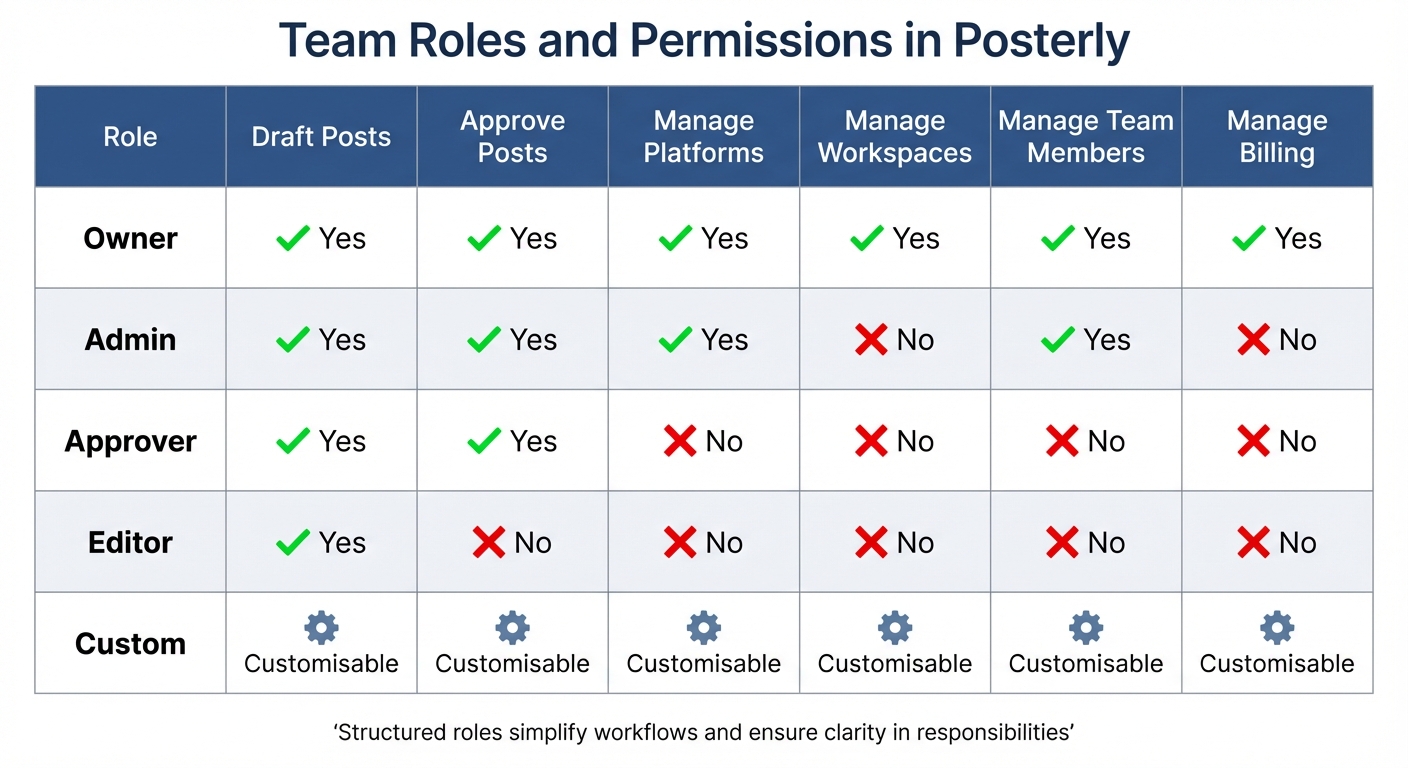 {Posterly Team Roles and Permissions Comparison Chart}
:::
{Posterly Team Roles and Permissions Comparison Chart}
:::
Posterly offers collaboration tools designed to streamline teamwork through role-based access control, shared visibility, and structured approval processes. With over 58,513 creators and teams relying on it to manage content across 10+ platforms, the platform ensures clarity in roles while safeguarding sensitive settings from unintended changes [2].
Team Roles and Permissions
Posterly provides five distinct roles - Owner, Admin, Approver, Editor, and Custom - each with specific permissions to optimise team workflows. Here's a breakdown:
- Owner: Manages billing and workspace settings.
- Admin: Handles platforms and team members but doesn't access financial details.
- Approver: Focuses on reviewing and approving content without altering configurations.
- Editor: Concentrates on creating and drafting posts.
- Custom: Offers flexibility with permissions tailored to specific needs.
To further enhance security, Posterly incorporates workspace isolation, keeping client data separate. This feature is especially helpful for agencies in the UAE managing multiple international accounts. Each workspace operates independently, ensuring no crossover of information between clients. Importantly, Posterly does not store social media passwords; instead, it uses secure OAuth flows and official APIs. Only Admins and Owners can authorise or manage social media connections [2].
| Role | Draft Posts | Approve Posts | Manage Platforms | Manage Workspaces | Manage Team Members | Manage Billing |
|---|---|---|---|---|---|---|
| Owner | Yes | Yes | Yes | Yes | Yes | Yes |
| Admin | Yes | Yes | Yes | No | Yes | No |
| Approver | Yes | Yes | No | No | No | No |
| Editor | Yes | No | No | No | No | No |
| Custom | Customisable | Customisable | Customisable | Customisable | Customisable | Customisable |
These structured roles simplify workflows and ensure clarity in responsibilities.
Shared Content Calendars
Posterly’s shared calendar provides a single view of all scheduled content across platforms like Instagram, LinkedIn, TikTok, and Facebook. Instead of juggling multiple browser tabs or accounts, teams can access a unified schedule in real time. The calendar offers three viewing modes - Calendar, List, and Table - allowing teams to pick what works best for them [3].
Rescheduling is effortless with drag-and-drop functionality, making adjustments quick and intuitive. Additionally, the calendar includes smart validation, ensuring posts meet platform-specific requirements before they’re queued. This reduces errors and ensures smoother workflows.
Content Approval Workflows
Content creation in Posterly follows a clear four-stage process: Draft, Review, Approve, and Schedule [5]. Editors draft content, team members review it for alignment with brand guidelines, and Approvers provide final sign-off before scheduling. Even after approval, teams can make edits, reschedule, pause, or cancel posts directly from the shared calendar.
For agencies, this system is a game-changer. Clients can be invited into dedicated workspaces with restricted permissions. This allows them to give feedback and approve posts without accessing sensitive settings or billing details. According to reports, this structured approach helps agencies save more than 10 hours weekly on social media management tasks [2].
Real-Time Feedback and Task Assignments
Posterly’s real-time queue monitoring keeps track of scheduled posts, automates retries, and prevents duplicate entries [3]. Teams can easily see where each piece of content is in the workflow, identifying and resolving bottlenecks before they cause delays. The unified dashboard eliminates the confusion of switching between platforms, which users often describe as "platform chaos" [3].
With a 99.9% uptime SLA, Posterly ensures posts are published as planned [4]. Its enterprise-grade infrastructure, powered by Redis/BullMQ, guarantees timely publishing regardless of team location [3]. These features make Posterly an efficient all-in-one collaboration hub for content teams.
Additional Collaboration Tools in Posterly
Posterly offers a range of integrations and AI-powered features designed to simplify workflows for design, development, and publishing. These tools help teams work more efficiently while maintaining consistent quality and adhering to brand guidelines. They blend seamlessly with Posterly's main features, further improving team productivity.
GitHub Integration: Ship & Share
The Ship & Share feature connects developers and marketing teams by transforming GitHub commits into ready-to-publish marketing content. When a developer pushes code updates, Posterly's integration identifies and processes the commit, using AI to craft engaging, platform-ready copy from technical details. Content is formatted specifically for major social platforms. The Starter, Pro, and Power User plans offer varying levels of access, ranging from 1 to unlimited Ship & Share credits per month [7].
Integration with Google Drive and Canva
Posterly works with Google Drive and Canva to provide easy access to essential brand assets and design templates. With Google Drive, teams can centralise their media files, ensuring everyone uses the latest brand guidelines. Canva’s auto-resize feature allows designs to be quickly adjusted for different platforms before scheduling them through Posterly [8]. This integration is available starting from the Starter plan, which costs AED 25.70 per month [7]. By using these tools, teams can create a unified "Single Source of Truth" for all brand-related materials.
AI-Powered Caption Assist
Caption Assist simplifies the process of creating platform-specific captions. From a single upload, the AI generates tailored variations and hashtags for different platforms, significantly cutting down on manual effort [7]. Over time, the tool adapts to a team’s tone, improving its suggestions. Marcus Johnson, a solo creator managing multiple accounts, shared his experience:
"As a solo creator managing 5 accounts, Posterly cut my scheduling time by 70%"
[7]. The Starter plan includes 30 AI assists per month, while the Pro and Power User plans offer unlimited assists [7]. Additionally, the "Brand Voice & Visual Guidelines" feature ensures the AI generates content that aligns with the team’s specific style, making it possible to schedule an entire week’s worth of posts across multiple platforms in one session.
How Teams Use Posterly's Collaboration Features
Managing social media at scale comes with its own set of challenges, and these challenges vary greatly depending on the team. Posterly's collaboration tools are designed to fit a range of workflows, whether you're running a creator agency, coordinating across different time zones, or managing multiple brands from a single platform.
Creator Agencies Managing Multiple Clients
Agencies often need to juggle content for several clients, and Posterly makes this simpler with isolated client workspaces. Each workspace functions as its own environment, complete with separate content, calendars, and social accounts. This setup ensures that content for one client doesn’t accidentally end up on another client’s platform, keeping everything neatly organised and secure [4][5].
Granular role management adds another layer of control. For instance, an agency might assign the "Owner" role to its account director, "Editor" roles to content creators, and "Approver" roles to clients. This way, clients can review and approve content without needing access to sensitive platform credentials [5].
Alex, an Agency Director, shared how Posterly has streamlined their workflow:
"With Posterly, you upload content in bulk, schedule posts across Instagram, X, and LinkedIn, assign approvals to your team, and track engagement - all from one dashboard." [9]
This kind of structure is especially helpful for agencies working with remote teams spread across different time zones.
Remote Teams Working Across Time Zones
For remote teams, Posterly offers tools that reduce the headaches of working across time zones. A centralised shared calendar gives everyone a clear view of scheduled campaigns, eliminating the need for constant updates or meetings [6]. For example, a team member in Dubai can easily see what their colleague in London has planned, keeping everyone aligned without needing to coordinate in real time.
The asynchronous approval workflow is another game-changer. Contributors can draft, review, and approve content on their own schedules, making it easier to collaborate without needing everyone online at the same time [5]. Once approved, Posterly’s automated scheduler takes care of distributing the posts across 11+ platforms at the designated times [4][6].
On top of that, Posterly’s analytics tools recommend the best posting times for specific regions, helping teams reach their audiences more effectively [6]. And with a 99.9% uptime SLA, remote teams can rely on the platform to run smoothly, no matter the time of day [2].
Managing Multiple Brands
Posterly also shines when it comes to managing multiple brands. Its flexible workspaces allow teams to keep each brand’s content, calendar, and asset library completely separate. This setup ensures that team members working on one brand won’t have access to another, maintaining both organisation and confidentiality.
The platform’s customisable workflow - Draft > Review > Approve > Schedule - makes it easy to tailor the approval process to each brand’s specific needs [5]. This flexibility helps teams stay organised and ensures that every piece of content meets the right standards before going live.
sbb-itb-f7b3a33
Best Practices for Team Collaboration in Posterly
Posterly's collaboration tools are designed to make teamwork more efficient and productive. By following some tried-and-tested practices, teams can save significant time - agencies report saving over 10 hours per week on average by implementing these strategies [2][5]. Here's how to ensure seamless and secure collaboration.
Set Clear Role-Based Permissions
Assigning the right roles is essential to avoid confusion and safeguard sensitive information. For instance, the Editor role is ideal for content creators who only need to draft and edit posts, while the Approver role suits managers or clients tasked with reviewing and approving content without dealing with technical settings [2][5].
A recommended setup includes assigning Owners to directors, Editors to content creators, and Approvers to clients. This configuration ensures clients can approve posts without accessing billing details or social account credentials [2]. Additionally, Editor, Approver, and Reviewer roles are automatically restricted from viewing the Social Accounts page, further protecting sensitive data [2].
Use Shared Calendars for Better Visibility
The shared calendar in Posterly serves as a central hub for team schedules, eliminating the need for constant updates. Adjusting timelines is easy with its drag-and-drop feature [1], and the post preview function allows teams to verify content directly from the calendar before it goes live [6].
To maximise efficiency, establish a structured weekly workflow. Use Posterly's analytics to determine when your audience is most active and schedule posts during these peak times. This strategy has been shown to increase engagement by 36% to 39% on average [4][6].
Organise your calendar by creating separate Workspaces for each brand or client. This keeps content pipelines focused and clutter-free, allowing teams to work more effectively [2][4]. It’s a simple way to maintain clarity and ensure everyone stays on track.
Use Multi-Level Approval Processes
Multi-level approvals are crucial for maintaining brand consistency and quality. Within your Workspace settings, you can define approval stages, such as requiring a specific number of approvers before content is published [10].
When a post is submitted for review, it becomes locked to prevent further edits. If it’s rejected, it moves to the "Not Approved" folder and unlocks for revisions [10]. Any changes made after approval automatically return the post to the "Pending Approval" stage, ensuring the final version meets all standards [10].
For agencies, inviting clients to specific Workspaces with limited roles - like Approver - allows them to provide feedback and approve posts without accessing sensitive settings [2][5]. Regularly reviewing the "Not Approved" folder helps address feedback quickly, keeping workflows smooth and efficient [10]. With Posterly's 99.9% uptime SLA, you can trust that these processes will run reliably around the clock [10].
Conclusion
Handling social media across various platforms doesn’t have to mean juggling countless tabs or spreadsheets. Posterly simplifies the process by centralising everything - drafting, scheduling, approvals, and analytics - all in one platform. With over 58,513 creators and teams already using it to streamline their social media efforts, it’s clear that Posterly is making a difference [2].
This isn’t just about the features; it’s about how they come together to address real-world needs. Whether you’re an agency managing several clients, a remote team working across time zones, or a brand balancing multiple accounts, Posterly ensures smooth collaboration. Tools like role-based permissions, shared content calendars, and multi-level approval workflows keep everyone on the same page.
The platform’s strength lies in its integrated workflow. Isolated workspaces safeguard client data, granular permissions secure sensitive settings, and bulk scheduling tools let you plan weeks of content in one go [2]. This organised "draft, review, approve, and schedule" system replaces scattered manual processes, helping maintain brand consistency [5].
With clear role assignments, shared calendars, and streamlined approvals, Posterly turns social media management into a scalable and efficient process.
FAQs
::: faq
How does Posterly's role-based permissions improve team collaboration?
Posterly's role-based permissions make teamwork easier by letting you control who has access to what. You can assign roles like owner, editor, or viewer to team members, ensuring everyone has just the right level of access for their tasks. This not only keeps workflows organised but also protects sensitive data.
On top of that, Posterly lets you set up secure, dedicated workspaces for different brands or clients. This is a game-changer for agencies juggling multiple accounts, as it keeps content and permissions neatly separated for each workspace. By combining these permissions with workspace segregation, Posterly helps teams collaborate more smoothly, avoid mistakes, and work more efficiently - perfect for managing complex social media strategies. :::
::: faq
What are the advantages of using Posterly's shared content calendar?
Posterly’s shared content calendar is your go-to tool for keeping your social media strategy organised and on track. It offers a centralised, user-friendly interface where you can plan, schedule, and manage posts across multiple platforms with ease. Whether you’re mapping out content for the week, the month, or even further ahead, this feature ensures consistent and timely posting without the last-minute rush.
What sets it apart is how it simplifies team collaboration. With role-based access, team members can contribute while maintaining clear approval workflows. This means every piece of content gets reviewed and signed off before it goes live. Plus, the real-time status tracker lets you see at a glance whether a post is pending, scheduled, or already published - helping to minimise mistakes and improve efficiency.
In short, Posterly’s calendar isn’t just about saving time; it’s about staying organised while boosting the overall performance of your social media efforts. :::
::: faq
How does Posterly's AI simplify content creation for social media?
Posterly's AI tools are designed to simplify and speed up social media content creation by handling tasks that often take up too much time. With AI-assisted content creation, you can quickly produce top-notch visuals built specifically for platforms like Instagram, TikTok, and LinkedIn. The AI takes it a step further by resizing images, rewriting captions, and customising designs to ensure your content not only grabs attention but also stays true to your brand's identity.
On top of that, Posterly's AI analyses audience activity to suggest the best times to post, helping you get the most engagement possible. By automating these repetitive tasks and optimising your workflow, Posterly frees up your time to focus on brainstorming and developing impactful ideas, while leaving the technical details to the platform. It’s a powerful ally for anyone looking to manage social media with ease and efficiency. :::
Related Articles
How to Create 30 Days of Social Media Content Using AI Images in posterly
A practical guide to generating a full month of original social media images with posterly's AI image tool, writing captions for each one, and scheduling everything in a single session.
Read moreHow to Find the Best Time to Post on Social Media Using posterly's AI Scheduler
Stop guessing when to post. This guide explains how posterly's AI Scheduler analyses your audience activity and automatically picks the best posting times so your content gets seen by more people.
Read moreHow to Manage Google Business Reviews on Autopilot With posterly
A step-by-step guide to responding to Google reviews with AI, automatically requesting new reviews from customers, auditing your profile for local SEO, and turning your best reviews into social media content.
Read moreHow to Manage Multiple Client Social Media Accounts With posterly Workspaces
A practical guide for agencies and teams on using posterly Workspaces to organise client accounts, assign roles, get content approved, and schedule posts across dozens of social profiles without things getting messy.
Read more