
5 Workflow Tips for Multi-Platform Posting
5 Workflow Tips for Multi-Platform Posting

5 Workflow Tips for Multi-Platform Posting
Managing multiple social platforms doesn't have to take hours. Here's how you can save time while improving results:
- Batch Content Creation: Dedicate a single session to create posts for the week. Tools like Posterly and AI assistants can help generate platform-specific posts in seconds, saving up to 90% of your time.
- Unified Dashboard: Use one platform to schedule and post content across multiple channels, cutting down manual uploads and saving up to 15 hours weekly.
- Optimal Timing: Schedule posts when your audience is most active. AI tools can analyse engagement patterns and automate this for you.
- Platform-Specific Customisation: Tailor captions, hashtags, and visuals to match each platform's style and technical requirements.
- Track Performance: Use real-time analytics to monitor what works, recycle top-performing content, and focus on platforms that drive the most growth.
These steps can reduce your posting time from 30–45 minutes per post to just 3–5 minutes, freeing up hours for other tasks.
::: @figure 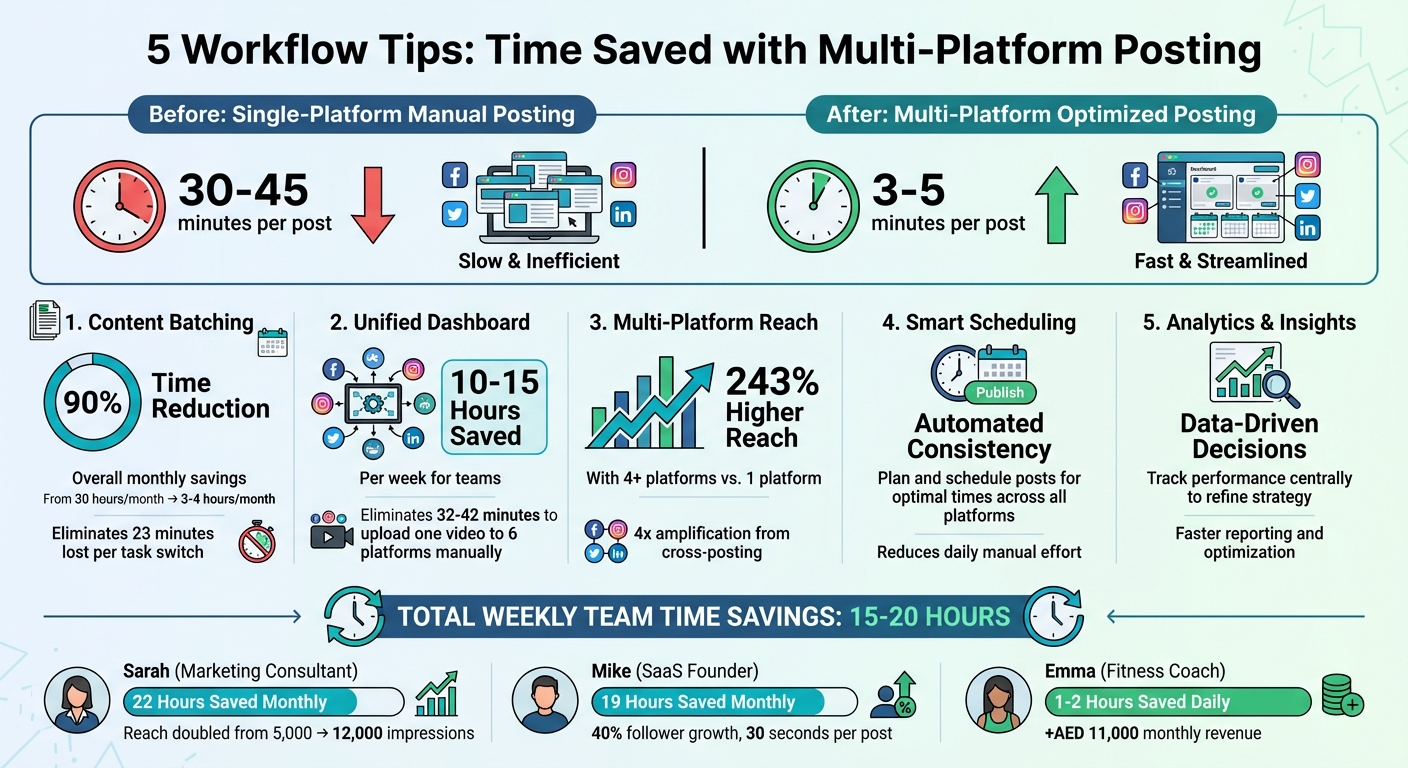 {Time Savings from Multi-Platform Social Media Workflow Optimization}
:::
{Time Savings from Multi-Platform Social Media Workflow Optimization}
:::
1. Create Content in Batches Using AI Tools
Time-Saving Features
Creating individual posts one by one can drain your time and energy. Every time you switch tasks, you lose about 23 minutes just refocusing[6]. Instead, batching your content allows you to dedicate a single session to creating an entire week’s worth of posts. This approach can cut your social media management time from 30 hours a month to as little as 3–4 hours - a massive 90% reduction[6]. For example, marketing consultant Sarah spends three hours every Sunday crafting 21 posts for the month. This strategy saved her 22 hours and doubled her average reach from 5,000 to 12,000 impressions per post[6].
To take this a step further, you can integrate AI tools into your workflow, making content creation even smoother and faster.
Efficiency in Workflow Management
AI tools can transform a single idea into multiple, platform-specific posts in seconds. Instead of manually rewriting captions for each platform, AI assistants adapt your core message to fit various audiences. For instance, you can have a professional tone for LinkedIn, a casual vibe for X, and a conversational style for Threads - all generated in moments[6][2]. Posterly’s AI Caption Assist simplifies this process by creating captions that are "80% complete", cutting down your customisation time significantly[6][2]. For platforms with strict character limits, AI can split longer posts into cohesive threads while keeping the full version ready for LinkedIn[3].
This kind of automation isn’t just convenient - it drives results. SaaS founder Mike used AI tools to maintain a twice-daily posting schedule across three platforms. Each post took him just 30 seconds to prepare, leading to a 40% growth in followers over three months while saving him 19 hours of manual work every month[6].
Customisation Options for Platform-Specific Needs
Every social media platform has its own quirks - whether it’s a 9:16 aspect ratio for TikTok, 1:1 for Instagram, or 16:9 for LinkedIn. Manually resizing images and videos to meet these specifications can be a frustrating, time-consuming process. Tools like Posterly take care of this for you, using Nano Banana Pro to automatically resize and optimise your visuals for each platform[4][2]. It even handles video adjustments by trimming, compressing, or reformatting files as needed.
Fitness coach Emma is a great example of how batching and AI tools can save time and boost results. She filmed 15 workout videos in a single 3.5-hour session, creating 30 days of content in one go. This saved her 1–2 hours every day and increased her monthly revenue by AED 11,000[6]. One important tip: always upload original files to avoid platform watermarks. For instance, TikTok’s watermark on Instagram Reels can lead to your content being deprioritised by algorithms[1][2].
2. Use a Unified Dashboard for Scheduling
Efficiency in Workflow Management
Once you've streamlined content creation with AI, the next step is managing distribution efficiently. Jumping between platforms to upload content isn't just tedious - it drains time and focus. For instance, uploading a single video to six platforms can take anywhere from 32 to 42 minutes. By centralising your publishing process with a unified dashboard, you can eliminate this hassle. Imagine creating a week's worth of posts in one session, only to spend hours manually distributing them - this defeats the purpose of batching. A unified dashboard allows you to upload content once and distribute it everywhere, saving your team a hefty 10–15 hours each week[1]. Plus, this centralised system makes it easier to fine-tune your content for specific platforms.
Multi-Platform Compatibility
Once your content is uploaded, customisation for each platform becomes key. Posterly offers platform-specific previews, allowing you to craft one core message and tweak it for different networks. For instance, you might add hashtags for Instagram, keep a professional tone for LinkedIn, or opt for a snappier style for X[1][7]. Calls-to-action can also be adjusted: "Link in bio" works for Instagram, while LinkedIn lets you use direct links.
The dashboard’s Smart Media Optimisation tool ensures your content meets each platform’s technical requirements. For example, it can split longer posts into threads for X while keeping the full version intact for LinkedIn[3]. This feature takes the guesswork out of formatting, saving even more time.
Time-Saving Features
A unified calendar view brings all your scheduled posts across platforms into one place, so no channel is overlooked[3]. You can easily drag, drop, and edit posts directly in the queue, and even schedule content weeks or months in advance - well beyond TikTok’s native 10-day scheduling limit[5].
Cross-posting content to multiple platforms can amplify your reach by up to four times compared to posting on just one[7]. However, timing matters. Avoid posting the same content on all platforms simultaneously. Instead, use your dashboard to stagger posts based on when each audience is most active[5][7]. Lastly, always upload clean, watermark-free files. Platforms like Instagram may penalise content with visible watermarks, which could hurt your engagement rates[1][7].
3. Schedule Posts at the Right Times
Efficiency in Workflow Management
Timing your posts isn’t just about convenience - it’s about leveraging algorithms to your advantage. Platforms like Facebook and TikTok are known to boost content that garners quick engagement. For LinkedIn, the first 60–120 minutes after posting (often called the "golden hour") are critical for driving further interaction. TikTok and Instagram Reels, on the other hand, see peak activity between 17:00 and 21:00, when users are relaxing after their day. X (formerly Twitter) thrives during commuter hours, such as 08:00–10:00 and 17:00–18:00. Tracking these peak times manually can feel overwhelming, but smart scheduling tools make it easier. When combined with AI-based content batching and a unified dashboard, you can ensure your posts go live at the best moments, boosting reach and engagement.
Time-Saving Features
Using a unified dashboard for posting is already efficient, but adding precise scheduling can take your engagement to the next level. For example, Posterly's AI Scheduler studies your audience’s activity and automatically schedules posts during peak engagement times. This eliminates the need to stay up at odd hours, like 03:00, just to target audiences in different time zones. By automating these tasks, teams can save anywhere from 15 to 20 hours per week, freeing up time for more creative and strategic work[2].
Multi-Platform Compatibility
Each platform has its own rhythm, and your scheduling strategy should reflect that. For Instagram, aim to post feed content during lunch hours (11:00–13:00) and save Stories or Reels for the evening (19:00–21:00). On LinkedIn, mid-week posts between 10:00–12:00 work well for sharing insights, while polls perform better later in the afternoon (15:00–17:00). However, these general rules aren’t one-size-fits-all. Always cross-check these timing strategies with the analytics provided by the platforms to ensure they align with your audience’s unique habits[8].
Post Once, Grow Everywhere | The Smart Content Scheduling System
::: @iframe https://www.youtube.com/embed/znZOvoG39lo :::
4. Adapt Posts for Each Platform
Once your posts are scheduled, tailoring them for each platform's unique style is key to boosting engagement.
Multi-Platform Compatibility
Posting the same content across platforms might seem efficient, but it often falls flat. Each platform has its own technical requirements and audience preferences. For instance, Instagram captions can go up to 2,200 characters, while X (formerly Twitter) limits free users to just 280. Video formats also vary - TikTok and Instagram Reels favour 9:16 vertical videos, but LinkedIn performs better with 1:1 or 4:5 aspect ratios. On top of that, Meta announced in 2025 that Facebook would deprioritise unoriginal or duplicated content, making it even more important to tailor posts for each platform [9].
Instead of copy-pasting, start with a central asset and tweak captions, hooks, and hashtags to fit each platform’s style and audience.
Customisation Options for Platform-Specific Needs
Begin with a single core message and adjust it for each platform. For LinkedIn, keep things professional and insightful, adding 3–5 relevant industry hashtags. On X, focus on short, bold statements and limit hashtags to 1–2. Instagram allows for longer, more visually driven captions, where 5–10 hashtags can mix niche and broader terms. And don’t forget - Instagram penalises Reels with visible TikTok watermarks, so it’s best to remove those before uploading [9].
Pay attention to metadata too. Add alt text for Instagram images to improve accessibility, use SEO-friendly titles for YouTube videos, and customise your calls-to-action. For example, "Link in Bio" is ideal for Instagram and TikTok, while clickable URLs work better on LinkedIn and X [2]. Tools like Posterly’s unified composer can simplify this process by letting you write one caption and automatically generating platform-specific versions - saving you up to 45 minutes compared to manual posting [2].
Customising posts not only saves time but also ensures they’re optimised for each platform’s audience.
Time-Saving Features
Always preview your posts to ensure text isn’t cut off and visuals display correctly [2]. For longer content, use automated tools to split it into threads for X while keeping the full version on LinkedIn [3]. Staggering your posts by 1–4 hours can help avoid overwhelming followers who engage with you on multiple platforms. Additionally, using UTM tracking (e.g., "?utm_source=linkedin") can help you pinpoint which platforms are driving the most traffic [2].
These steps make it easier to prepare platform-ready posts while improving overall efficiency.
5. Track Performance with Real-Time Data
Keeping an eye on performance is essential if you want your content strategy to translate into actual growth. By integrating real-time analytics into your workflow, you can make smarter decisions about what to post and when.
Streamlining Your Workflow
A centralised dashboard can simplify your analytics process. Take Posterly, for example - it combines data from platforms like Instagram, LinkedIn, and TikTok into one easy-to-read interface. This setup eliminates the need to constantly jump between platforms, saving you time and effort. With this unified view, you can seamlessly move from scheduling posts to optimising their performance.
Real-time data also helps you pinpoint posts that consistently engage your audience, often referred to as evergreen content [3][1]. Instead of scrambling to create new material during content gaps, you can recycle these proven performers. On top of that, tracking data reveals which content formats work best - whether it’s LinkedIn carousels or TikTok short videos [1].
Adapting Across Platforms
Effective tracking isn’t just about saving time; it’s also about tailoring strategies for different platforms. Considering that 67% of marketers manage between three to six platforms daily [2], cross-platform analytics are a must. Tools like UTM parameters (e.g., ?utm_source=linkedin) allow you to accurately measure traffic sources [2][1]. This level of detail helps you focus your resources on platforms that drive the most growth while scaling back on those that don’t perform as well.
The payoff for multi-platform strategies is clear: brands active on four or more platforms achieve 243% higher reach compared to those sticking to just one [2]. To stay on top of this, audit your engagement data every quarter. If a platform consistently underperforms, it might be time to shift your focus to where your audience is more active [3].
Conclusion
Managing multiple platforms doesn’t have to drain your energy or time. By following the five workflow tips outlined here - batching content with AI tools, leveraging a unified dashboard, scheduling posts at the best times, tailoring content for each platform, and monitoring real-time data - you can reduce the mental strain of juggling apps and accounts [3][9].
Consider this: manual posting takes about 30–45 minutes per post, while a unified scheduler can cut that down to just 3–5 minutes. For a team, this translates to saving 15–20 hours each week - time that can be redirected toward strategy and growing your audience [2].
"If your current process looks like ideas in DMs, images in a drive, and captions in a spreadsheet... Most teams don't lack ideas - they lack a reliable operating system." – PostEverywhere [10]
This quote underscores the importance of having a structured, repeatable system. A smooth workflow - Plan → Create → Schedule → Publish → Review → Adjust - makes all the difference [10]. For instance, dedicating just 60 to 90 minutes to batch-create a week’s worth of content can prevent the scattered approach that disrupts momentum [10][3].
FAQs
::: faq
How many posts should I batch-create in one session?
To keep things running smoothly and stay consistent, try creating multiple posts in one go - enough to cover your schedule for a few days or even a week. How many you need will depend on your overall content plan and how often you post. :::
::: faq
How do I pick the best posting times for my UAE audience?
Focusing on local engagement patterns can make a big difference when connecting with audiences in the UAE. For example, early mornings, lunch breaks, and post-work evenings often align with local work habits and peak mobile activity. It's also important to factor in key cultural elements like Ramadan, public holidays, and prayer times, as these can significantly influence online behaviour.
To fine-tune your timing, use platform analytics to pinpoint when your audience is most active. Scheduling posts during these windows can help boost visibility and interaction. Tools like Posterly can make this process easier by identifying the best times to post for maximum engagement. This way, you can stay relevant and consistent without the guesswork. :::
::: faq
What should I customise per platform to avoid reach drops?
To keep your reach steady when posting across different platforms, tailor your content to fit each platform's format, tone, and media preferences. For instance, adjust aspect ratios - like 9:16 for TikTok or 1:1 for Instagram - and tweak captions and visual styles to match the platform's vibe. Avoid directly copying and pasting content; instead, make subtle changes to optimise engagement. These small adjustments help you avoid algorithm penalties and ensure your content resonates with the audience on each platform. :::
Related Articles
How to Create 30 Days of Social Media Content Using AI Images in posterly
A practical guide to generating a full month of original social media images with posterly's AI image tool, writing captions for each one, and scheduling everything in a single session.
Read moreHow to Find the Best Time to Post on Social Media Using posterly's AI Scheduler
Stop guessing when to post. This guide explains how posterly's AI Scheduler analyses your audience activity and automatically picks the best posting times so your content gets seen by more people.
Read moreHow to Manage Google Business Reviews on Autopilot With posterly
A step-by-step guide to responding to Google reviews with AI, automatically requesting new reviews from customers, auditing your profile for local SEO, and turning your best reviews into social media content.
Read moreHow to Manage Multiple Client Social Media Accounts With posterly Workspaces
A practical guide for agencies and teams on using posterly Workspaces to organise client accounts, assign roles, get content approved, and schedule posts across dozens of social profiles without things getting messy.
Read more